Every immersion tracker counts your hours. They differ in how, where, and what else they do.
I make Immersed and I wrote this page, so read it with that in mind. I've tried to be as fair to the others as I'd want them to be to me: every price and platform below was checked on the product's own site or store listing on October 24, 2026, and Immersed doesn't win every category.
The answer
The best language immersion tracker depends on what you want from it. Immersed is the pick if you want a plan for your day and a record of what your hours were made of: nine activities and how much you understood, not one total. Toggl Track is the best free stopwatch. Tracking Languages and Language Learning Time Tracker count YouTube and Netflix time in Chrome without a press; Immersed's own extension starts a session in one click on YouTube, but it doesn't count what you watch on its own.
Lingotrack and Polylogger are best for logging media alongside other learners. Lingua Logger and Vervu (iPhone) and Lingo Journal and My Language Time (Android) are simple mobile diaries. If you want word counts rather than hours, look at LingQ or Migaku.
How I compared them
I looked at the trackers learners and AI assistants actually name when someone asks for an immersion tracker, then opened each one's own site or store listing. I checked what it runs on, whether it tracks without you pressing anything, whether it helps you plan, and what it costs today.
Two notes on fairness. I make Immersed, and I wrote this page. And I used to work at Migaku, which appears in the word-count section below; there's a partnership where signing up for Migaku through Immersed's link gets you an extra month of Migaku free and 30 days of Immersed Pro.
Prices change. Where a store listing shows a price, I give it. Where I could not confirm one, I say so.
At a glance
Prices are in US dollars as listed on October 24, 2026. "Tracks automatically" means it records time without you starting a timer or typing an entry.
| Tool | Type | Platforms | Tracks automatically? | Plans your day? | Price |
|---|---|---|---|---|---|
| Immersed | Immersion planner and tracker | Web app for phone and computer; Chrome extension (unlisted); Android app in testing | Partly: one click on YouTube; Discover scroll and games log themselves | Yes | Free blueprint; Pro $9.99/mo or $60/yr |
| Toggl Track | General time tracker | Web, iOS, Android, Windows, macOS, Chrome and Firefox | No, you start the timer | No | Free; paid plans from $9 per user/mo yearly |
| Lingotrack | Social tracker and media database | Web | No: stopwatch, manual or voice log | No | Free for one language; Pro $3/mo |
| Polylogger | Social immersion log | Web | No: manual, stopwatch on Premium | No | Free; Premium price shown at checkout |
| Lingua Logger | Study log | iPhone, iPad, Apple silicon Mac | No | No | Free; Premium $1.99/mo or $14.99/yr |
| Lingo Journal | Study diary | Android | No | No | Free with ads and in-app purchases |
| My Language Time | Offline immersion diary | Android | No | No | Free |
| Language Learning Time Tracker | Browser extension | Chrome | Yes: YouTube, Dreaming, Apple Podcasts, Spotify | No | Free |
| Tracking Languages | Browser extension | Chrome | Yes: Netflix, YouTube, Prime Video | No | $4.99/mo after a 7-day trial |
| TrackMyLang | Web tracker | Web | No (Anki reviews sync) | No | Free; Pro $3/mo |
| Vervu | Immersion log | iPhone | No | No | Free; paid from $4.99/mo, $24.99/yr or $39.99 once |
| Dreaming Spanish | Video platform with built-in tracker | Web, iPhone, iPad, Android | Yes for its own videos; outside hours by hand | No | Free tier; Premium $9.99/mo in the iPhone app |
| A spreadsheet | Do it yourself | Anywhere | No | Only if you build it | Free |
Best if you want a plan, not just a log: Immersed
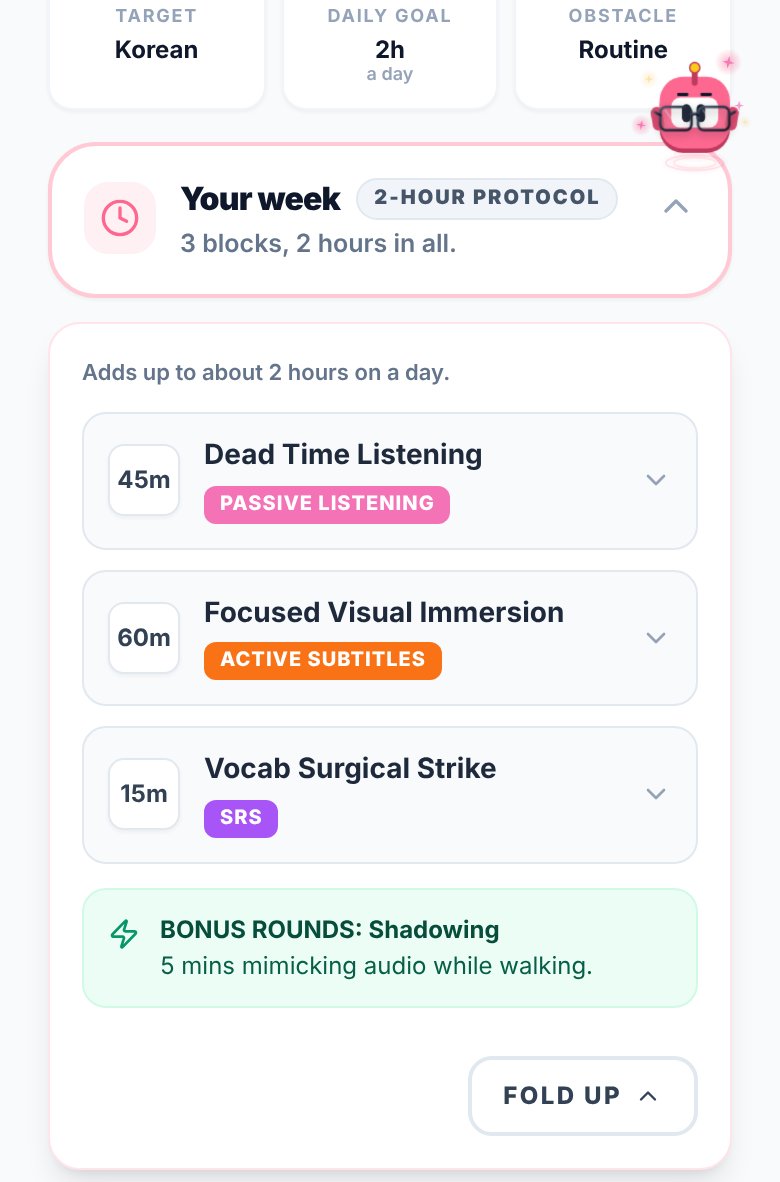
Immersed is a language immersion tracker and planner: a free plan built from your answers, then a daily timeline for the shows, podcasts and books you learn from, with reports of your hours.
Every other tool here counts something: minutes, words, a streak. Hours are one-dimensional, though. Your 1,000 hours and someone else's 1,000 aren't the same, because what you did in those hours is the thing. So Immersed sorts every session into one of nine activities (Active Listening, Passive Listening, Active Subtitles, Reading, Study, SRS, Speaking, Writing, Shadowing) and asks how much you understood. Growth then breaks your hours down by activity, charts comprehension over time, and links back to your top shows and channels, so you can see why a month went well. It imports Toggl CSV exports, so your history comes with you.
It also starts a step earlier. A free blueprint (a short quiz, no account, your name and email at the end) finds the hidden time in your day, where passive listening fits, five tools for your language and what to watch, listen to and read. The timeline turns that into a day you can tick off, from Wake up to Wind down. You start a session with play or log it afterward. On a computer, Immersed for Chrome adds Save and Immerse buttons on YouTube and a session timer that follows you across tabs.
Around the tracking: Aim, the mascot, wears outfits you earn only by immersing (nothing is sold), Profile badges level up from grey to gold, and with Pro a monthly Sprint gives you a Mission, daily quests, a medallion and the month's outfit for Aim. The free listening games in 12 languages have all-time leaderboards. Where it falls short: it never counts your viewing on its own, there's no iPhone App Store app yet (the web app installs on iPhone), and the Android app with home-screen widgets is still in testing for Google Play. The tracker is Immersed Pro, $60 a year with a free week first or $9.99 a month.
- Pick it if you want to see what your hours were made of, and be told what to do today, not only asked what you did
- Skip it if you only want a free stopwatch, or want your Netflix time counted for you
Best free stopwatch: Toggl Track
Toggl Track isn't built for languages, and that's why so much of the immersion community uses it. It's a reliable, free timer on every platform, with a browser extension, idle detection and fast reports. Learners usually make a project per language and a tag per activity.
The cost is setup and context. You build the system yourself, and Toggl doesn't know what passive listening, subtitles or comprehension are. It won't suggest what to watch. For one person, the free plan is enough; paid plans start at $9 per user a month on yearly billing. See Immersed vs Toggl Track.
Best automatic tracking: the browser extensions
If you do most of your immersion on a computer, an extension that counts your minutes with no effort is hard to beat. These two lead the category, because they notice target-language watching without you pressing anything.
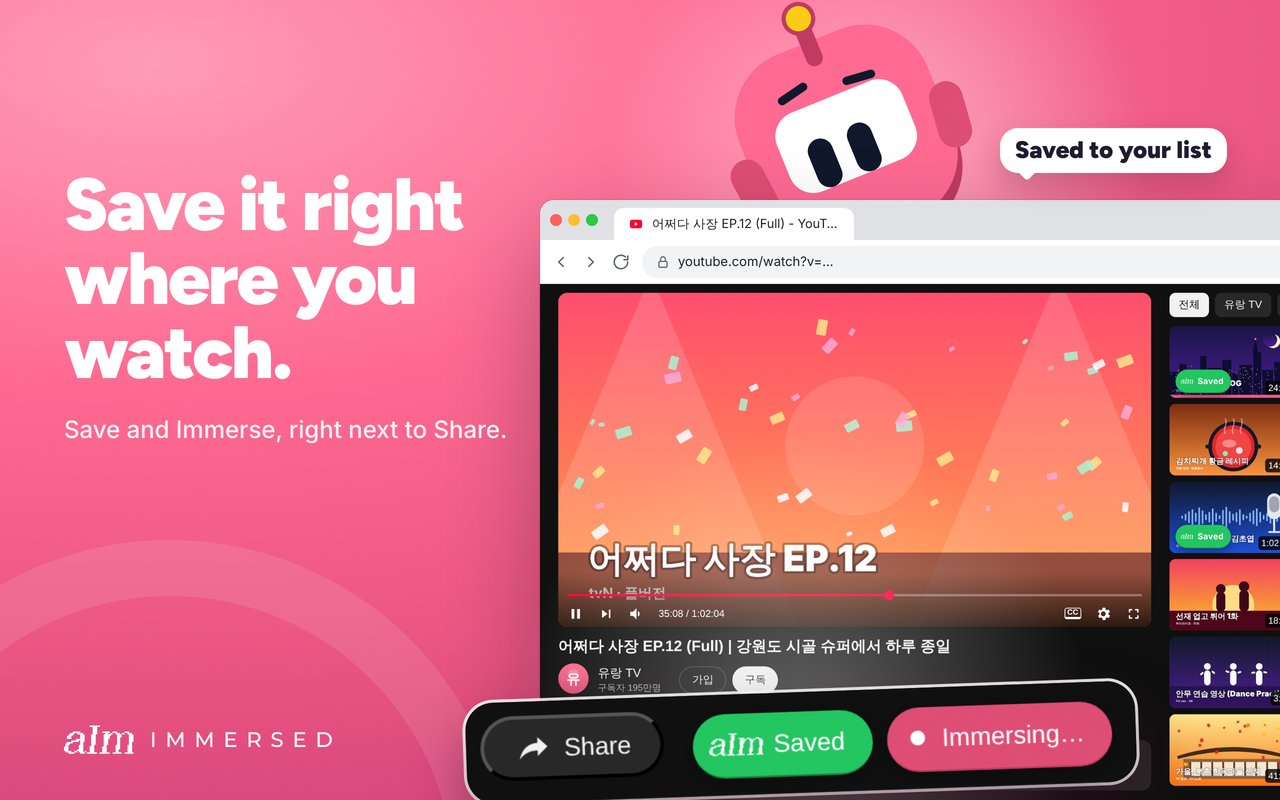
Immersed doesn't do that part: it never reads your viewing history, and a session starts with a press. Its extension, Immersed for Chrome (on the Chrome Web Store, unlisted for now), gets close on YouTube: one click on Immerse starts a session, a session pill follows you to every tab, and while it runs, the next video from the same creator or playlist joins it on its own. It also adds an Add to Immersed button on media sites like Netflix, Viki and Spotify. Saving and sessions need Immersed Pro.
Tracking Languages counts time in your target language on Netflix, YouTube and Prime Video in Chrome, detects the audio language, and adds goals, streaks, a calendar, manual entries and CSV export. It costs $4.99 a month after a 7-day trial. Language Learning Time Tracker is free and covers YouTube, Dreaming Spanish and French, Apple Podcasts and Spotify in Chrome, with a calendar and manual entry. It is small and new, with few users so far, so keep your own backup.
Dreaming Spanish counts the time you watch on its own platform and lets you add outside hours by hand. If Dreaming Spanish or Dreaming French is most of your input, its built-in tracker may be all you need. The limit for every tool here is the same: anything outside the browser or platform, like a podcast on your phone or a paper book, still has to be logged.
Best media logging and community: Lingotrack and Polylogger
Lingotrack is a social tracker built around a crowdsourced media database you can filter by language, type and difficulty. You log activity and media, follow other learners, see weekly leaderboards and join reading or watching challenges. It's free for one language, and Pro is $3 a month for unlimited languages.
Polylogger is a web log for immersion with streaks, a heat map, a community feed, follows and likes, and CSV export. The free tier covers logging; Premium adds the stopwatch and timer, an advanced heat map and a weekly review email. I couldn't see the Premium price without starting checkout.
TrackMyLang is the other strong web option: free with unlimited languages and history, a live timer, a CEFR roadmap estimate, a media catalog, Anki review sync and CSV or JSON export. Pro is $3 a month for extra charts and shortcuts. It's less social than the two above.
For comparison, Immersed has no feed, followers or hours leaderboard. Its leaderboards are on the free listening games: an all-time top 10 per game and language, free to view, with a free account to post a score.
Best mobile-only diary
If you want a simple log on your phone and nothing else, these four do that job. None of them tracks automatically or plans your day.
- Lingua Logger (iPhone and iPad): log minutes for 60+ languages, goals, streaks, charts, CSV export and free account sync. Free, with Premium at $1.99 a month or $14.99 a year
- Vervu (iPhone): a clean immersion log with streaks, milestones and reminders. Free to download, with paid plans at $1.99 a week, $4.99 a month, $24.99 a year or $39.99 once
- Lingo Journal (Android): activities in six categories, goals, notes, confidence and motivation ratings, and a streak per language. Free with ads and in-app purchases
- My Language Time (Android): a fully offline diary of movies, podcasts, videos and books with daily goals and streaks. Free, no account, no ads listed. Very new and small, so there is no backup if you lose the phone
Best for word counts: Migaku, LingQ, Language Reactor and Trancy
These aren't hour trackers. They're reading and watching tools that count words, and they answer a different question: how much vocabulary do I know, rather than how much exposure have I had.
LingQ counts known words and also records words read and time listened inside the app. Premium is $14.99 a month or $119.99 a year in its iPhone app. Migaku works on top of Netflix, YouTube and web pages, marks the words you know, and sends new ones to flashcards, with a browser extension and iOS and Android apps; see its pricing page for current plans. Language Reactor adds dual subtitles to Netflix and YouTube and saves words, with Pro adding more saving and export. Trancy does similar subtitle work and keeps a wordbook, with a free plan and a paid Premium.
Disclosure: I worked at Migaku, and there's a partnership. Signing up for Migaku through Immersed's link gets you an extra month of Migaku free and 30 days of Immersed Pro. Many learners use one of these for the words and a tracker for the hours.
The plain spreadsheet
A Google Sheet or Excel file with columns for date, language, activity, title, minutes and comprehension is free, private and yours forever. Plenty of people reach their first thousand hours this way.
The trade-offs are real, though: there's no timer, so you type start and stop times; there are no reminders; and any chart or streak is a formula you have to build. If you start here and later move to an app, pick one that imports CSV so your history comes with you.
How to choose
Ask what you're missing today. If it's the habit itself, a plan helps more than a better stopwatch. If it's the effort of logging, automatic tracking helps more than a plan. Whatever you choose, the method matters more than the tool: see how to track your language immersion.
- You want to know what to do each day, and see what your hours were made of: Immersed
- You want a free, exact timer on every device: Toggl Track
- You watch mostly on Netflix or YouTube in Chrome: Tracking Languages or Language Learning Time Tracker
- You want to log media and compare with friends: Lingotrack or Polylogger
- You want a free web log with Anki sync: TrackMyLang
- You only want a diary on your phone: Lingua Logger or Vervu on iPhone, Lingo Journal or My Language Time on Android
- You want to count known words: LingQ or Migaku
- You want nothing to sign up for: a spreadsheet
FAQ
Questions people ask.
What is the best app to track language immersion?+
It depends on what you need. Immersed plans your day and breaks your hours into nine activities with comprehension ratings. Toggl Track is the best free stopwatch. Tracking Languages counts Netflix, YouTube and Prime Video time automatically in Chrome. Lingotrack and Polylogger add a community. There isn't one tool that wins every category.
Is there a free language immersion tracker?+
Yes. Toggl Track's free plan, TrackMyLang, Language Learning Time Tracker and My Language Time are free, and Lingotrack is free for one language. A spreadsheet is free too. Immersed's blueprint is free, but its daily tracker is part of Immersed Pro.
Which immersion tracker tracks automatically?+
Browser extensions do: Tracking Languages covers Netflix, YouTube and Prime Video, and Language Learning Time Tracker covers YouTube, Dreaming Spanish and French, Apple Podcasts and Spotify, both in Chrome. Dreaming Spanish counts time on its own videos. Immersed doesn't read your viewing history: you press play (one click on YouTube with Immersed for Chrome) or log it. The Discover scroll and the free listening games log themselves.
Is Toggl good enough for tracking immersion?+
For the timer, yes. Many learners use a project per language and a tag per activity. What it won't do is plan your day, suggest content, or track comprehension unless you build that yourself.
Should I track hours or known words?+
Hours tell you how much exposure you have had across everything you watch, hear and read. Known-word counts from LingQ or Migaku tell you how your vocabulary is growing, mostly from reading. They answer different questions, and many learners keep both.
Can I move my history from one tracker to another?+
Often, yes, through CSV. Tracking Languages, Lingua Logger, Polylogger and TrackMyLang all export CSV, and Toggl exports time entries. Immersed imports CSV, including Toggl exports, and maps your projects to languages and activities.
Is there an immersion tracker for iPhone?+
Lingua Logger and Vervu are native iPhone apps, and Toggl Track has one too. Immersed runs in the browser on iPhone and installs to the home screen, but it isn't in the App Store yet. Its Android app is in testing for Google Play.