LingQ counts what you read in it. Immersed plans and counts your whole day.
LingQ is a reader and importer: bring in an article, a YouTube video, a podcast or an ebook, read it with a tap-to-translate dictionary, and watch your known words climb. Immersed shows what your hours were made of: every session is one of nine activities with a rating of how much you understood, because your 1,000 hours and someone else's 1,000 aren't the same. It is a language immersion tracker and planner: a free plan built from your answers, a daily timeline for the shows, podcasts and books you learn from, and reports of your hours.
Free. About two minutes. No account, no card.
The short version
Checked October 24, 2026.
Something out of date? Tell me.
LingQ is for learning from content: it turns almost anything into a lesson, saves the words you look up as LingQs, and tracks known words, words read and hours listened inside the app. If you learn by reading, it is one of the best tools there is.
Immersed is for your whole immersion day: a plan built around your time, a timeline to follow it, a timer for nine kinds of immersion, a comprehension rating per session and reports of your hours. Use LingQ for reading and Immersed for the plan and the record. LingQ shows how many words you know; Immersed shows what your time was made of, which is often why two learners with the same hours are in different places.
01What each one counts
LingQ counts words. Immersed shows what your hours were made of.
LingQ's statistics are built around vocabulary: Known Words (Learned plus Known), LingQs created, LingQs learned, words read, and listening hours from lesson audio and playlists. A streak runs on hitting a daily LingQ goal. Listening and reading inside LingQ are tracked automatically, and you can add time you spent elsewhere by hand on the web.
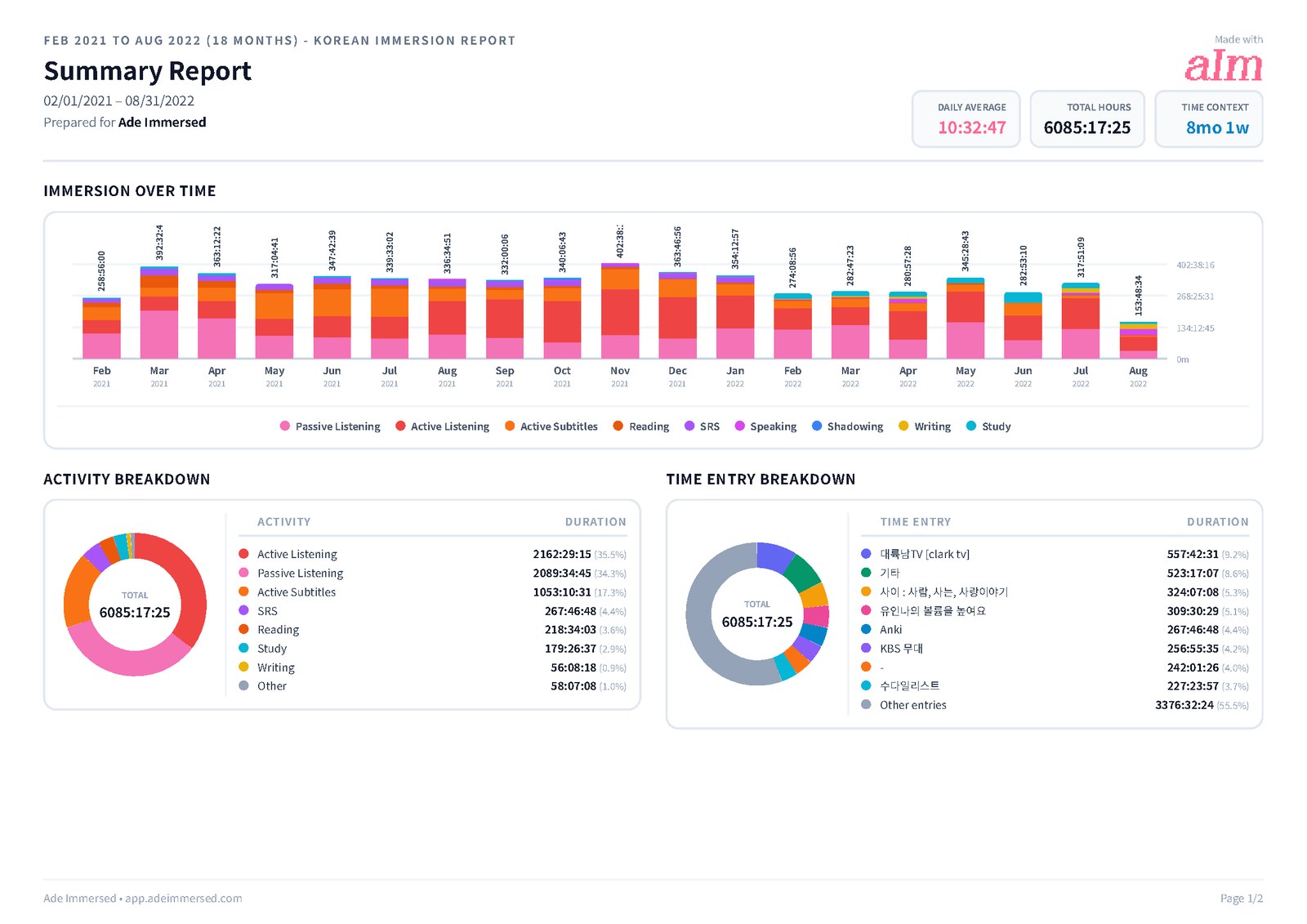
A total of hours is one number. Immersed counts sessions, and each one is one of nine activities (Active Listening, Passive Listening, Active Subtitles, Reading, Study, SRS, Speaking, Writing or Shadowing) with a length, a note and your rating of how much you understood. Reports stack your hours by activity, chart comprehension over time and link back to the shows and channels you spent the most hours with.
That mix is the point. Two learners with 1,000 hours can be in very different places: one spent most of it with subtitles on, the other listening and reading at the right level. LingQ's known-word count shows the result in vocabulary. The activity mix in Immersed helps explain it.
- LingQ: known words, LingQs, words read, hours listened in the app
- Immersed: hours by activity everywhere, comprehension over time, streaks, top shows and channels
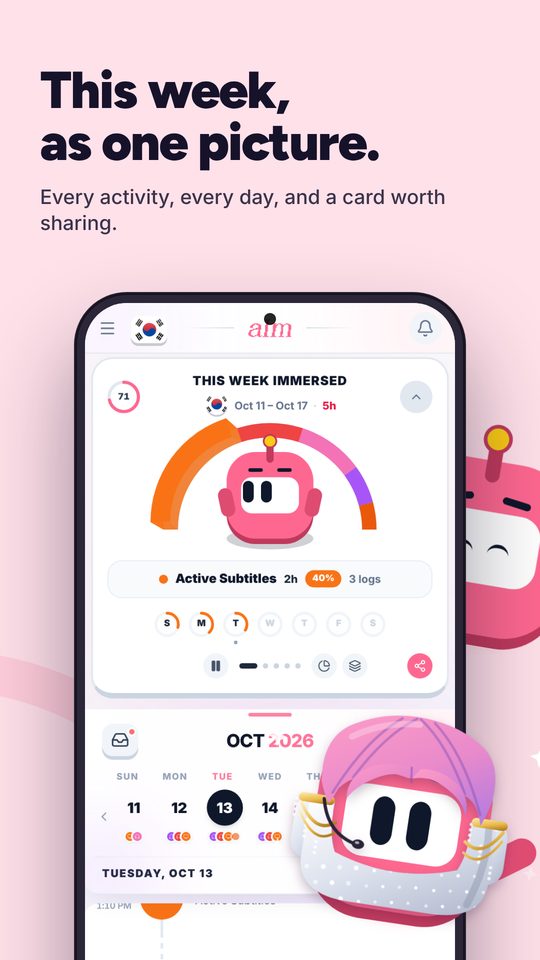
02A day with both
Read in LingQ, track the whole day in Immersed.
Your Immersed timeline might hold an article in LingQ at lunch, an episode on Netflix after dinner and a podcast on the commute. For the article, press play in Immersed, choose Reading, and read in LingQ as usual, tapping blue words and making LingQs. Stop when you finish and rate how much you understood.
The episode and the podcast get their own sessions in Immersed, as Active Subtitles and Passive Listening. LingQ only counts those if you imported them as lessons. Immersed sees all three because you start a session for each (one click on YouTube with Immersed for Chrome), so your reports show the whole day, not only the part spent in one app.
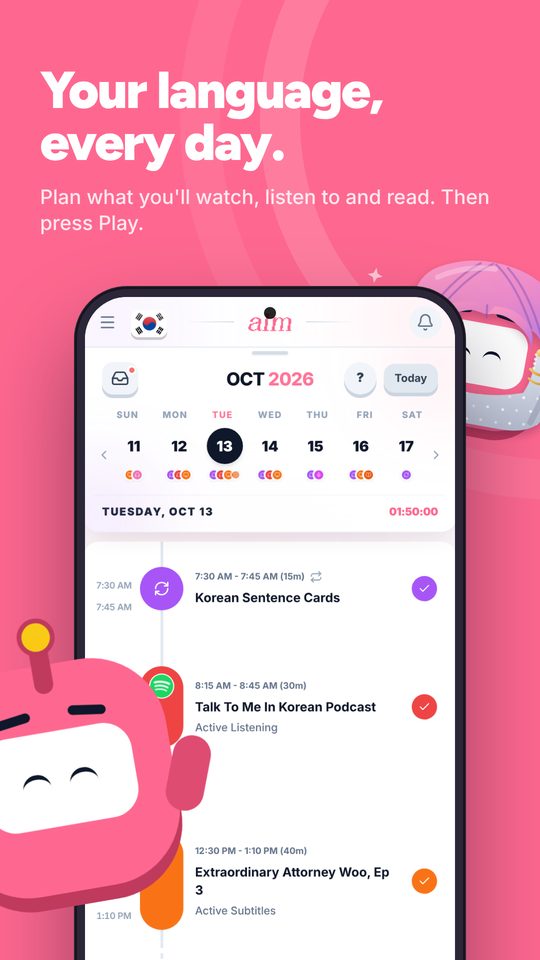
03Before you press play
A plan for your day, not just a library.
LingQ has a huge library and an importer that brings in almost anything. What it doesn't do is plan your immersion or show where it fits in a day that already has a job and a commute.
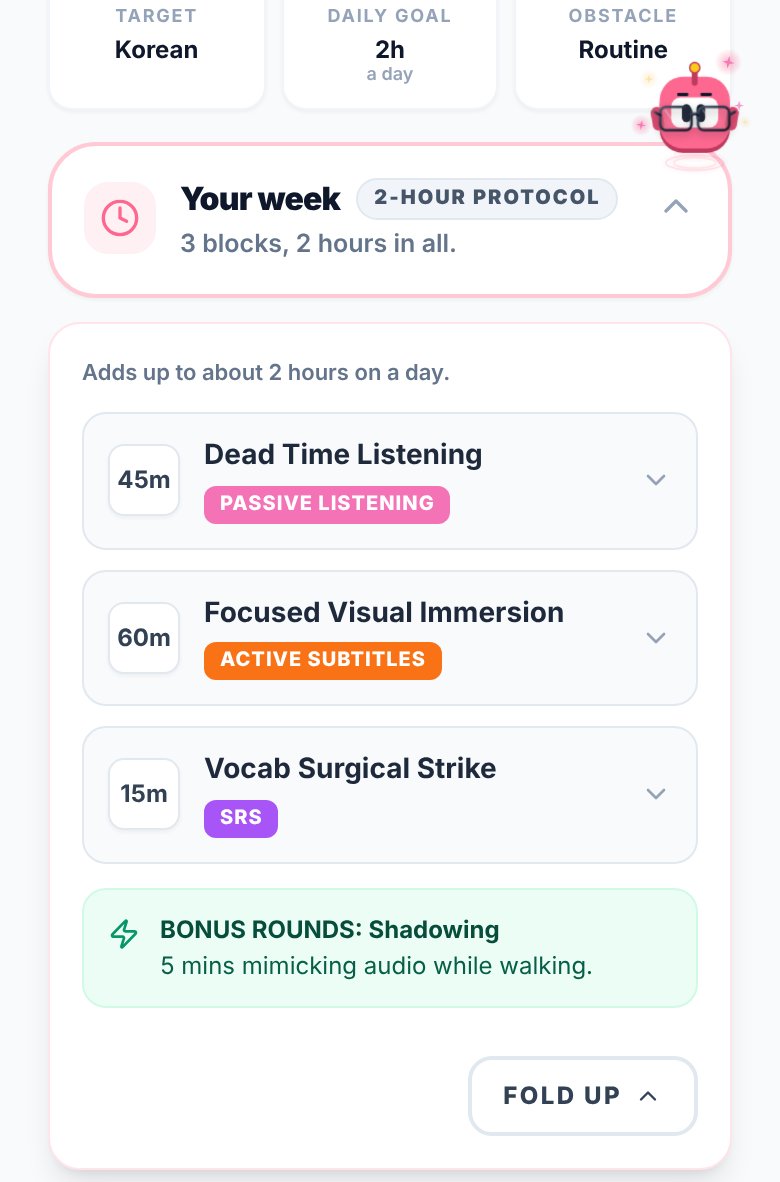
Immersed starts with a free blueprint built from your answers: milestones for your first months, a daily protocol, Hidden Immersion Time (where passive listening fits) and a Library of picks for your language across Watch, Listen and Read. Then the timeline turns it into a day you can tick off, with repeating tasks and reminders.
With Pro, the full Library lists the platforms native speakers use in 22 languages, by kind (streaming, broadcasters, webtoons, news, podcasts and more) and by region. Discover adds a feed of creators and podcasts in your language, and scrolling it logs itself as immersion.
04Looking back
Two kinds of proof.
LingQ's proof is the known-word count, and it's motivating to watch it climb. It's worth knowing how it counts: by default, new accounts mark every blue word you didn't tap as known when you turn the page, which can inflate the number. You can switch that off in the reader settings.
Immersed's proof is the record: time immersed by week, month and year, your daily average, the days you showed up, time by activity and comprehension over time. Export it as a PDF, Excel or CSV, or share a report link. Put both together and you see what you put in and what it turned into.
Side by side · checked October 24, 2026
Immersed and LingQ, feature by feature.
Inside the content
Import articles, videos, podcasts and ebooks as lessons
Immersed · No
LingQ · Yes, with a browser extension
Tap-to-translate reader
Immersed · No
LingQ · Yes
Saved words and spaced repetition
Immersed · No, log reviews as SRS
LingQ · LingQs, with flashcard review
Known-word count
Immersed · No
LingQ · Yes
Built-in content library
Immersed · Library of native platforms in 22 languages
LingQ · Large library of lessons in the app
Planning
A plan built from your time and goals
Immersed · Free blueprint
LingQ · Daily LingQ goal
Daily timeline with reminders
Immersed · Yes, Wake up to Wind down
LingQ · No
Where passive listening fits in your day
Immersed · Hidden Immersion Time on the blueprint
LingQ · No
Tracking and reports
Listening and reading inside the app
Immersed · One press to start; Discover scroll and games log themselves
LingQ · Tracked automatically
Immersion outside the app
Immersed · Any activity, timer or log after
LingQ · Add time by hand on the web
Time by kind of immersion
Immersed · Nine activities, stacked in reports
LingQ · Listening, reading, plus manual entries
Comprehension over time
Immersed · Rated per session, charted
LingQ · No
Streak
Immersed · Days you showed up, consistency grid
LingQ · Days you hit your LingQ goal
Export
Immersed · PDF, Excel, CSV, share links
LingQ · Not on its plan list
Apps and price
Phone and computer
Immersed · Web app that installs; Android app in testing for Google Play
LingQ · Web, iOS and Android
Browser extension
Immersed · Yes, Immersed for Chrome (unlisted; saving and sessions are Pro)
LingQ · Importer for Chrome, Safari, Firefox and Edge
Free plan
Immersed · Blueprint, games with leaderboards, Discord, sample app
LingQ · 20 LingQs, 5 imports, no statistics
Paid plan
Immersed · $60 a year or $9.99 a month
LingQ · Premium $119.99 a year or $14.99 a month
Credit where it's due
Both are good. At different things.
What LingQ does well
- Imports almost anything: web articles, YouTube and Netflix videos with captions, podcasts, and ebooks
- A reader that makes native text usable early, with a tap on any word
- Tracks known words, words read and hours listened automatically while you use it
- Lets you add time spent outside the app by hand, so your totals can include more than LingQ
- More than 50 languages, and Premium covers all of them
- Apps on web, iOS and Android, and an importer for Chrome, Safari, Firefox and Edge
- A long-running product with a large community and a big lesson library
What Immersed does that LingQ doesn't
- Builds you a plan first, from your time, your goals and your level
- Puts that plan on a daily timeline with reminders and repeating tasks
- Breaks your hours into nine activities, from Passive Listening to Shadowing, so you see what your time was made of
- Asks how much you understood after each session and charts it over time
- Shows your consistency and the shows and channels you spent the most hours with, linked from the report
- Lists the platforms native speakers use in 22 languages, and gives you a Discover feed where scrolling logs itself
- Immersed for Chrome adds Save and Immerse on YouTube and an Add to Immersed button on 73 media sites
Pick LingQ if
- You learn best by reading and want native text to be readable now
- You want a known-word count that grows as you read
- You want to turn your own articles, podcasts and ebooks into lessons
- You study a language with few dedicated tools: LingQ covers more than 50
- You want listening and reading time counted automatically inside one app
Pick Immersed if
- You want a plan for your day, not only a library of lessons
- Most of your immersion happens outside one app: Netflix, podcasts, books on paper
- You want to see comprehension and consistency, not only word counts
- You're past the reader stage and mainly need to keep showing up
Use both, or move over
LingQ for reading, Immersed for the plan and the record
Keep LingQ for reading and imported lessons. Plan those sessions on the Immersed timeline next to everything else. When you open a lesson, start a session in Immersed as Reading (or Active Listening if you are listening to the lesson audio), and rate comprehension when you stop.
Log your LingQ flashcard reviews as SRS. Over a month, LingQ shows your known words going up, and Immersed shows the hours, the streak and the comprehension that got you there.
Pricing · checked October 24, 2026
What each one costs.
Immersed
- Free: the blueprint for one language (with the Toolkit, Library picks and the Fluency Checklist's Foundations), the listening games in 12 languages with their leaderboards, Aim Runner, the Discord and the sample app. A free account also gets the Fitting Room's day-one outfits, Hour Marks and badges from game time.
- Immersed Pro: $60 a year (starts with a free week, about $5 a month) or $9.99 a month. Timeline, sessions with the nine activities, Discover, Library, Growth and reports, monthly Sprints, more languages.
LingQ
- Free: 20 LingQs in total, 5 imported lessons, 1 audio playlist. Statistics, flashcard quizzes and offline access are Premium.
- Premium: $14.99 a month, $80.99 for six months (App Store), $119.99 a year, or $215.76 for 24 months on the web.
- Premium Plus: $29.99 a month or $269.99 a year. Adds AI voices, an AI chat tool and AI-simplified lessons.
- US prices from LingQ's App Store listing and its own free vs Premium post. Check their pricing page before you buy, as offers change.
LingQ's free plan is a trial more than a plan: 20 LingQs go fast. Premium costs about twice what Immersed does on the yearly plan, and covers a different job. If you read a lot, LingQ is worth it; Immersed is worth adding when you want the plan and a record of everything else.
FAQ
Questions people ask.
Does LingQ track immersion hours?+
Partly. It tracks listening hours and words read inside LingQ automatically, and lets you add outside time by hand on the web. Statistics are a Premium feature. It does not plan your day or rate how much you understood.
Is Immersed a LingQ alternative?+
Not for reading. Immersed has no reader, dictionary or flashcards, and it doesn't count known words. It plans and tracks your immersion. Use LingQ inside your reading and Immersed around all of it.
Does Immersed have a browser extension like LingQ's?+
Yes, for a different job. LingQ's extension imports a page as a lesson. Immersed for Chrome, on the Chrome Web Store as an unlisted listing for now, adds Save and Immerse buttons on YouTube, an Add to Immersed button on 73 media sites and a session timer that follows you across tabs. It works in Chrome, Edge, Brave and Arc. It doesn't read your history: a session starts when you press Immerse. Saving and sessions are Pro.
How much is LingQ Premium?+
In the US as of 2026-10-24: $14.99 a month, $119.99 a year, or $215.76 for 24 months on the web. Premium Plus is $29.99 a month or $269.99 a year. The free plan caps you at 20 LingQs.
Is the LingQ known-word count accurate?+
It counts words at status 4 (Learned) plus Known words. By default, turning a page marks the words you did not tap as known, which can push the number up. You can turn that off in the reader settings.
Can I bring my LingQ statistics into Immersed?+
Not directly. Immersed tracks time by activity and doesn't import word counts. Start logging your LingQ sessions in Immersed from today and keep your vocabulary numbers in LingQ.
What should I log LingQ time as in Immersed?+
Reading a lesson is Reading. Listening to the lesson audio while you follow the text is Active Listening. Playlists in the background are Passive Listening, and flashcard review is SRS.
More comparisons
Stop guessing. See what your hours add up to.
Answer a few questions and Immersed builds your plan: a daily routine that fits your life, milestones for your first months, and things to watch at your level. Free, about two minutes, no account needed.
The plan is free and stays free. No card.
Checked October 24, 2026 against published product information. Prices and features change; if something here is out of date, tell me on Discord and I'll fix it.