Polylogger shows your minutes to friends. Immersed plans them first.
Polylogger is a language immersion log on the web, with an older iPhone app: you log time by language and type, keep a streak, and follow other learners to see what they log. Immersed is a language immersion tracker and planner: a free plan built from your answers, then a daily timeline for the shows, podcasts and books you learn from, with reports of your hours.
Free. About two minutes. No account, no card.
The short version
Checked October 24, 2026.
Something out of date? Tell me.
If you want a quick log of your minutes, a streak, a heat map of the year, and a feed of what people you follow are logging, Polylogger does that, and the logging itself is free.
If you want a plan for how much to immerse and where it fits in your day, a timer that knows passive listening from active subtitles, comprehension ratings, and ideas for what to watch next, Immersed is built for that. Immersed has no follower feed, though its free listening games have leaderboards, and its tracker is paid.
Polylogger adds up the minutes. Immersed shows what they were made of, because your 1,000 hours and someone else's 1,000 are not the same.
01Before you start
A log you fill in, or a day you plan.
Polylogger opens on your logs. Set a focus language and log defaults (type, duration, language) and adding an entry is a couple of taps. It assumes you already know what you will do today and just want to count it.
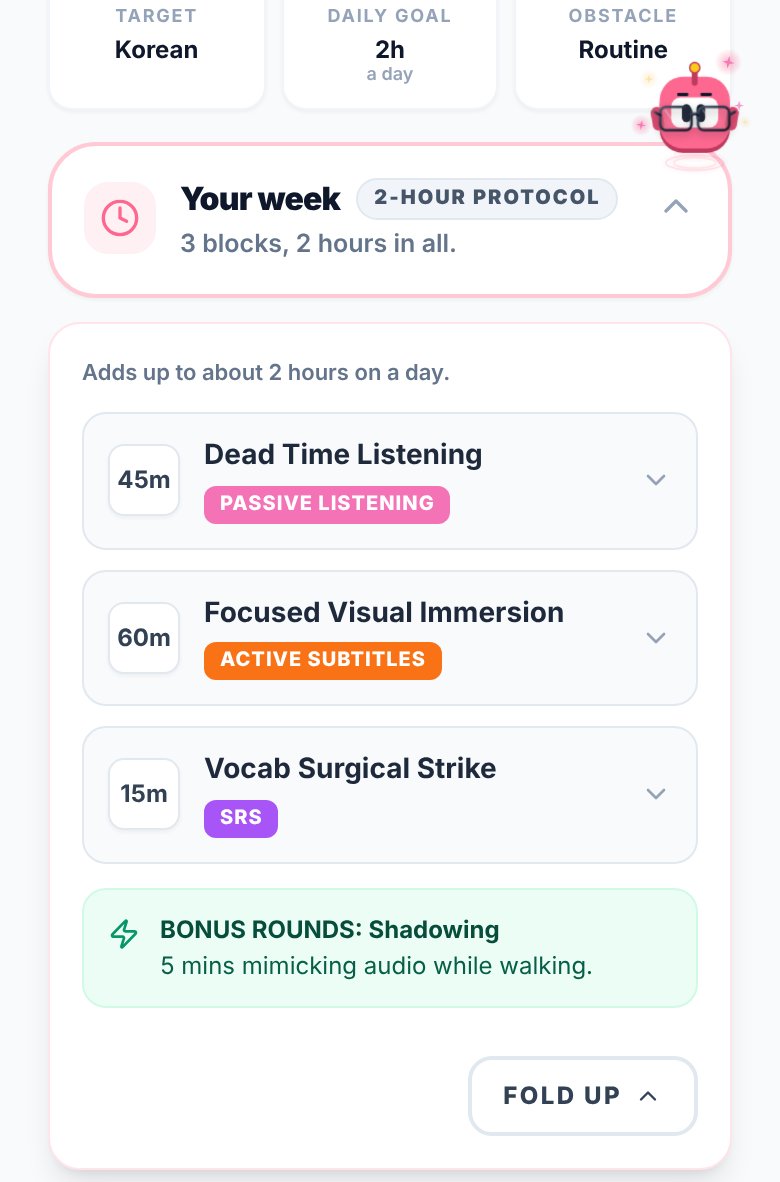
Immersed starts one step earlier. A free blueprint, about two minutes of questions, sets milestones for your first months, a daily protocol, and Hidden Immersion Time: the commute, the dishes, the gym, where passive listening fits. The timeline turns that into a day from Wake up to Wind down that you plan and tick off.
- Free blueprint in about two minutes, no account needed
- Plan tasks into the free gaps of your day, repeat them, get reminders
- The Fluency Checklist (its Foundations free) and monthly Sprints on Pro for what to work on next
02Logging it
Minutes by type, or a session that says what you did.
On Polylogger's free tier you type the minutes in. Premium adds a stopwatch and timer inside the log window, so you can time a session as it happens. Logs carry a language, a type such as reading, listening or speaking, a duration and a date.
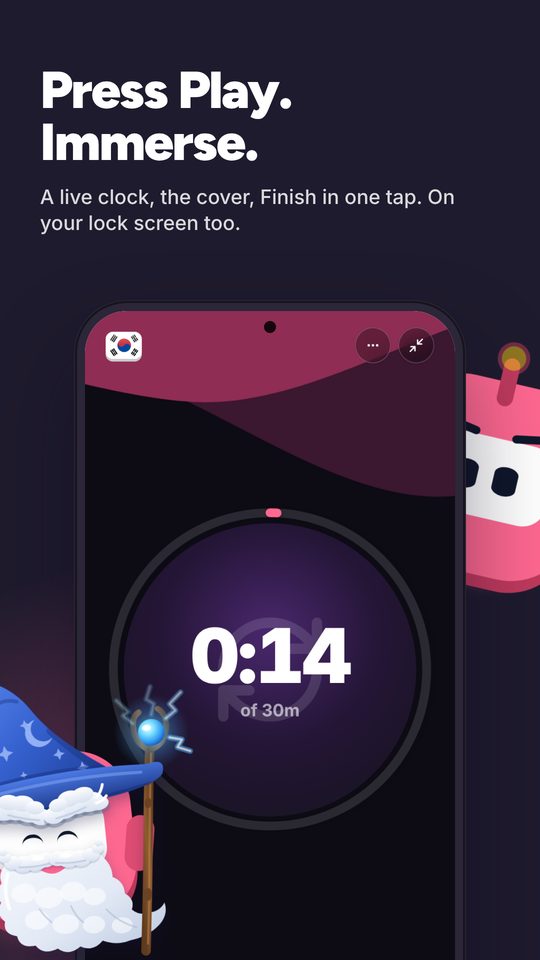
In Immersed the timer is the main way in: press play, pick one of nine activities (Active Listening, Passive Listening, Active Subtitles, Reading, Study, SRS, Speaking, Writing, Shadowing), stop, and it lands on your timeline. Paste a YouTube, Spotify or Apple Podcasts link and it plays inside the session. Rate how much you understood, and add notes. Forgot to press play? Log it afterward.
The split matters more than the total. Listening with subtitles and listening on the commute both count as listening in a broad log, but they do different work. Immersed keeps them apart, so a month's report shows the mix that got you where you are.
- The play button can default to one activity, like Passive Listening on the commute
- With Immersed for Chrome, one click on a YouTube page starts the session with the title on it
- Immersed never reads your history; the Discover scroll and the free listening games log themselves
03Other learners
Polylogger is built to be seen. Immersed is built to plan.
Polylogger's social side is real: follow people, see the latest logs from you and the people you follow, browse what the community is logging, like logs, and see the most active learners this week. You can make your account private. It can also make a share image of your progress for Instagram or X.
Immersed has no follows, feed or likes. Its social side is smaller: all-time leaderboards on the free listening games (a top 10 per game and language), an opt-in public card when someone taps your row, share cards with Aim, the mascot, and the Discord.
In place of a feed of people, Immersed gives you an Immersion Library for your language and Discover, a feed of creators and podcasts who post in your language, where scrolling counts as immersion and logs itself.

04Looking back
Totals and a heat map, or totals with the why.
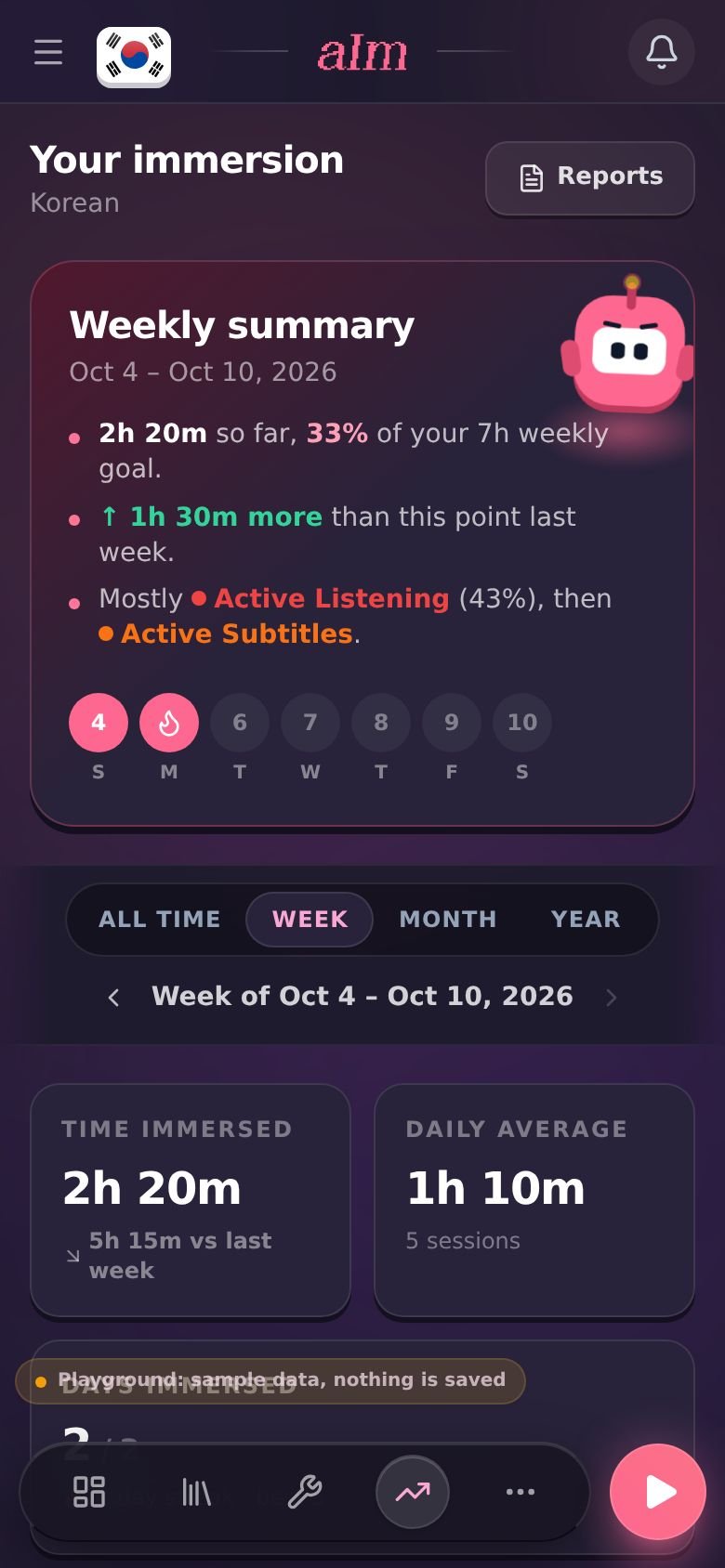
Polylogger shows total hours, daily average, your streak, hours over 7 days, 30 days, a year or all time with a cumulative line, a ratio by type, a current-year heat map and a year in review. Premium adds a longer-range heat map and a weekly review email. You can download all your logs as a CSV.
Immersed's Growth page covers week, month, year and all time: each day stacked by the nine activities, comprehension over time, a consistency grid with your streak, and the shows and channels you spent the most hours with, linked back to them. Export a PDF, Excel or CSV, keep monthly reports in My reports, or share a report link.
Side by side · checked October 24, 2026
Immersed and Polylogger, feature by feature.
Planning
A plan built for your language and your day
Immersed · Free blueprint from your answers
Polylogger · No
Daily planner
Immersed · Timeline from Wake up to Wind down
Polylogger · No
Guided next steps
Immersed · Fluency Checklist stages and monthly Sprints
Polylogger · No
Tracking
Manual log
Immersed · Yes, with start and stop time
Polylogger · Yes, with saved defaults
Timer or stopwatch
Immersed · Yes, on Pro
Polylogger · Premium only
Immersion activities built in
Immersed · Nine, from Passive Listening to Shadowing
Polylogger · Log types such as reading, listening, speaking
Comprehension rating per session
Immersed · Yes, charted over time
Polylogger · No
Play YouTube, Spotify, Apple Podcasts inside the session
Immersed · Yes
Polylogger · No
Automatic tracking or browser extension
Immersed · Immersed for Chrome: one click on YouTube; never reads history
Polylogger · No
Content and community
What to watch, listen to and read
Immersed · Library in 22 languages, Toolkit, Discover
Polylogger · No
Follow other learners, feed, likes
Immersed · No; game leaderboards and the Discord
Polylogger · Yes
Leaderboards
Immersed · All-time top 10 per listening game and language
Polylogger · Most active learners this week
Share your progress
Immersed · Share cards with Aim (mission, Language Day, week, stats) and report links
Polylogger · Share images for Instagram or X
Reports
Time by activity
Immersed · Each day stacked by the nine activities
Polylogger · Ratio by type
Streaks and heat map
Immersed · Consistency grid with streaks
Polylogger · Streak and current-year heat map
Export
Immersed · PDF, Excel, CSV
Polylogger · CSV
Apps and price
Where it runs
Immersed · Web app on phone and computer, Immersed for Chrome; Android app in testing
Polylogger · Web; iPhone app last updated in 2021
Free plan
Immersed · Blueprint, games with leaderboards, Discord, sample app
Polylogger · Logging, stats, social features
Paid plan
Immersed · $60 a year or $9.99 a month
Polylogger · Premium; see their site for the price
Credit where it's due
Both are good. At different things.
What Polylogger does well
- Fast manual logging, with saved defaults for type, duration and language
- A real social layer: follow learners, see their logs, like them, and see who was most active this week
- A focus language, so stats open on the one you are working on now
- A current-year heat map and a year in review on the free tier
- Share images sized for Instagram or X
- CSV export of every log
- A private account option if you want the log without the audience
What Immersed does that Polylogger doesn't
- Builds you a plan first, from your time, your goals and your level
- Plans your day on a timeline from Wake up to Wind down, with reminders
- Has the timer at the center, with nine immersion activities already set up, so reports show what your hours were made of
- Asks how much you understood, and charts comprehension over time
- Tells you what to watch, listen to and read, and gives you a feed in your language that logs itself
- Starts a session in one click on YouTube with Immersed for Chrome
- Dresses Aim, its mascot, in outfits earned only by immersing, with Profile badges that level up and monthly Sprints with a medallion
Pick Polylogger if
- You want to see what other learners log and have them see yours
- You already know your routine and only want to write the minutes down
- You want manual logging, streaks and a heat map without paying
- You learn several languages and want to switch focus between them
Pick Immersed if
- You want a plan that fits your actual day, not a blank log
- You want to see what your hours were made of: passive listening, active listening, active subtitles and the rest
- You want to track how much you understood, not only how long you spent
- You want help finding things at your level to watch, listen to and read
Use both, or move over
Log for friends, plan for yourself
If the Polylogger feed is what keeps you going, you can keep posting there and use Immersed for the planning and the timer. Immersed plans the day and times the sessions; Polylogger is where your friends see the total.
If you move over completely, download your logs from Polylogger as a CSV first. Immersed's CSV import reads Toggl exports and files from other apps (choose Other), so check the help pages and how the rows map before you import.
Pricing · checked October 24, 2026
What each one costs.
Immersed
- Free: the blueprint for one language (with the Toolkit, Library picks and the Fluency Checklist's Foundations), the listening games in 12 languages with their leaderboards, Aim Runner, the Discord and the sample app. A free account also gets the Fitting Room's day-one outfits for Aim, Hour Marks and badges from game time.
- Immersed Pro: $60 a year (starts with a free week, about $5 a month) or $9.99 a month. Timeline, sessions, Discover, Library, Growth and reports, monthly Sprints, more languages.
Polylogger
- Free: logging, streaks, stats, the current-year heat map, CSV export and the social features.
- Premium: stopwatch and timer logging, an advanced heat map, a weekly review email and a member badge. Checkout runs through Stripe and you can cancel anytime. The price is shown after you sign in, so see their site for it.
Polylogger's free tier covers manual logging, stats and the social feed, which is enough for many learners. Immersed's tracker is paid, about $5 a month on the yearly plan, and what you pay for is the plan, the timeline, the nine activities and the reports built around immersion.
FAQ
Questions people ask.
Is Polylogger still around?+
Yes. The website at polylogger.com is live, with policies updated in February 2026. The iPhone app on the App Store was last updated in June 2021, and its reviews mention bugs, so I would start on the website.
Is Polylogger free?+
Logging, stats, the heat map, CSV export and the social features are free. Premium adds the stopwatch and timer, an advanced heat map, a weekly review email and a badge. The price shows after you sign in.
Does Immersed have a social feed like Polylogger?+
No. Immersed has no follows, feed or likes. Its free listening games have all-time leaderboards with an opt-in public card, reports are private unless you share a report link, and learners talk in the Discord. If following other learners keeps you going, Polylogger is built for that.
Do either of them track automatically?+
Neither reads your viewing history. In Polylogger you log it yourself. In Immersed you press play or log a session afterward; with Immersed for Chrome, one click on a YouTube page starts the session with the title on it, and the Discover scroll and the free listening games log themselves.
Does Immersed work on iPhone?+
Yes, in the browser. Immersed runs on any phone and installs to your home screen like an app. There is no App Store app yet; a native iPhone app is coming, and a native Android app is in testing for Google Play.
Can I bring my Polylogger history into Immersed?+
Polylogger exports your logs as a CSV. Immersed's CSV import reads Toggl exports and files from other apps, and maps them to languages and activities. Check the help pages before moving a Polylogger file across.
More comparisons
Stop guessing. See what your hours add up to.
Answer a few questions and Immersed builds your plan: a daily routine that fits your life, milestones for your first months, and things to watch at your level. Free, about two minutes, no account needed.
The plan is free and stays free. No card.
Checked October 24, 2026 against published product information. Prices and features change; if something here is out of date, tell me on Discord and I'll fix it.