Toggl counts the minutes. Immersed shows what they were made of.
Toggl Track is a time tracker built for freelancers that many immersion learners adopted because nothing better existed. Immersed is a language immersion tracker and planner that already knows the nine kinds of immersion, so your reports show what your hours were spent on, not only how many there were.
Free. About two minutes. No account, no card.
The short version
Checked October 24, 2026.
Something out of date? Tell me.
If you already have a Toggl setup with a project per language and a tag per activity, and you mostly want an exact stopwatch with idle detection and desktop tracking, Toggl is excellent and free.
If you want the tracker to know what immersion is, Immersed is built for that: nine activities already set up, a comprehension rating after each session, one click on YouTube with Immersed for Chrome, and a plan for your day. It imports your Toggl CSV, so you keep every hour you already tracked.
Hours are one number. Your 1,000 hours and someone else's 1,000 aren't the same, and the difference is what you did in them.
01What your hours were made of
Nine activities, already set up. No tags to build.
In Toggl you build the system yourself: a project for Japanese, a tag for every kind of immersion, and the habit of picking the right one each time. Every learner who copies a Refold setup rebuilds the same tags, and a report can only split what you remembered to tag.
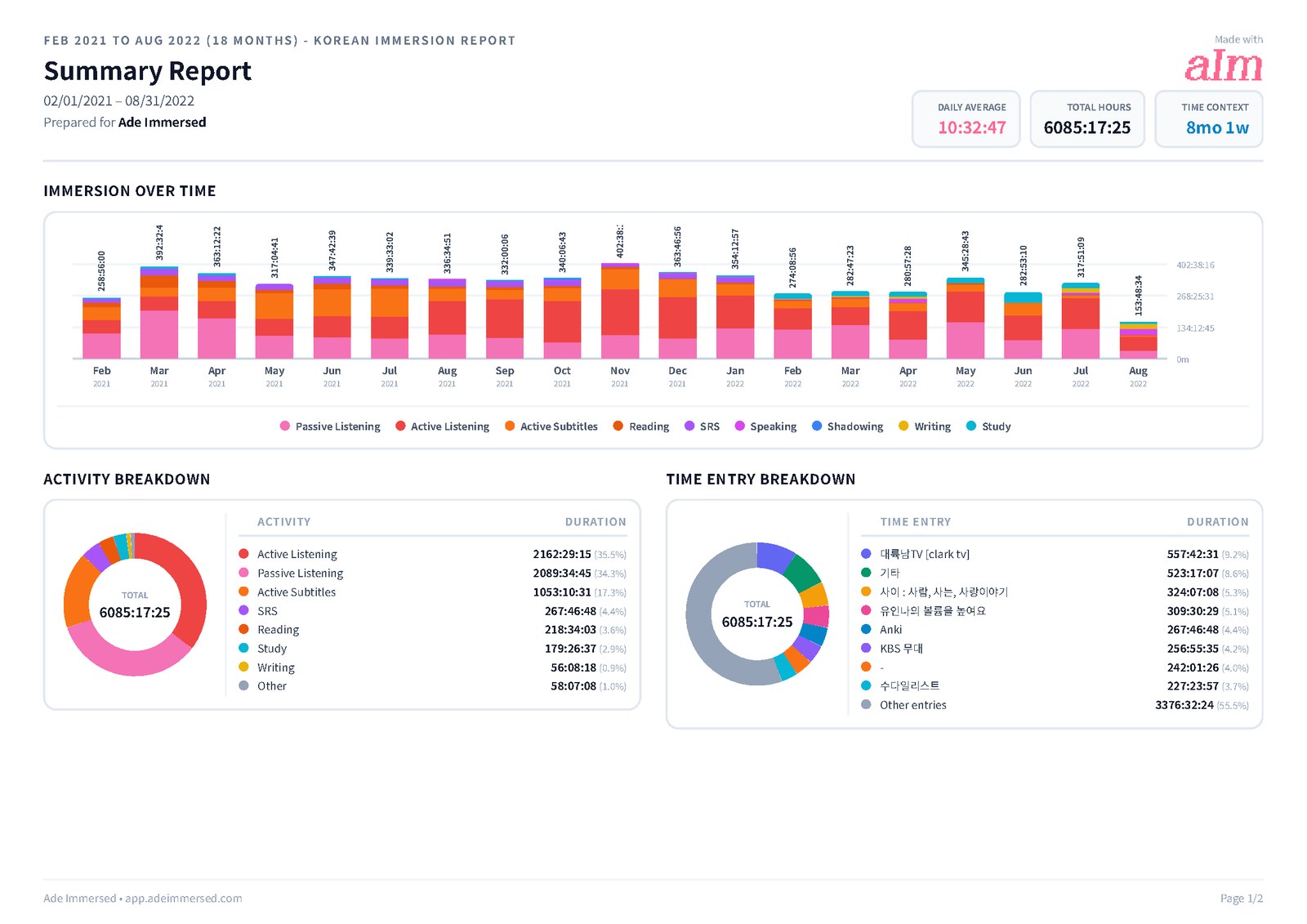
Immersed already knows the nine activities: Active Listening, Passive Listening, Active Subtitles, Reading, Study, SRS, Speaking, Writing and Shadowing. Press play, pick one, and when you stop, rate how much you understood. That's the part a stopwatch can't give you. A learner two months in can be ahead of one six months in, and the reason is how the time was spent: which activities, content at the right level, the attention given.
So the reports read like progress, not timesheets. Each day's bar is stacked by activity, comprehension gets its own line over time, and your top shows and channels link straight back to them. Toggl's reports are superb for billable hours; for a learner they answer "how much?" and stop there.
- Comprehension (for input) and Flow (for output) ratings from 1 to 5 after each session
- Make the play button default to one activity, like Passive Listening on the commute
- Export a PDF with clickable links, Excel or CSV, or share a report link
02In the browser
One click on YouTube, and the title comes with it.
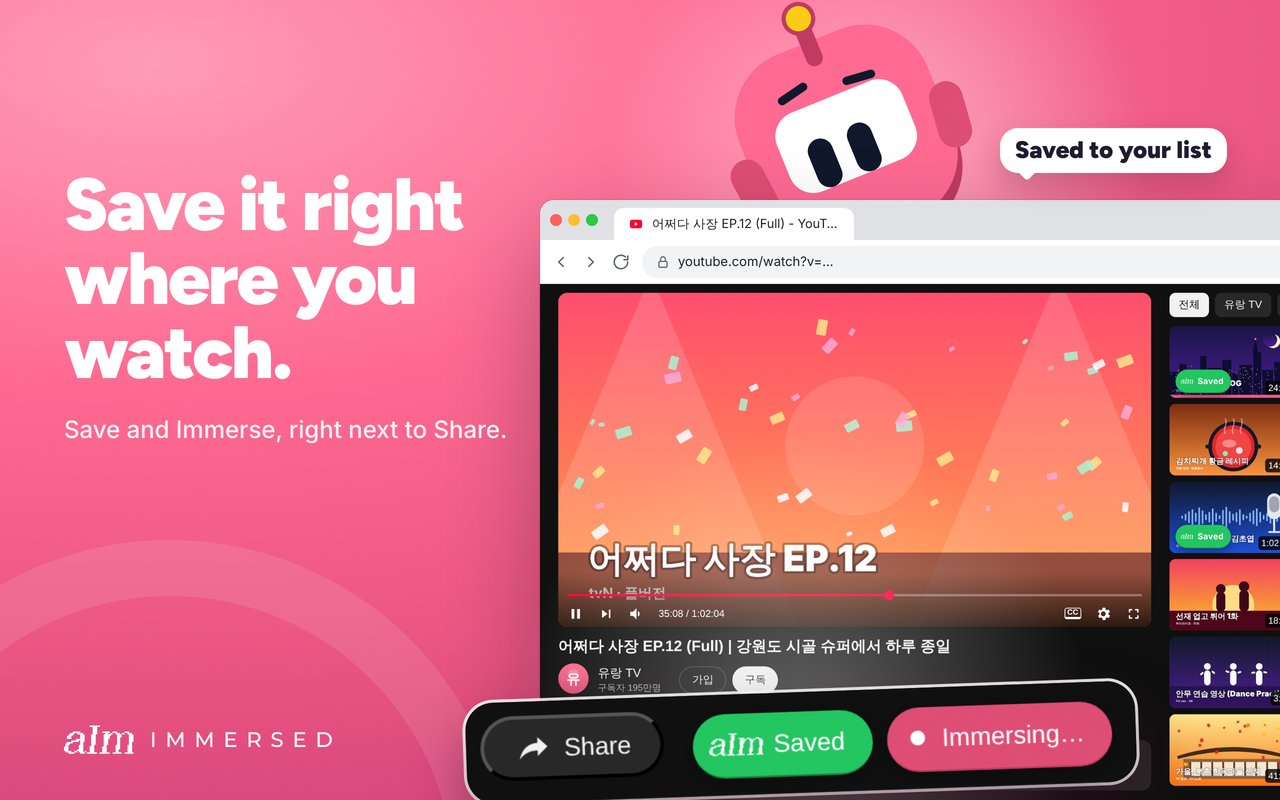
When I tracked in Toggl, I copied the video's title, pasted it into the timer, then pressed start. Immersed for Chrome does that part for you. On a YouTube watch page it adds Save and Immerse buttons: Immerse starts a session with the title and the page already on it. On 73 other media sites, from Netflix and Viki to Spotify and webtoons, an Add to Immersed button saves the title, picture and language.
Once a session runs, a small pill shows the clock on every tab you open, and a pop-up player keeps the video going while you look something up. If the next video is from the same playlist or creator, it joins the running session on its own. It works in Chrome, Edge, Brave and Arc, and it is unlisted on the Chrome Web Store for now, so use the link. Saving and sessions are Pro.
What it doesn't do: read your history, detect idle time or track your desktop apps. Nothing starts without a press, and a "Still immersing?" card every 30 minutes catches a session you forgot. If you want automatic desktop tracking, Toggl has it.
- A minutes badge on the toolbar, and Today and Week totals with a month heat map in the popup
- One session on your account: start on the laptop, and the phone shows it with Play here
03Moving over
Your Toggl history comes with you, split by activity.
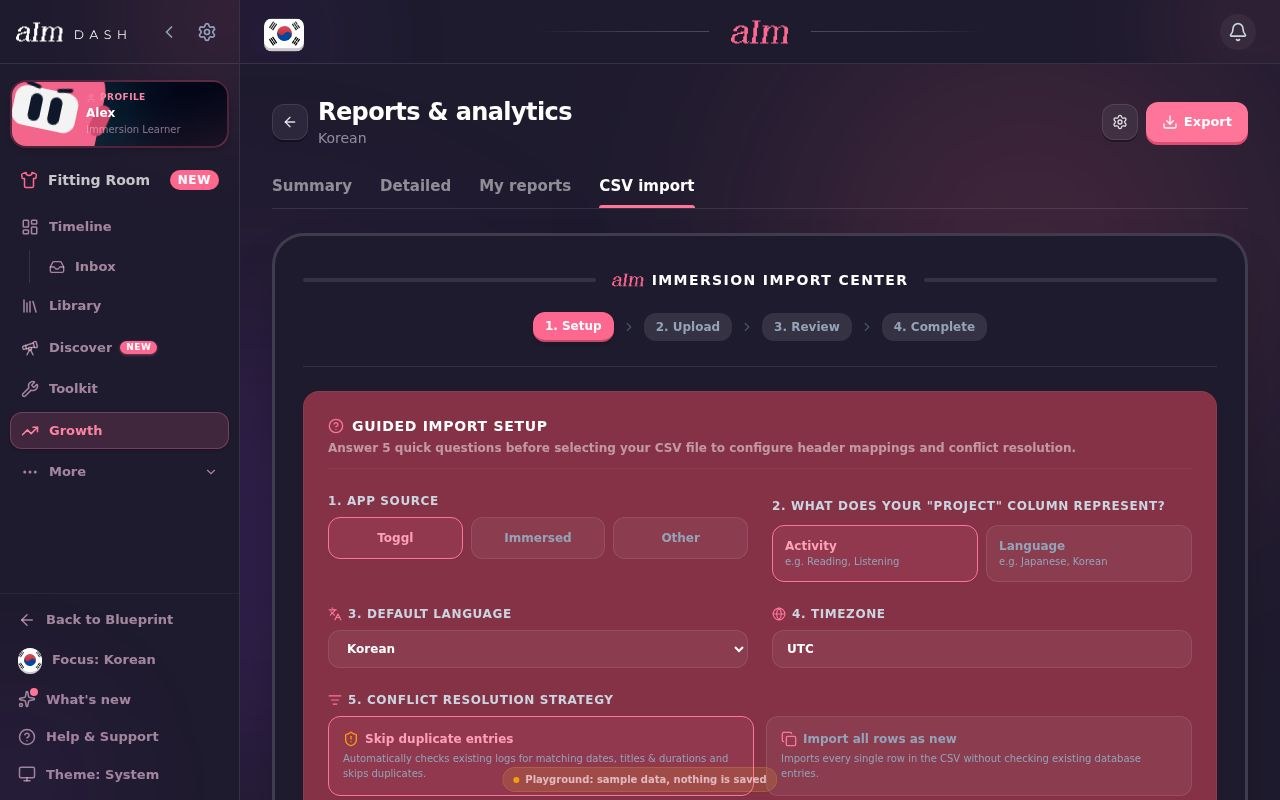
Export your time entries from Toggl's Detailed report as a CSV, then in Immersed open Growth, Reports & analytics, CSV import, and pick Toggl as the source. Immersed lists every Toggl project it finds with its hours, and you map each one to a language and one of the nine activities. One catch on Toggl's side: its free plan exports reports as PDF only, and CSV export needs a paid plan (Starter or above). If you're on the free plan, a single month of Starter is enough to get the file out.
That mapping is the point: your old hours land in the same stacked chart as your new ones, so the years you tracked in Toggl count in your totals and reports from day one. Duplicates can be skipped, so importing the same file twice will not double your hours.
04Before you press play
A plan for your day, not an empty timer.
Toggl starts from a blank box: you type what you're doing and press start. That works when you already know what to do. Most learners don't, or they know but can't see where it fits in a day that already has a job, a commute and a gym session.
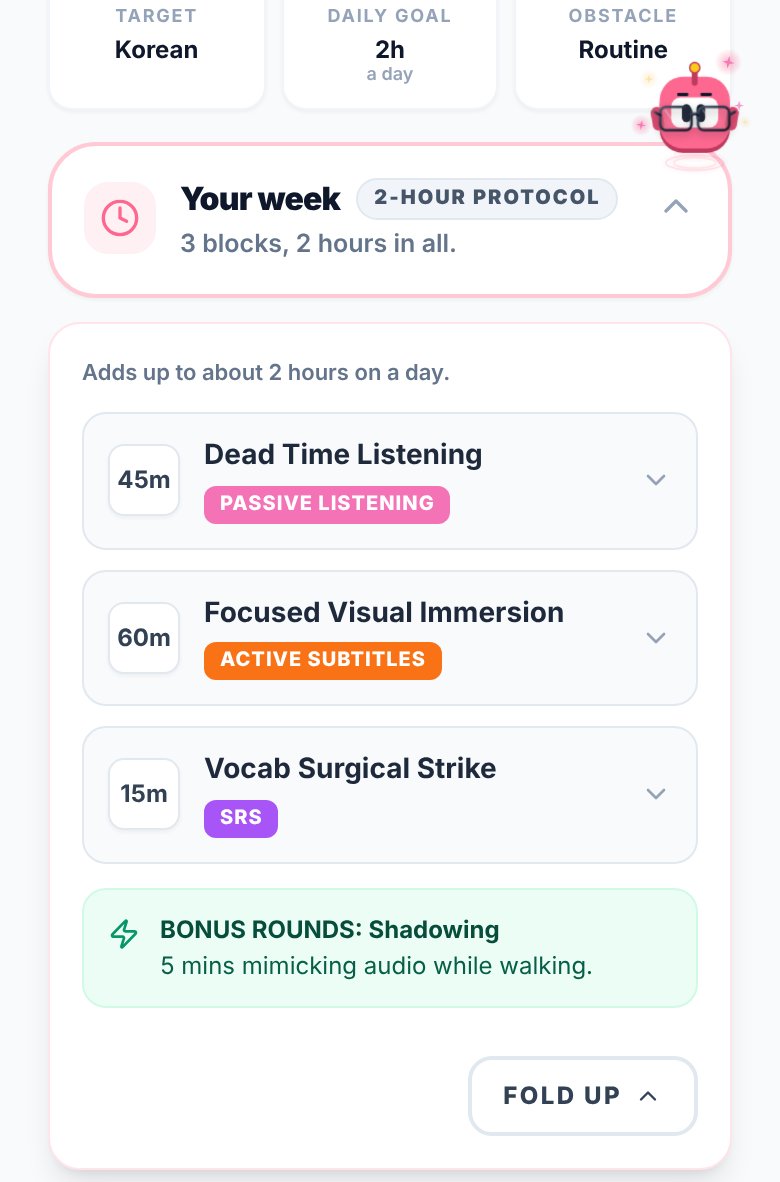
Immersed starts with a free blueprint built from your answers: how much time you really have, where passive listening hides in your day, and milestones for your first months. Then the timeline turns that into a day you can tick off, from Wake up to Wind down.
- A free blueprint in about two minutes, no account needed
- Plan tasks into the free gaps of your day, repeat them, get reminders
- The Fluency Checklist and monthly Sprints for what to work on next
05What to put on
The tracker also tells you what to watch.
Toggl doesn't know what Korean is. It can't suggest a podcast. That's fine for a time tracker, but finding the next thing at your level is half the battle in immersion.
Immersed comes with an Immersion Library in 22 languages (Watch, Listen and Read, across the platforms native speakers use) and Discover, a feed of creators and podcasts in your language. Scroll Discover for a minute and it logs itself to your timeline.
Side by side · checked October 24, 2026
Immersed and Toggl Track, feature by feature.
Activities and reports
Immersion activities built in
Immersed · Nine, from Active Listening to Shadowing
Toggl Track · Build your own with projects and tags
Comprehension rating per session
Immersed · Yes, 1 to 5, charted over time
Toggl Track · No
Each day broken down by activity
Immersed · Yes, stacked chart
Toggl Track · By project or tag if you set them up; stacked chart on Premium
Top shows and channels, linked back
Immersed · Yes, in the reports
Toggl Track · Not built in
Streaks and consistency grid
Immersed · Yes
Toggl Track · No
Export
Immersed · PDF with links, Excel, CSV; share links
Toggl Track · PDF on the free plan; CSV and Excel on paid plans
Bring your history across
Immersed · Imports Toggl CSV, maps projects to language and activity
Toggl Track · Not applicable
Tracking
Browser extension
Immersed · Yes, Immersed for Chrome (unlisted; saving and sessions are Pro)
Toggl Track · Yes, with idle detection
Automatic tracking
Immersed · One press to start; Discover scroll and games log themselves; never reads history
Toggl Track · Desktop activity tracking on Windows and macOS
Play YouTube, Spotify, Apple Podcasts inside the session
Immersed · Yes
Toggl Track · No
One session across devices
Immersed · Yes, with Play here on the other device
Toggl Track · Timer syncs across apps
Idle detection and Pomodoro
Immersed · No
Toggl Track · Yes
Planning and content
A plan built for your language and your day
Immersed · Free blueprint from your answers
Toggl Track · No
Daily planner
Immersed · Timeline from Wake up to Wind down
Toggl Track · Tasks, boards and calendar view
Guided next steps
Immersed · Fluency Checklist stages and monthly Sprints
Toggl Track · No
What to watch, listen to and read in your language
Immersed · Library in 22 languages, Toolkit, Discover
Toggl Track · No
Apps and price
Phone and computer
Immersed · Web app that installs on both; Immersed for Chrome; Android app in testing for Google Play
Toggl Track · iOS, Android, desktop and web
Free plan
Immersed · Blueprint, games with leaderboards, Discord, sample app
Toggl Track · Timer, reports and calendar for personal use
Paid plan
Immersed · $60 a year or $9.99 a month
Toggl Track · From $9 per user a month, billed yearly
Credit where it's due
Both are good. At different things.
What Toggl Track does well
- A genuinely free plan that is more than enough for one learner
- Apps everywhere: iOS, Android, Windows, macOS, web and a browser extension
- Idle detection and reminders that catch a timer you forgot to stop
- Total flexibility: projects, tags and clients can model any system, including Refold-style tracking
- Deep, fast reports and exports, built for people who bill by the hour
- Years of reliability and a huge user base, including much of the immersion community
What Immersed does that Toggl Track doesn't
- Knows the nine immersion activities, so there are no tags to build and every report shows what your hours were made of
- Asks how much you understood, and charts comprehension over time
- Links your top shows and channels from the report back to the content
- Starts a session from the YouTube page in one click with Immersed for Chrome, title and page included
- Builds you a plan first, from your time, your goals and your level
- Tells you what to watch, listen to and read in your language, and gives you a feed that logs itself
- Imports your Toggl history and maps each project to a language and an activity
Pick Toggl Track if
- You already know what to do every day and only want an exact timer
- You want idle detection or desktop activity tracking on Windows or macOS
- You track work hours in the same app and want one place for both
- You want a native iPhone app, or you want to pay nothing
Pick Immersed if
- You want to see what your hours were made of, not only how many there were
- You want the tracker to understand immersion: passive vs active, subtitles, comprehension
- You immerse on YouTube and want one click to start, with the title filled in for you
- You want a plan that fits your actual day, and help finding things at your level
Use both, or move over
Using both, or moving over
Some people keep Toggl for work and use Immersed for their language. That works: they never touch each other.
If you are moving over, import your Toggl CSV first so your history comes with you. Toggl's free plan exports PDF only, so getting the CSV out needs a paid Toggl plan (Starter or above), even if only for a month. Then add Immersed for Chrome so the YouTube part of your day starts with one click.
Pricing · checked October 24, 2026
What each one costs.
Immersed
- Free: the blueprint for one language (with the Toolkit, Library picks and the Fluency Checklist's Foundations), the listening games in 12 languages with their leaderboards, Aim Runner, the Discord and the sample app. A free account also gets the Fitting Room's day-one outfits for Aim, Hour Marks and badges from game time.
- Immersed Pro: $60 a year (starts with a free week, about $5 a month) or $9.99 a month. Timeline, sessions with the nine activities, saving and sessions in Immersed for Chrome, Discover, Library, Growth and reports, CSV import, monthly Sprints, more languages.
Toggl Track
- Free: timers, personal reports with PDF export, calendar integrations, for small teams. CSV and Excel export need a paid plan.
- Starter: $9 per user a month billed yearly, $12 monthly.
- Premium: $16 per user a month billed yearly, $24 monthly.
For one person who only wants a stopwatch, Toggl's free plan costs nothing and is hard to beat. Immersed costs about $5 a month on the yearly plan, and what you pay for is the nine activities, the reports that show what your hours were made of, the extension, the plan and the library.
FAQ
Questions people ask.
Is Toggl Track good for tracking language immersion?+
Yes, for the stopwatch part. Many learners in the Refold and Mass Immersion Approach communities use a Toggl project per language and a tag per activity. What it doesn't do is know passive listening from active subtitles unless you build the tags yourself, ask how much you understood, plan your day or tell you what to watch.
Why does the activity matter if I am tracking hours anyway?+
Because hours are one-dimensional. Your 1,000 hours and someone else's 1,000 aren't the same: one might be mostly passive listening, the other active subtitles and reading at the right level. Immersed's reports show that mix day by day, with comprehension beside it, so you can see why a month went well and plan the next one around it.
Can I import my Toggl history into Immersed?+
Yes. Export a CSV from Toggl's Detailed report, then in Immersed open Growth, Reports & analytics, CSV import, and choose Toggl. Immersed lists your projects with their hours and lets you map each to a language and one of the nine activities. Two things to know: Toggl's free plan exports PDF only, so the CSV needs a paid Toggl plan (Starter or above, even for one month), and importing needs Immersed Pro.
Does Immersed have a browser extension or automatic tracking?+
It has a browser extension, Immersed for Chrome: one click on YouTube starts a session with the title on it, a pill shows the clock on every tab, and videos from the same playlist or creator join the running session. It doesn't read your history or detect idle time, and there's no desktop activity tracking; Toggl has those.
Is Immersed free like Toggl?+
Partly. The blueprint, the listening games and their leaderboards, the Discord and the sample app are free, and a free account gets Aim's Fitting Room. The daily tracker, the timeline, Discover, the reports and saving in Immersed for Chrome are Immersed Pro: $60 a year with a free week first, or $9.99 a month.
Which is better for passive listening?+
Immersed has Passive Listening as its own activity, shows where it fits in your day on the blueprint, and can make the play button start it in one tap. In Toggl you create a tag for it.
Does Immersed work on my phone?+
Yes. Immersed runs in the browser on any phone and installs to your home screen like an app. A native Android app is in testing for Google Play, and a native iPhone app is coming.
More comparisons
Stop guessing. See what your hours add up to.
Answer a few questions and Immersed builds your plan: a daily routine that fits your life, milestones for your first months, and things to watch at your level. Free, about two minutes, no account needed.
The plan is free and stays free. No card.
Checked October 24, 2026 against published product information. Prices and features change; if something here is out of date, tell me on Discord and I'll fix it.