Tracking Languages counts your Netflix minutes. Immersed plans your day.
Tracking Languages is a Chrome extension that detects when you watch in your target language on Netflix and YouTube (and, by its name, Prime Video) and counts the minutes without a timer, with goals, streaks and a growing garden. Immersed is a language immersion tracker and planner: a free plan built from your answers, then a daily timeline for the shows, podcasts and books you learn from, with reports of your hours.
Free. About two minutes. No account, no card.
The short version
Checked October 24, 2026.
Something out of date? Tell me.
If your immersion is mostly shows and videos in Chrome and you want every minute counted without lifting a finger, Tracking Languages does that and Immersed does not. Immersed never reads your viewing history: you press play (one click on YouTube with Immersed for Chrome) or log it.
If you want a plan for how much to immerse and where it fits in your day, tracking that covers podcasts, books and your phone the same way, ideas for what to watch, and reports by activity and comprehension, Immersed is built for that.
Tracking Languages tells you how many minutes you watched. Immersed tells you what your hours were made of: which of nine activities, how much you understood, and which shows and channels took the time.
01Counting the minutes
Automatic tracking is what Tracking Languages does best.
Pick your target languages once and press play on Netflix or YouTube. The extension detects the language and counts the minutes. No timer to start, nothing to forget. Its own line is "Stop counting minutes. Just press play." and that is a fair description.
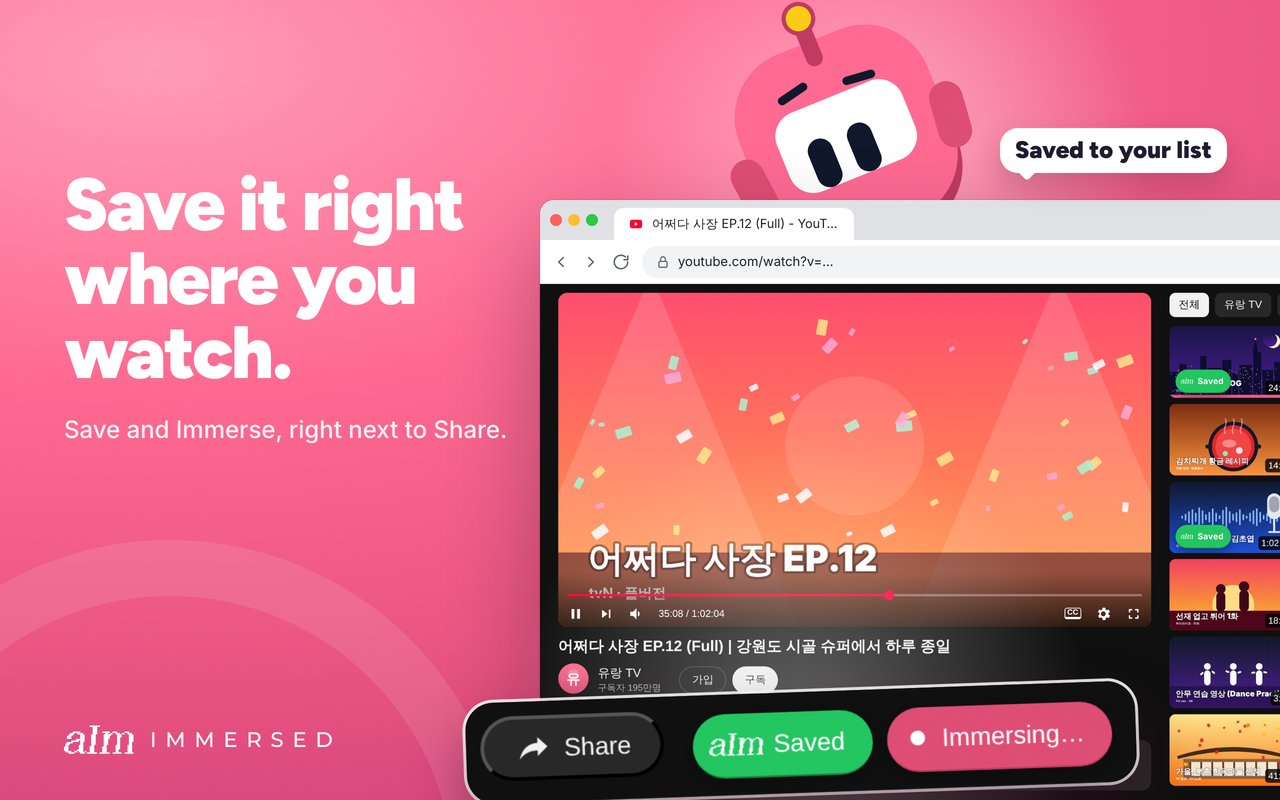
Immersed doesn't do this. It doesn't read your Netflix or YouTube history, and nothing counts without a press. What it has is Immersed for Chrome: on a YouTube page, one click on Immerse starts a session with the title and link on it, a pill shows the clock on every tab, and later videos from the same playlist or creator join the running session on their own. It's unlisted on the Chrome Web Store for now, and sessions are Pro.
That's quick, but it's still a press. If forgetting to log is your problem, Tracking Languages solves it and Immersed doesn't.
- Tracking Languages: automatic on Netflix and YouTube in Chrome, add outside time by hand
- Immersed: one click on YouTube with Immersed for Chrome, one tap in the app, or log it later
- In Immersed the Discover scroll and the free listening games log themselves
02Before you press play
A count of what you did, or a plan for what to do.
Tracking Languages gives you a daily goal and a streak to protect. It does not plan where immersion fits around a job and a commute, or show what your hours were made of.
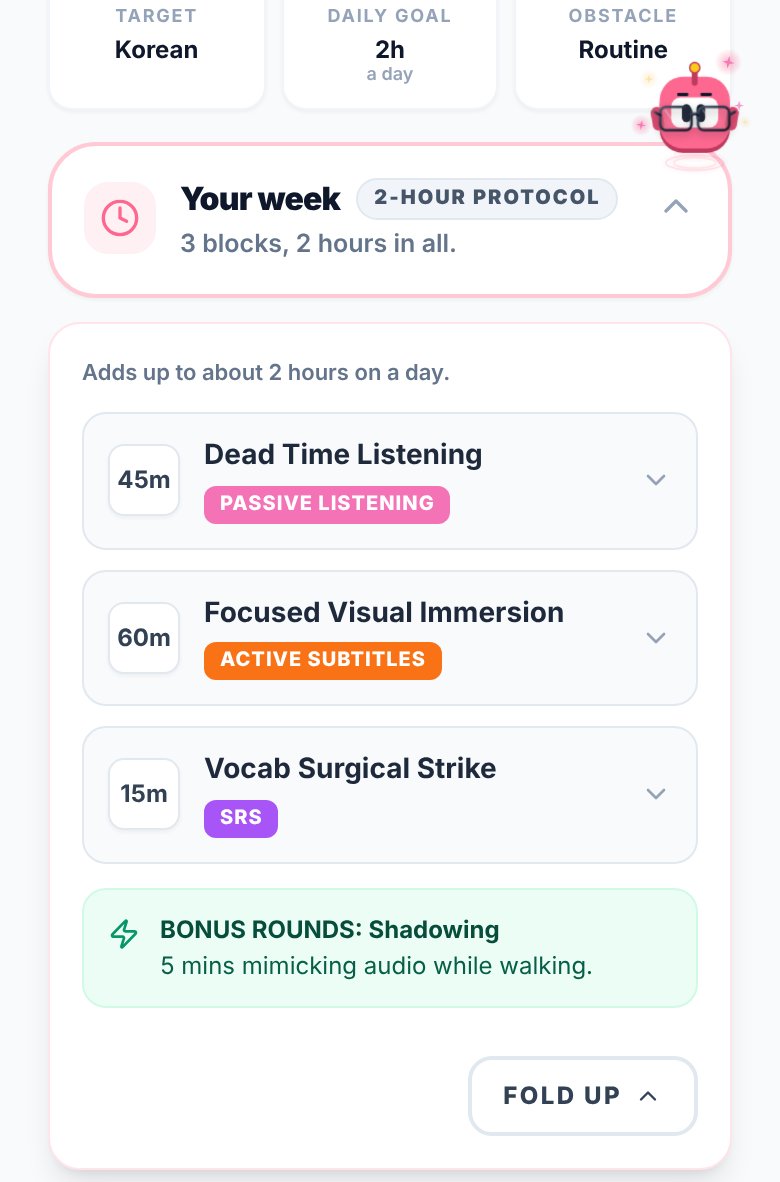
Immersed starts with a free blueprint, about two minutes of questions, that sets milestones for your first months, a daily protocol and Hidden Immersion Time, the passive listening hiding in your commute or chores. The timeline turns it into a day from Wake up to Wind down, with tasks, repeats and reminders.
03Beyond the browser
Podcasts, books and the phone count the same in Immersed.
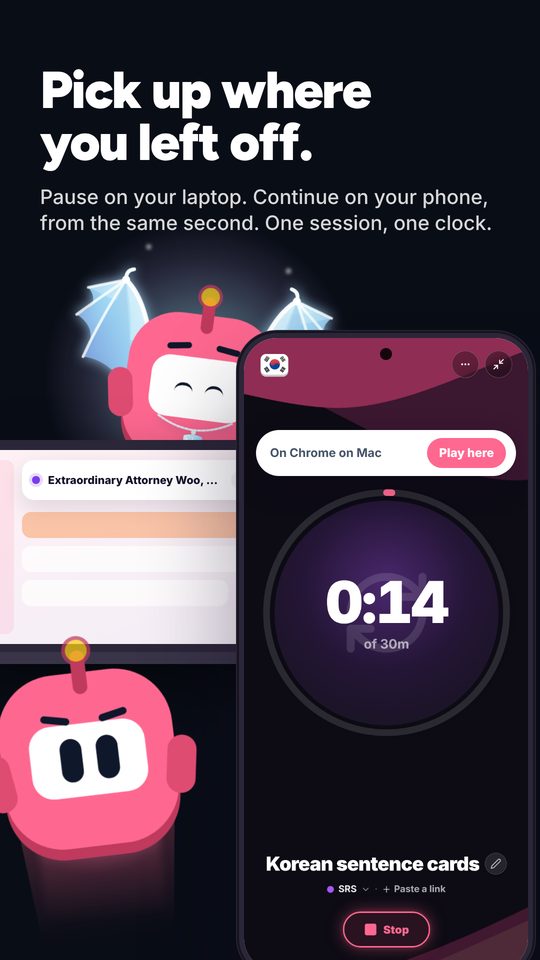
Tracking Languages is at its best in Chrome on a computer. Time on your phone, a TV app or a book goes in by hand, and all of it is watch time.
Immersed runs in the browser on phone and computer and installs to the home screen like an app. Every session is one of nine activities (Active Listening, Passive Listening, Active Subtitles, Reading, Study, SRS, Speaking, Writing, Shadowing), and you rate how much you understood. That's what makes the hours readable: a month of active subtitles and a month of background listening are not the same month, and Immersed shows which one you had.
It also suggests what to watch next, with an Immersion Library in 22 languages and Discover, a feed of creators and podcasts in your language that logs itself as you scroll.
04Looking back
A garden and a streak, or reports by activity.
Tracking Languages shows minutes per language today, this week and all time, a streak, an activity calendar and a garden that grows as you show up. There is a leaderboard if you like a little competition, CSV export, and you can send your hours to Dreaming Spanish or Dreaming French.
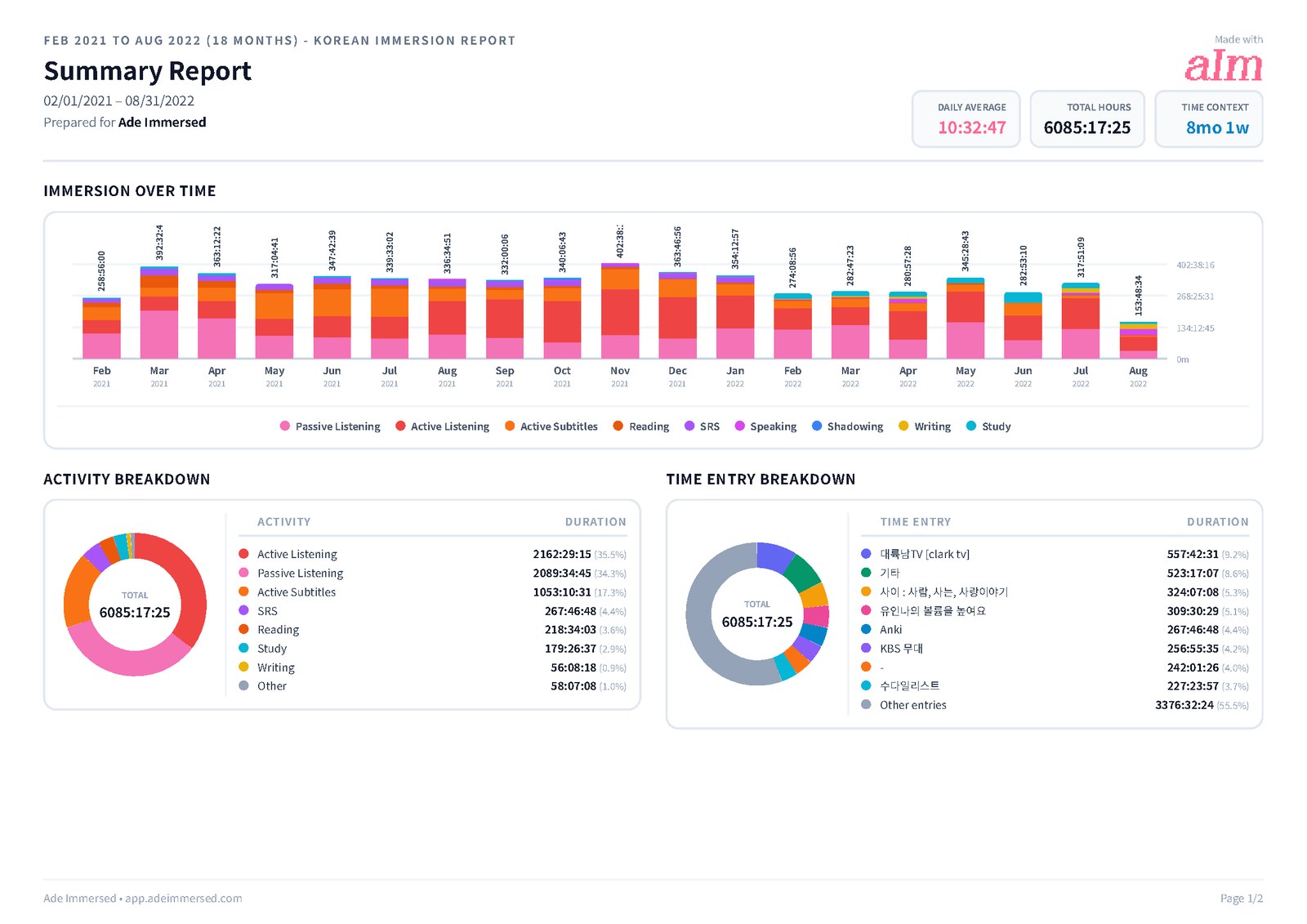
Immersed's Growth page shows week, month, year and all time: each day stacked by activity, comprehension over time, a consistency grid with streaks, and your top shows and channels with links back to them. Export a PDF, Excel or CSV, or share a report link.
Where Tracking Languages grows a garden, Immersed dresses Aim, its mascot: outfits earned only by immersing, Profile badges that level up from grey to gold, and on Pro, monthly Sprints with daily quests and a medallion. Its free listening games have their own all-time leaderboards.
Side by side · checked October 24, 2026
Immersed and Tracking Languages, feature by feature.
Tracking
Automatic tracking
Immersed · One press to start; Discover scroll and games log themselves; never reads history
Tracking Languages · Yes, on Netflix and YouTube in Chrome
Browser extension
Immersed · Yes, Immersed for Chrome (unlisted; saving and sessions are Pro)
Tracking Languages · Yes, Chrome
Detects the language
Immersed · Saves by title script in the extension; sessions use your focus language
Tracking Languages · Yes
Time outside the browser
Immersed · Timer or log it, any activity
Tracking Languages · Add it by hand
Immersion activities
Immersed · Nine, from Passive Listening to Shadowing
Tracking Languages · Watch time
Comprehension rating
Immersed · Yes, charted over time
Tracking Languages · No
Languages
Immersed · Any
Tracking Languages · About 70
Planning and content
A plan built for your language and your day
Immersed · Free blueprint from your answers
Tracking Languages · No
Daily goal and streak
Immersed · Yes
Tracking Languages · Yes
Daily planner with reminders
Immersed · Timeline from Wake up to Wind down
Tracking Languages · No
What to watch, listen to and read
Immersed · Library in 22 languages, Toolkit, Discover
Tracking Languages · No
Progress
Totals over time
Immersed · Week, month, year, all time
Tracking Languages · Today, week, all time
Hours broken down by activity
Immersed · Each day stacked by the nine activities
Tracking Languages · No; it counts watch time
Consistency view
Immersed · Consistency grid
Tracking Languages · Activity calendar and garden
Rewards for showing up
Immersed · Outfits for Aim, badges that level up, monthly Sprints
Tracking Languages · A garden that grows
Leaderboard
Immersed · Game leaderboards (top 10 per game and language); no hours leaderboard
Tracking Languages · Yes
Export
Immersed · PDF, Excel, CSV
Tracking Languages · CSV; send hours to Dreaming Spanish or French
Apps and price
Where it runs
Immersed · Web app on phone and computer, Immersed for Chrome, Android app in testing
Tracking Languages · Chrome on a computer
Price
Immersed · Free blueprint; Pro $60 a year or $9.99 a month
Tracking Languages · Store: $4.99 a month after a free week; site: £9.99 lifetime
Credit where it's due
Both are good. At different things.
What Tracking Languages does well
- Tracks automatically: watch Netflix or YouTube in Chrome and the minutes count themselves
- Detects the language, so you set it up once and forget about it
- Supports about 70 languages
- Goals, streaks, an activity calendar and a growing garden that make showing up feel good
- CSV export, plus a way to send your hours to Dreaming Spanish or Dreaming French
- Reviewers on the Chrome Web Store praise accurate tracking and a developer who replies fast
- Rated 4.3 out of 5 from 16 ratings, with 323 users, when I checked
What Immersed does that Tracking Languages doesn't
- Builds you a plan first, from your time, your goals and your level
- Puts the plan on a daily timeline with reminders and repeating tasks
- Treats podcasts, books and phone time the same as browser time
- Knows nine immersion activities and asks how much you understood, so reports show what your hours were made of
- Tells you what to watch, listen to and read, and gives you a feed that logs itself
- Reports by activity and comprehension, with your top shows and channels linked, exportable as PDF, Excel or CSV
- Dresses Aim, its mascot, in outfits earned only by immersing, with badges that level up
Pick Tracking Languages if
- Most of your immersion is Netflix and YouTube in Chrome on a computer
- You forget timers and want tracking that just happens
- You log hours on Dreaming Spanish or Dreaming French and want them sent there
- You want a streak and a garden more than a plan
Pick Immersed if
- A lot of your immersion is podcasts, books or your phone
- You want to see what your hours were made of, not only how many minutes you watched
- You want a plan that tells you how much to immerse and where it fits in your day
- You want help finding things at your level in your language
Use both, or move over
Using both, or moving over
Some learners will run both: Tracking Languages to catch every Netflix minute in Chrome, Immersed for the plan, the timeline and everything off the computer. Pick one as your total so the same hour is not counted twice.
If you move to Immersed, export your hours from Tracking Languages as a CSV, then in Immersed open Growth, Reports & analytics, CSV import, choose Other as the source and check how the rows map before you import.
Pricing · checked October 24, 2026
What each one costs.
Immersed
- Free: the blueprint for one language (with the Toolkit, Library picks and the Fluency Checklist's Foundations), the listening games in 12 languages with their leaderboards, Aim Runner, the Discord and the sample app. A free account also gets the Fitting Room's day-one outfits for Aim, Hour Marks and badges from game time.
- Immersed Pro: $60 a year (starts with a free week, about $5 a month) or $9.99 a month. Timeline, sessions, saving and sessions in Immersed for Chrome, Discover, Library, Growth and reports, monthly Sprints, more languages.
Tracking Languages
- The Chrome Web Store listing says $4.99 a month after a 7-day free trial, cancel anytime, with in-app purchases.
- Their website says £9.99 as a one-time payment for lifetime access.
- The two disagreed when I checked, so see their listing for the current price.
Either way, Tracking Languages is cheap for what it does well, which is counting browser minutes automatically. What you pay Immersed for is different: the plan, the timeline, the nine activities, the library and reports that cover your immersion on every device.
FAQ
Questions people ask.
Does Immersed track Netflix or YouTube automatically?+
No. Immersed doesn't read your viewing history, and nothing counts without a press. With Immersed for Chrome, one click on a YouTube page starts a session, and videos from the same playlist or creator join it on their own. Tracking Languages counts Netflix and YouTube minutes in Chrome with no press at all, and that is its biggest advantage over Immersed.
How much does Tracking Languages cost?+
When I checked on 2026-10-24, the Chrome Web Store listing said $4.99 a month after a 7-day free trial, while their website said £9.99 one time for lifetime access. See their listing for the current price.
Does Tracking Languages work on Prime Video?+
Its store name says Netflix, YouTube and Prime Video. The description says automatic tracking works on Netflix and YouTube, so check the listing if Prime Video is what you watch.
Does it work on my phone or TV?+
It is a Chrome extension, so automatic tracking happens in Chrome on a computer. Other time can be added by hand. Immersed runs in the browser on any phone or computer, and a native Android app is in testing for Google Play.
What do users say about Tracking Languages?+
Chrome Web Store reviewers like the accurate tracking, the goals and a responsive developer. Some report tracking that stopped until they reinstalled, and one reported extra hours they could not edit.
Can I bring my Tracking Languages hours into Immersed?+
Tracking Languages exports a CSV. Immersed's CSV import accepts files from other apps: choose Other as the source and check how the rows map before importing.
More comparisons
Stop guessing. See what your hours add up to.
Answer a few questions and Immersed builds your plan: a daily routine that fits your life, milestones for your first months, and things to watch at your level. Free, about two minutes, no account needed.
The plan is free and stays free. No card.
Checked October 24, 2026 against published product information. Prices and features change; if something here is out of date, tell me on Discord and I'll fix it.