TrackMyLang maps your hours to CEFR levels. Immersed plans the day they come from.
TrackMyLang is a web tracker for immersion, Anki and study hours, with a big free plan: unlimited languages, Anki sync, a CEFR roadmap and a catalog of videos rated by level, with your data kept in the browser unless you sync. Immersed starts from a different idea: hours are one number, and what you did in them is what moves you, so every session is one of nine standard immersion activities with a rating of how much you understood. Immersed is a language immersion tracker and planner. It turns immersion into something you can see, plan and keep: a free plan built from your answers, a daily timeline for the shows, podcasts and books you learn from, and reports of your hours.
Free. About two minutes. No account, no card.
The short version
Checked October 24, 2026.
Something out of date? Tell me.
If you want the most tracker for the least money, TrackMyLang is hard to beat: its free plan covers unlimited languages, a timer, journals, Anki sync, a CEFR roadmap and CSV or JSON export, and Pro is $3 a month.
If you want a plan for how much to immerse and where it fits in your actual day, a timeline with reminders, and a feed in your language that counts as immersion, Immersed is built for that. Its reports show what your hours were made of, the mix of nine activities and how much you understood, which is what explains progress more than the total.
01Before you press play
A roadmap of levels, or a plan for today and a checklist for next.
TrackMyLang's Progress Roadmap (in beta) turns your hours into CEFR levels from A1 to C2, adjusted for how hard your language is, and lets you compare different hour models. Add daily, weekly and total goals with streaks and milestones at 100, 500 and 1,000 hours, and you always know where you stand.
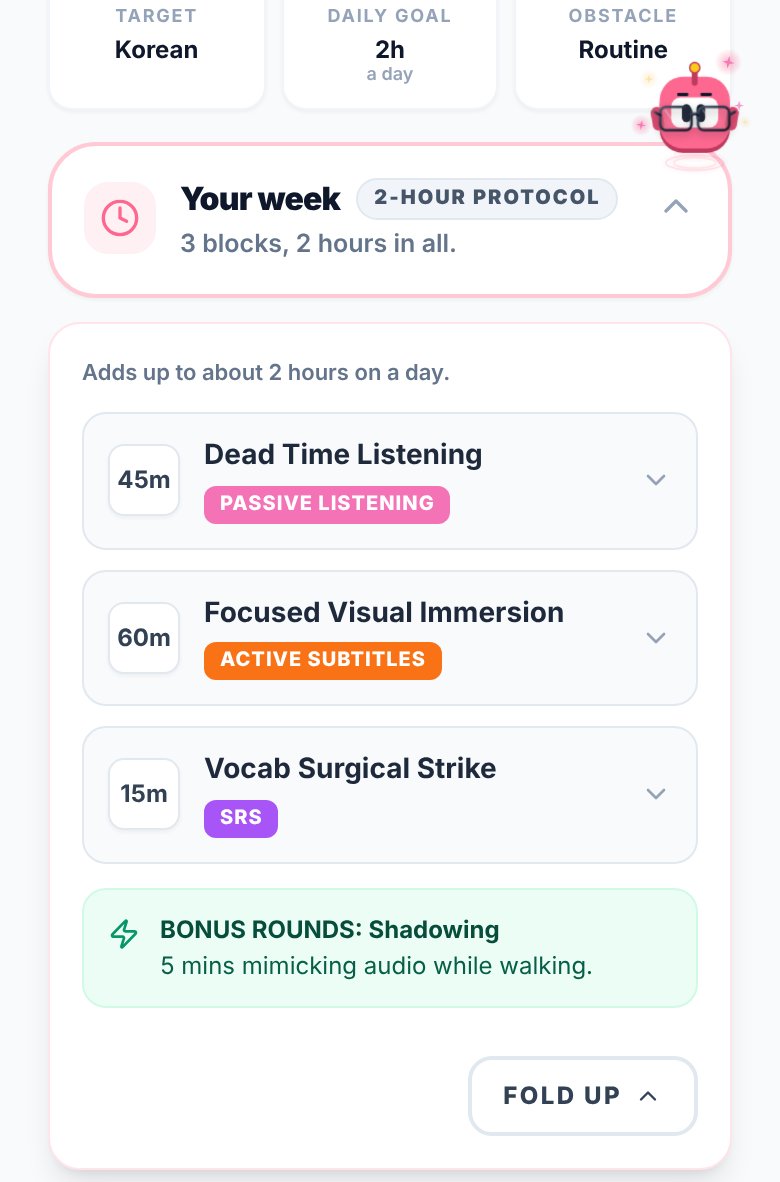
Immersed goes after the day itself. A free blueprint, about two minutes of questions, sets milestones for your first months, a daily protocol and Hidden Immersion Time, the passive listening hiding in your commute or chores. The timeline turns it into a day from Wake up to Wind down, with tasks planned into free gaps, repeats and reminders.
For what comes next, Immersed uses the Fluency Checklist instead of CEFR: 32 things an immerser has in place, in four stages (Foundations, Immersing, Living in the language, Speaking & writing), each with how to get there and why it matters. Foundations is free on the blueprint. On your Profile it becomes Your path for each language, where a stage asks for ticked habits as well as a suggested number of hours.
- Free blueprint in about two minutes, no account needed (just a name and email)
- Milestones in Immersed are things you wear: Hour Marks at 1, 5 and 10 hours, outfits for Aim, the mascot, from 25 to 1,200 hours in a language (Pro), and an Hours badge that levels up from grey to gold
- With Pro, a monthly Sprint of one Mission and Daily Quests earns that month's medallion and outfit for Aim
02While you immerse
Both have a timer. They sort your time differently.
TrackMyLang logs sessions in eight categories (Watching, Listening, Reading, Writing, Speaking, Studying, Playing and Other) with more than 80 subcategories, using a live timer or a manual entry. You can add a journal entry with a full text editor and track your mood. Pro adds URL auto-fill: paste a YouTube link and the title and length fill in.
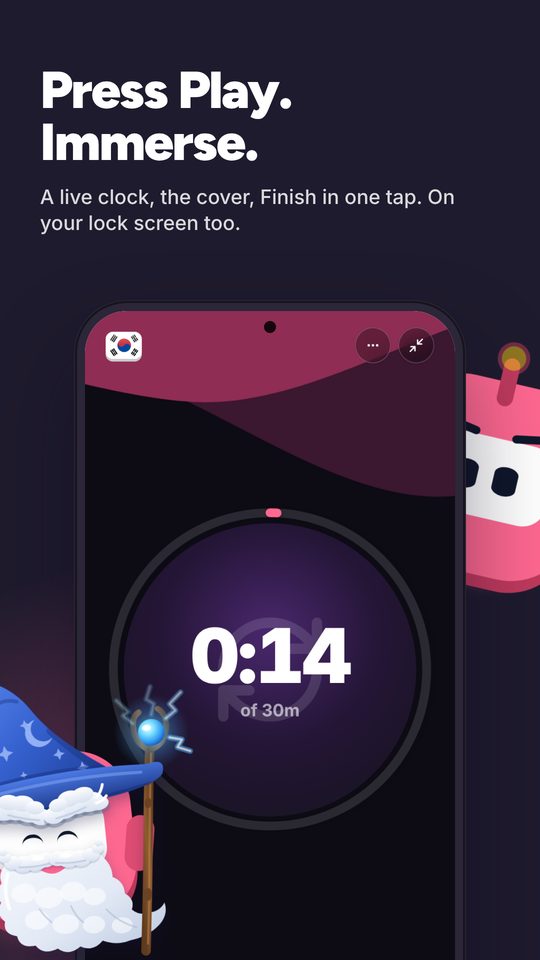
Immersed keeps to nine standard activities built for immersion: Active Listening, Passive Listening, Active Subtitles, Reading, Study, SRS, Speaking, Writing and Shadowing. Press play, and when you stop it lands on your timeline. Paste a YouTube, Spotify or Apple Podcasts link and it plays inside the session. Rate how much you understood.
The fixed nine are on purpose. Every learner logs the same kinds of time, so the mix is easy to read: how much was a podcast in the background, how much was a show with subtitles in your language, how much was speaking. Your 1,000 hours and someone else's 1,000 are not the same hours, and the mix shows why.
- Immersed doesn't read your viewing history: you press play (one click on YouTube with Immersed for Chrome) or log it. The Discover scroll and the free listening games log themselves
- TrackMyLang syncs your Anki reviews; Immersed has SRS as an activity you time
03What to put on
A catalog to search, or a library and a feed.
TrackMyLang's Media Catalog is a real strength. Its Product Hunt listing describes more than 40,000 videos from over 200 creators in 35+ languages, with community CEFR ratings from A0 to C2 so you can filter by level. Log a session from a catalog item with the length filled in, and keep a Watch List of what you are watching, want to watch, or finished.
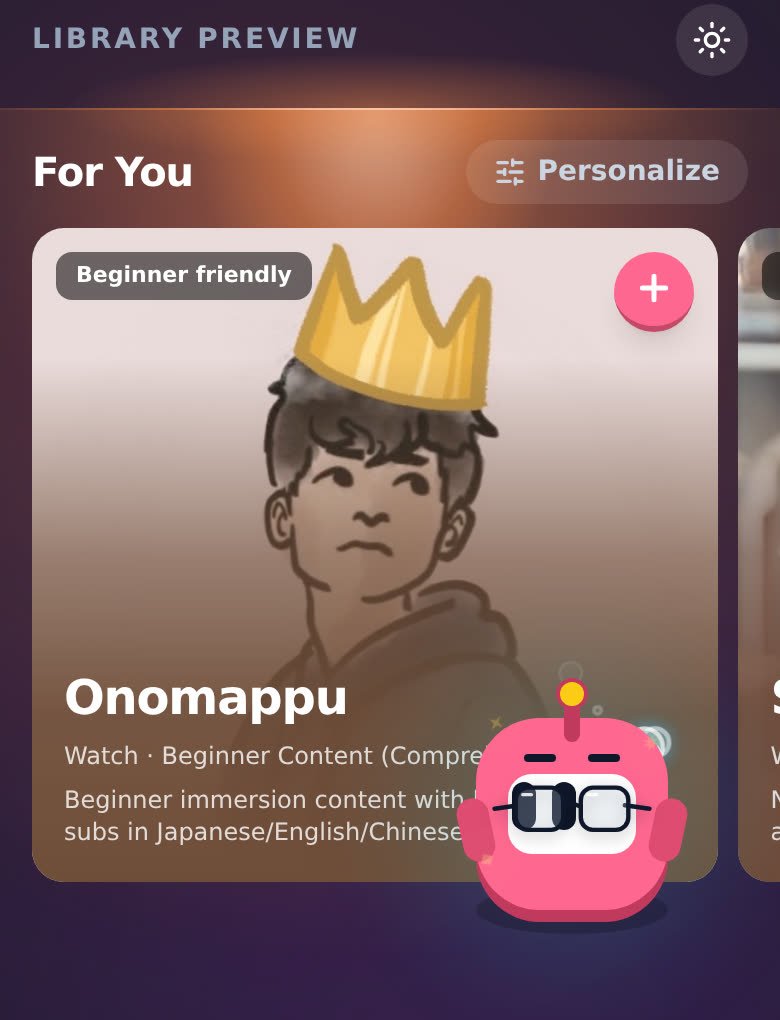
Immersed starts from platforms rather than single videos. Its Immersion Library covers 22 languages with the places native speakers watch, listen and read (streaming services, public broadcasters, webtoons, podcasts, radio, even games on Steam), with region and dialect filters for Arabic, Spanish, Portuguese and English. The free blueprint gives you picks from the main platforms for Watch, Listen and Read, and an Immersion List saves things for later.
Discover is a feed of creators and podcasts in your language, in 11 languages, and scrolling it logs itself as immersion.
04Looking back
Charts for the curious, reports you can hand over.
TrackMyLang's free dashboard has KPIs, an activity heatmap and mood tracking. Pro adds a long list of charts: Watch Analytics, Punchcard, Habit Drift, Media Lifespan, Activity Balance, Source ROI and Language Split. Export everything as CSV or JSON at any time, free.
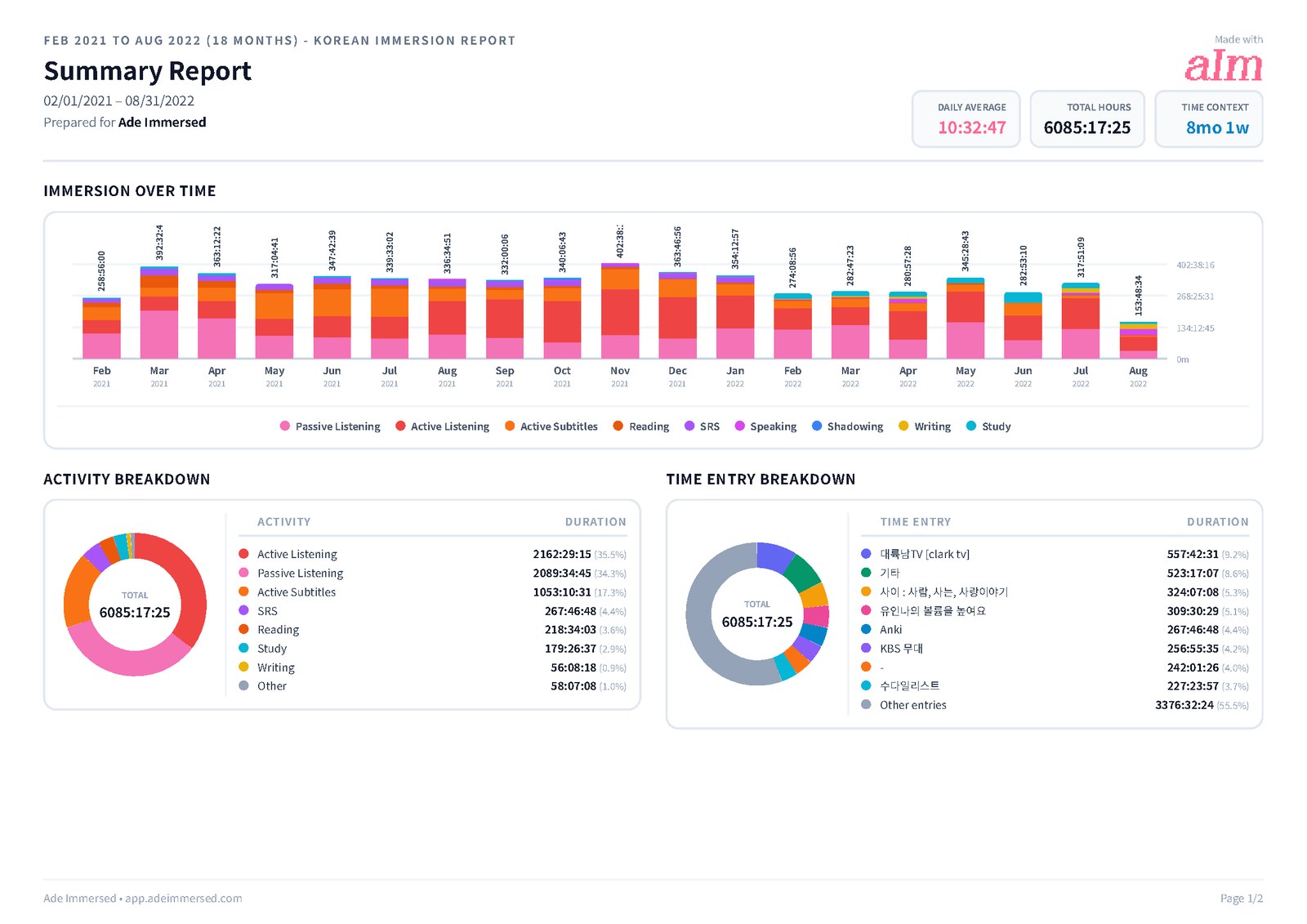
Immersed's Growth page covers week, month, year and all time with your hours stacked by the nine activities, a comprehension line that shows whether you understand more over time, and your top shows and channels with links back to them. That mix is usually what explains a learner two months in who is ahead of one six months in.
There is also a consistency grid with streaks. Export a PDF, Excel or CSV you can customize, keep monthly reports in My reports, or share a report link.
Side by side · checked October 24, 2026
Immersed and TrackMyLang, feature by feature.
Planning
A plan built for your language and your day
Immersed · Free blueprint from your answers
TrackMyLang · No
Daily planner with reminders
Immersed · Timeline from Wake up to Wind down
TrackMyLang · No
Levels and next steps
Immersed · Fluency Checklist stages, by hours and ticked habits
TrackMyLang · CEFR A1 to C2 from your hours (beta)
Goals and streaks
Immersed · Weekly goal, streaks, monthly Sprints
TrackMyLang · Daily, weekly and total goals
Milestones and rewards
Immersed · Hour Marks, badges that level up, outfits for Aim
TrackMyLang · Milestones at 100, 500 and 1,000 hours
Tracking
Timer and manual entry
Immersed · Yes
TrackMyLang · Yes
Activity types
Immersed · Nine immersion activities
TrackMyLang · Eight categories, 80+ subcategories
Comprehension rating
Immersed · Yes
TrackMyLang · No; mood tracking instead
Journal
Immersed · Notes on each session
TrackMyLang · Full text editor
Anki
Immersed · SRS as a timed activity
TrackMyLang · Syncs your Anki reviews
Automatic tracking or extension
Immersed · Immersed for Chrome (unlisted); one press to start, never reads history
TrackMyLang · No
Content
Things to watch at your level
Immersed · Immersion Library and Toolkit
TrackMyLang · Media Catalog with CEFR ratings
A feed that counts as immersion
Immersed · Discover
TrackMyLang · No
Save for later
Immersed · Immersion List
TrackMyLang · Watch List
Data and reports
What your hours were made of
Immersed · Stacked by nine activities, comprehension line, top shows linked
TrackMyLang · Activity Balance and Language Split charts on Pro
Export
Immersed · PDF, Excel, CSV
TrackMyLang · CSV and JSON, free
Import
Immersed · CSV from Toggl or another app
TrackMyLang · CSV
Use without an account
Immersed · Blueprint and sample app
TrackMyLang · Yes, data stays in your browser
Price
Free plan
Immersed · Blueprint, games with leaderboards, Discord, sample app
TrackMyLang · Unlimited languages and history, most features
Paid plan
Immersed · $60 a year or $9.99 a month
TrackMyLang · Pro at $3 a month
Credit where it's due
Both are good. At different things.
What TrackMyLang does well
- A very generous free plan: unlimited languages and history, Anki sync, roadmap and export
- Local-first: use it as a guest and your data stays in the browser unless you choose to sync
- A Media Catalog of tens of thousands of videos with community CEFR ratings to filter by level
- Anki integration that pulls in cards studied, new cards and retention
- A CEFR roadmap that turns hours into levels and adjusts for your language
- Free CSV and JSON export at any time, with no paywall
- A cheap Pro at $3 a month, with a long list of extra charts
What Immersed does that TrackMyLang doesn't
- Builds you a plan first, from your time, your goals and your level
- Puts the plan on a daily timeline with reminders and repeating tasks
- Tracks nine standard immersion activities and asks how much you understood, so the report shows what your hours were made of
- The Fluency Checklist: stages that ask for habits in place, not only hours
- Rewards hours with outfits for Aim, the mascot, earned only by immersing, and badges that level up from grey to gold
- Discover, a feed in your language where scrolling counts as immersion, and a Library in 22 languages
- Exports reports as PDF and Excel as well as CSV, with shareable links
Pick TrackMyLang if
- You want a full tracker for free, or a Pro for $3 a month
- You use Anki and want your reviews next to your immersion hours
- You want to see your hours as CEFR levels
- You want a big catalog of videos filtered by difficulty
- You want your data to stay in your browser by default
Pick Immersed if
- You want a plan that tells you how much to immerse and where it fits in your day
- You want a daily timeline with reminders, not only a log
- You want the tracker to know passive listening from active subtitles and to ask what you understood
- You want a feed in your language that counts as immersion while you scroll
Use both, or move over
Moving your hours across
TrackMyLang lets you export everything as CSV at any time. To bring it into Immersed, open Growth, then Reports & analytics, then CSV import, choose Other as the source and check how the rows map before you import.
Some learners may keep TrackMyLang for the catalog and the Anki numbers and use Immersed for the plan and the timeline. If you do, choose one as your total so the same hour is not counted twice.
Pricing · checked October 24, 2026
What each one costs.
Immersed
- Free: the blueprint for one language (with the Toolkit, Library picks and the Fluency Checklist's Foundations), the listening games in 12 languages with their leaderboards, Aim Runner, the Discord and the sample app. A free account also gets the Fitting Room's day-one outfits, Hour Marks and badges from game time.
- Immersed Pro: $60 a year (starts with a free week, about $5 a month) or $9.99 a month. Timeline, sessions with the nine activities, Discover, Library, Growth and reports, monthly Sprints, more languages.
TrackMyLang
- Free: $0 a month. Unlimited languages and history, timer and journal, goals, heatmap, Progress Roadmap, Anki sync, Media Catalog and Watch List, CSV and JSON export, optional Google Drive sync.
- Pro: $3 a month. Adds URL auto-fill, Watch Analytics and the advanced charts, goals per weekday, more grace days, journal images, session templates and keyboard shortcuts.
TrackMyLang gives more away for free than almost any tracker, and its Pro is cheaper than Immersed's. If logging and charts are what you want, it is the better deal. What you pay Immersed for is the plan, the daily timeline, the immersion activities and the feed.
FAQ
Questions people ask.
Is TrackMyLang free?+
Mostly, yes. When I checked on 2026-10-24 the free plan covered unlimited languages and history, the timer, goals, Anki sync, the roadmap, the Media Catalog and export. Pro was $3 a month for extra charts and conveniences.
Does TrackMyLang or Immersed track automatically?+
Neither reads your viewing history. Both have a timer and manual entry. TrackMyLang Pro can fill in a YouTube video's title and length from a link. With Immersed for Chrome, one click on the YouTube page starts a session, and the Discover scroll and the free listening games log themselves.
Which is better for Anki users?+
TrackMyLang. It syncs your Anki reviews and shows cards studied and retention next to your hours. In Immersed, SRS is an activity you time like any other.
Can I import my TrackMyLang history into Immersed?+
TrackMyLang exports CSV. Immersed's CSV import accepts files from other apps: choose Other as the source and check how the rows map before importing.
Which helps more with finding things to watch?+
Both help in different ways. TrackMyLang's catalog lets you filter videos by community CEFR rating. Immersed gives you an Immersion Library of the platforms native speakers use, in 22 languages, and Discover, a feed that counts as immersion while you scroll.
Does either have a phone app?+
TrackMyLang describes itself as a web app; I found no store app. Immersed runs in the browser on phone and computer and installs to the home screen. A native Android app is in testing for Google Play, with home-screen widgets.
More comparisons
Stop guessing. See what your hours add up to.
Answer a few questions and Immersed builds your plan: a daily routine that fits your life, milestones for your first months, and things to watch at your level. Free, about two minutes, no account needed.
The plan is free and stays free. No card.
Checked October 24, 2026 against published product information. Prices and features change; if something here is out of date, tell me on Discord and I'll fix it.