Which language learning app has the best progress reports?
I make Immersed, so read this with that in mind. I also spent years reading my own Korean hours in Toggl and a spreadsheet before I built it, and most of the apps below are good at what they were made for. This page looks at one thing only: when you open the report, what does it tell you as a learner, and what can you take away with you?
The answer
It depends on what you want the report to answer. For free, exact time reports on every device, Toggl Track is the best. For cards and memory, Anki's statistics. For known words, LingQ or Migaku. For a free log with free CSV, TrackMyLang, Polylogger or Lingotrack. For a picture of what your hours were made of (the activity mix, how much you understood and which shows got you there), in a PDF you can share, Immersed.
No single app wins every row. The general time trackers give PDF away and charge for CSV. Several immersion trackers do the opposite. Immersed gives PDF, Excel and CSV, but all of it is part of Immersed Pro.
What a good learner report should show
Hours are one-dimensional. Two people with 1,000 hours can be in very different places, because what you did in those hours is the thing. So a report for a language learner has more to do than a timesheet. These are the five things I looked for in every app.
- Time by activity: not just a total, but how much was listening, reading, subtitles, flashcards or speaking, day by day
- Comprehension: some sign of whether the same kind of content is getting easier
- Which content: the shows, channels, podcasts and books the hours came from, ideally with links back to them
- Goal and consistency: the days you showed up, and how you are doing against what you meant to do
- Shareable and yours: a PDF a tutor or friend can read, and a CSV you can keep or take to another app
Toggl Track and the new Toggl
Toggl Track has some of the best time reports anywhere, and a lot of immersion learners use it. The Summary report shows headline totals, a bar chart by day, a donut by project, client or tag, and a grouped list underneath, with strong filters and rounding. Detailed lists every entry, and Workload (the old Weekly report) shows hours per grouping across any range.
The free plan gives you personal reports and PDF export in portrait or landscape. CSV and Excel export, saved reports and sharing start at Starter, $9 per user a month billed yearly. Stacking the daily bars by project or tag is Premium, $16. Toggl 2.0 (the new Toggl, now the default for new sign-ups) lists CSV export on its free plan, so check which Toggl you are on.
For a learner, Toggl shows what you set up. Make one project per activity and the donut shows your mix. It has no idea of comprehension, and it won't link back to the show you watched. It suits anyone who wants a free, exact stopwatch on every device and doesn't mind building the system. The full comparison is in Toggl reports vs Immersed reports.
Clockify
Clockify's Summary report draws a bar per day, stacked by project or split by billable time, with the total printed above each bar, plus a donut beside a grouped table. Its reminders and idle detection are free, which is generous.
PDF export is free. CSV and Excel need the Basic plan or higher (from $3.99 a seat a month, yearly), and free reports cover up to a one-month range at a time. Like Toggl, it is built for teams and billable hours, so activities and comprehension are whatever you build with projects and tags. It suits learners who already use it for work.
A spreadsheet or Notion
A spreadsheet is the classic immersion log, and it deserves credit. It is free, private, and it will still open in twenty years. Some learners build lovely things in it: weekly columns stacked by language, monthly pies by activity, a year grid with each day coloured in.
It shows exactly what you designed and nothing you didn't. There is no timer, no reminders and no links unless you type them, and every chart is a formula you maintain. The export question doesn't come up, because the sheet is the record. Notion works the same way, with templates from free to about $15. It suits people who enjoy building their own system. See Immersed vs a spreadsheet.
Anki, LingQ and Migaku: reports about words
These answer a different question from an hours report, and they answer it well.
Anki has the statistics most learners know: cards due, a calendar of review days, reviews per day split into new, young and mature cards, retention and more, for a deck or your whole collection. A Save PDF button saves the whole page. It counts cards, not hours of immersion, which is right for flashcards. Free on desktop, Android and the web; the iPhone app is paid.
LingQ shows known words, LingQs, listening hours and words read as cumulative and daily charts over a range you pick, with a weekly summary against your goals. Listening and reading inside LingQ are counted for you; time outside it you add by hand. I found no export for the statistics. Premium is $14.99 a month in its iPhone app.
Migaku counts your known words, marks each word's status, and tells you roughly how much of a page or episode you should understand from the words you know. Users report a newer statistics page with a streak and a heat map; I couldn't find official documentation of an hours chart. See Migaku's pricing page for current plans. Disclosure: I worked at Migaku, and there is a partnership. Signing up through Immersed's link gets you an extra month of Migaku free and 30 days of Immersed Pro.
Many learners keep one of these for words and a tracker for hours. They pair; they don't compete.
The Refold app and the immersion trackers
These are built for immersion, so they speak a learner's language from the start.
- Refold app: today's goals with three tiers (a daily minimum, a target and a stretch), an action history by day, a Reports tab, and cumulative hours against the benchmarks for your phase. It counts habit health as a hit rate rather than a streak. The tracker is free. It imports from Toggl and Polylogger; I found no documented export
- Polylogger: totals, daily average, streak, a cumulative line over 7, 30 or 365 days, the ratio by type, a heat map and a year in review. CSV export is free. Manual logging is free; the stopwatch is Premium
- TrackMyLang: headline numbers, a heat map and mood, with more charts on Pro ($3 a month) such as activity balance and language split. CSV and JSON export are free, and Anki reviews can sync in
- Lingotrack: graphs, streaks, a heat map and weekly leaderboards, with all your logs exportable as CSV. Free for one language; Pro is $3 a month
- Tracking Languages (Chrome): minutes per language today, this week and all time, counted for you on Netflix, YouTube and Prime Video, with a streak, a calendar and CSV export. $4.99 a month after a 7-day trial
Immersed's report
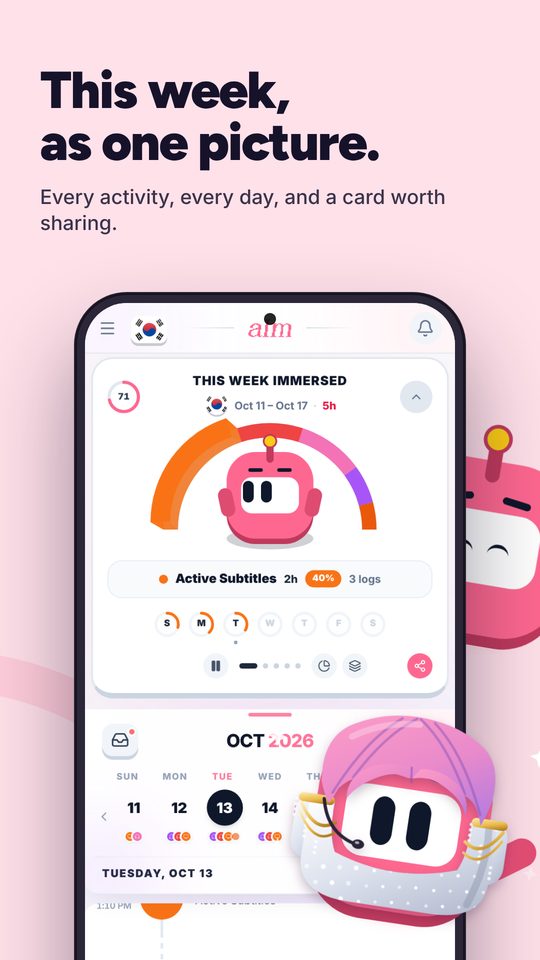
Immersed was built around the question a timesheet can't answer: what were my hours made of? Every session is one of nine activities (Active Listening, Passive Listening, Active Subtitles, Reading, Study, SRS, Speaking, Writing, Shadowing), with the actual show or book attached and a rating from 1 to 5: comprehension for input, flow for output.
In Growth, Reports & analytics, the Summary covers a week, a month, a year, all time or any dates. It shows each day as a bar stacked by activity, a comprehension line you can lay over the chart, a consistency grid with your streak and your best, your activity mix, and your top 10 shows, channels, podcasts and books with links back to them. Detailed lists every session, with search and filters.
The big trackers don't rate comprehension per session. To be fair, they aren't the only option: one small Chrome tracker, Arthur Immersion Tracker, shows a comprehension distribution too. Immersed puts the rating on the same chart as your hours, so you can see whether the same shows are getting easier.
Exports you can hand to someone
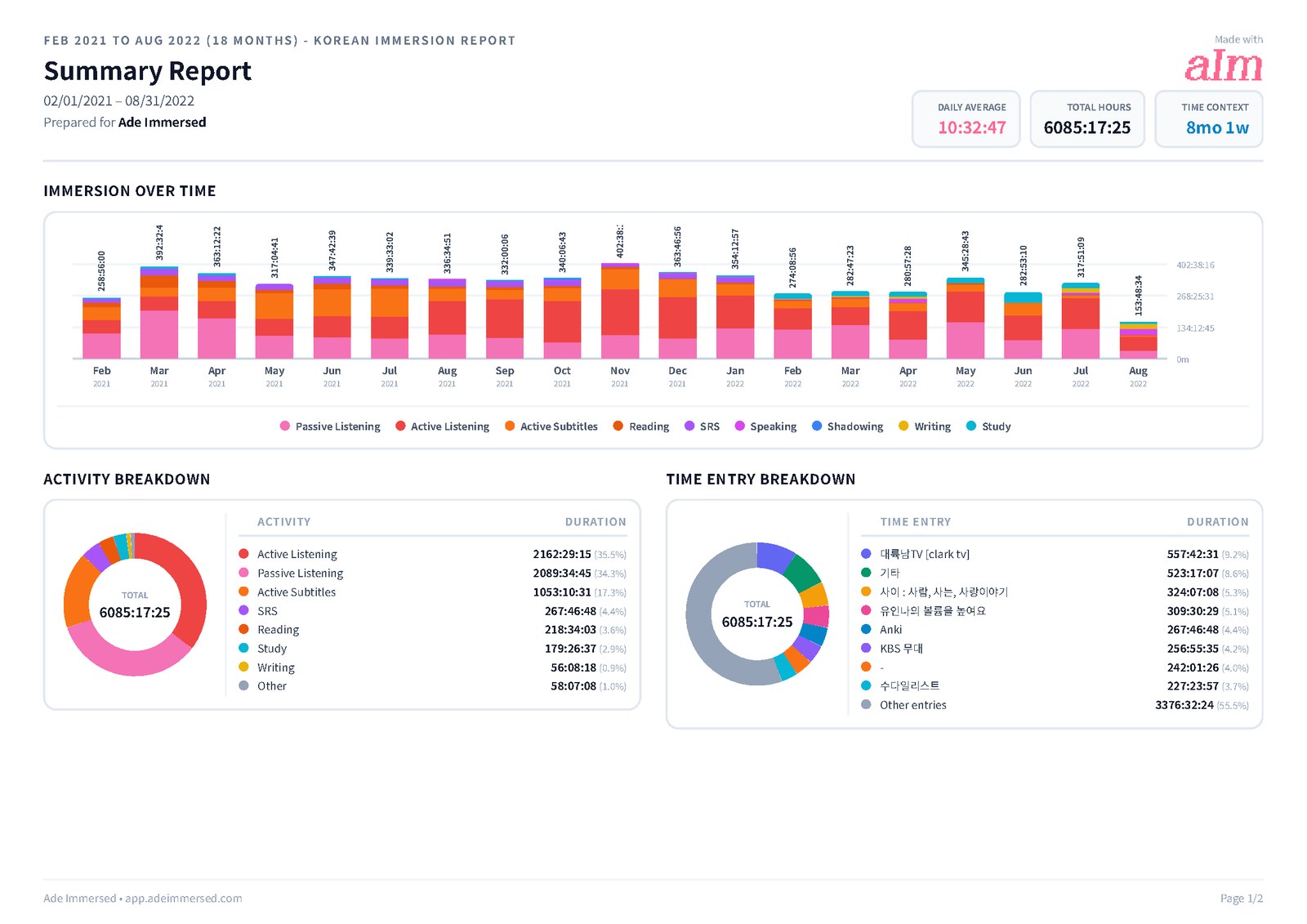
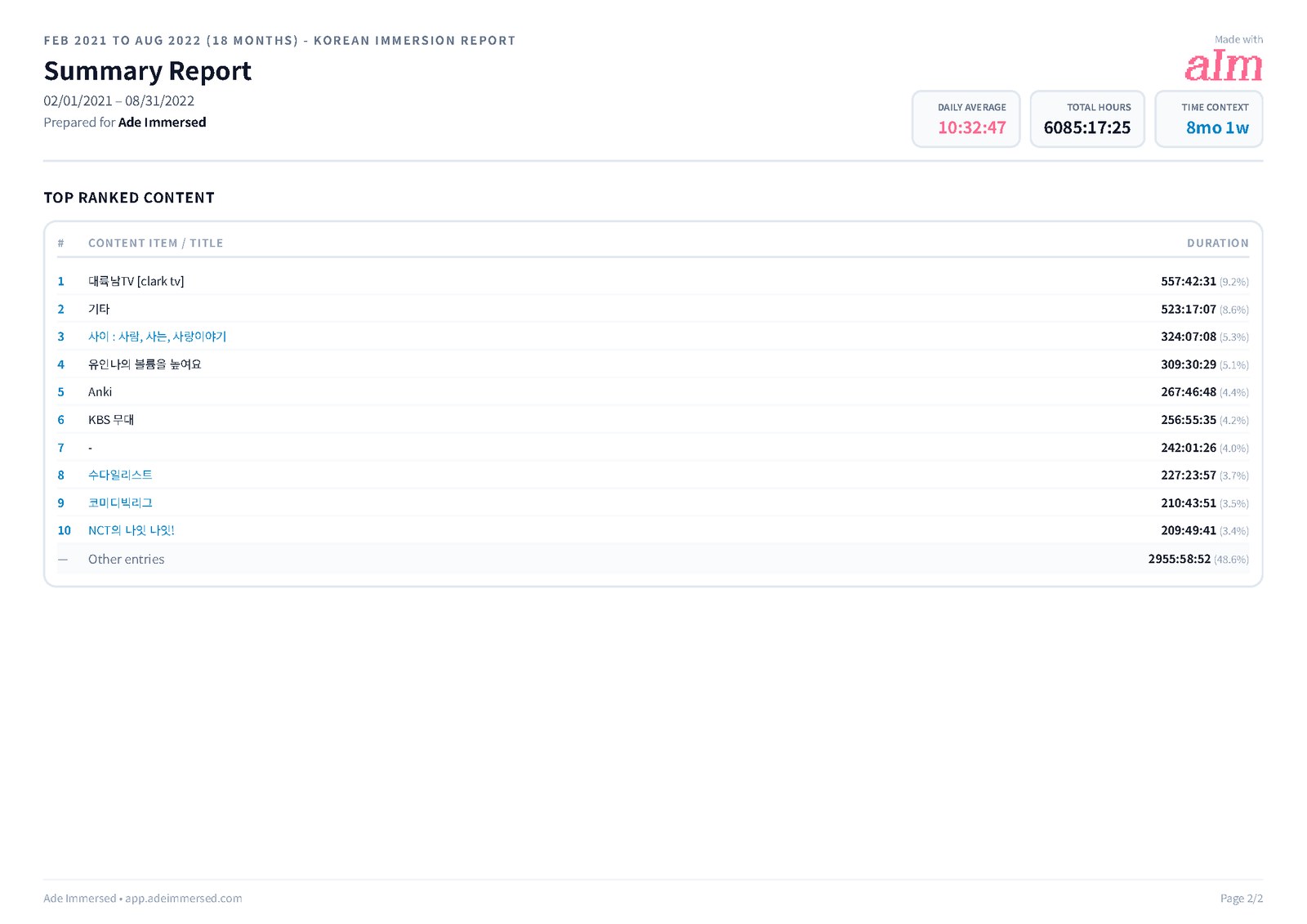
The PDF is made for a learner's month, not a client. It prints in landscape, with each day's bar stacked by activity colour and no minutes squeezed inside the bars. You give it your own title (it starts as "Korean Immersion Report", with your language), pick the sections, and it prints Korean, Japanese and Chinese titles in proper fonts with the links still clickable. It includes Activity and Time Entry breakdowns, so you see both the mix and the shows.
Every PDF you save goes into My reports. Share makes a short link anyone can open without an account, valid for 7 days. Summary also exports to Excel, and the Detailed tab exports your whole log as one CSV of 14 columns: language, activity, title, platform, link, start date and time, end date and time, duration, comprehension score, tags, notes and time zone. All of this is part of Immersed Pro, $60 a year with a free week first or $9.99 a month.
Where Immersed falls short: there's no free report, no idle detection, it never counts your viewing on its own (every session starts with a press), and there's no iPhone App Store app yet (the web app installs on iPhone).
Side by side
The short version. "Paid" means it needs a paid plan. Prices are in US dollars as listed on October 26, 2026.
| App | Main chart | Activity mix | Comprehension | Content linked | CSV | Price | |
|---|---|---|---|---|---|---|---|
| Toggl Track | Bars by day, donut by project | If you set up projects; stacking on Premium | No | No | Free | Paid (Starter $9) | Free; $9 or $16 per user/mo yearly |
| Clockify | Bars by day stacked by project | If you set up projects | No | No | Free | Paid (Basic $3.99) | Free; from $3.99/mo yearly |
| Spreadsheet or Notion | Whatever you build | If you add a column | If you add a column | If you paste links | Free | Free | Free |
| Anki | Reviews, calendar, card counts | Cards, not hours | Retention, not content | No | Save PDF of stats | No stats CSV | Free; iPhone app paid |
| LingQ | Known words and hours over time | Listen, read, write, speak | No | No | No | No | Free; Premium $14.99/mo |
| Migaku | Known words, streak | No | Estimated from known words | No | Not found | Not found | See pricing page |
| Refold app | Goals, history, phase benchmarks | Refold activity types | No | No | Not documented | Import only | Free tracker |
| Polylogger | Totals, heat map, year in review | Ratio by type | No | No | Not documented | Free | Free; Premium |
| TrackMyLang | Headline numbers, heat map | Activity balance on Pro | No | Media catalog | Not documented | Free (and JSON) | Free; Pro $3/mo |
| Immersed | Bars by day stacked by nine activities | Yes, built in | Yes, a line on the chart | Top 10, linked | Yes: your title, CJK fonts, clickable links | Yes, 14 columns; Excel too | Pro $60/yr or $9.99/mo |
How to get an Immersed report
If you already have a history in Toggl or a spreadsheet, bring it in first so your report covers it.
- 1. Start your free week of Immersed Pro, or build your free blueprint first so the app knows your language and your day
- 2. Log a few sessions: press play on a session or log it afterward, pick the activity, and rate how much you understood
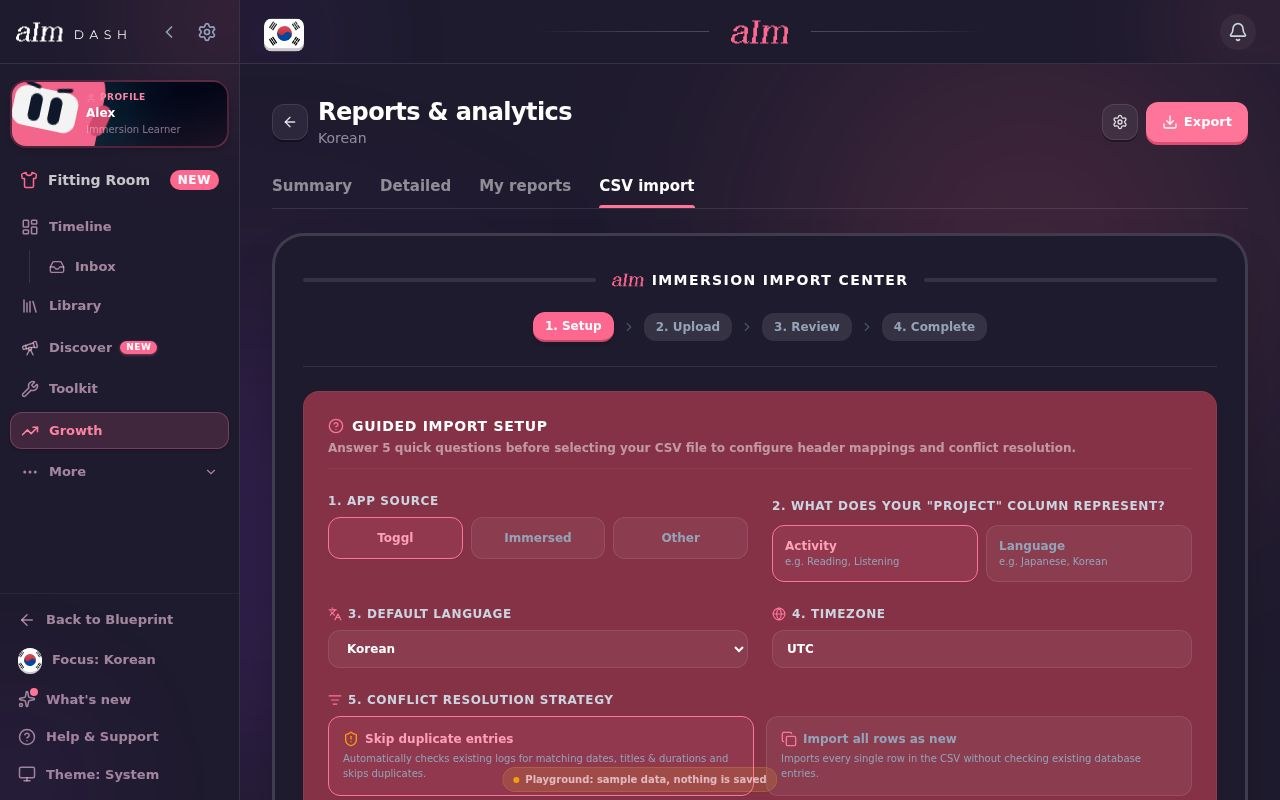
- 3. Moving from Toggl? Export your time entries as a CSV, then open Growth, Reports & analytics, CSV import, pick Toggl and map each project to an activity and a language
- 4. Open Growth, Reports & analytics, Summary, and pick a range: a week, a month, a year, all time or your own dates
- 5. Export, give the report your title, choose the sections, and save the PDF. It lands in My reports
- 6. Tap Share for a 7-day link anyone can open, or download Excel or CSV to keep
FAQ
Questions people ask.
Which language learning app has the best progress reports?+
It depends on the question. Toggl Track has the best free time reports. Anki has the best flashcard statistics. LingQ and Migaku are best for known words. TrackMyLang, Polylogger and Lingotrack give free CSV. Immersed is best if you want one picture of what your hours were made of, with comprehension and the shows linked, in a PDF you can share.
Which app shows my immersion by activity?+
Immersed sorts every session into nine activities and stacks each day's bar by them. Toggl and Clockify can do it if you make one project per activity (stacked bars are Premium in Toggl). Polylogger shows a ratio by type, and TrackMyLang Pro has an activity balance chart.
Can I export my language learning data as a CSV?+
In many apps, yes. TrackMyLang, Polylogger, Lingotrack and Tracking Languages export CSV, and the first three do it free. Toggl Track and Clockify export CSV on paid plans. Immersed exports your whole log as a 14-column CSV, comprehension included, on Immersed Pro. A spreadsheet is already one.
Is there a free language learning progress report?+
Yes. Toggl Track and Clockify give you PDF reports free, Anki's statistics are free, and Polylogger, TrackMyLang and Lingotrack have free charts and free CSV. A spreadsheet is free too. Immersed's reports are part of Immersed Pro; its blueprint is free.
Does any app track comprehension over time?+
The big trackers don't rate comprehension per session. Immersed asks for a 1 to 5 rating and draws it as a line over your hours. Arthur Immersion Tracker, a small Chrome extension, shows a comprehension distribution. Migaku estimates how much of a show you'll understand from the words you know, which is a different measure.
Can I share my report with a tutor?+
In Immersed, Share makes a link anyone can open without an account, valid for 7 days, or you can send the PDF itself. Toggl and Clockify PDFs can be emailed as files, and Toggl's shared reports are on paid plans. For more on working with a tutor, see Immersed for tutors and teachers.