Hours are one-dimensional. What you did in those hours is the thing a report should show.
Toggl Track has some of the best time reports anywhere, and a lot of immersion learners use them. I built Immersed after years of reading my own Korean hours in Toggl. This page puts the two side by side: what each report shows, what each one exports, what is free and what is paid, and which one answers the question a language learner actually has.
The answer
Toggl Track's reports (Summary, Detailed, Workload, Profitability and My Reports) are built for billable work: totals by project, client, tag or member, strong filters, rounding, and a free plan that covers personal reports with PDF export. CSV and Excel export, saved reports and chart stacking need a paid plan.
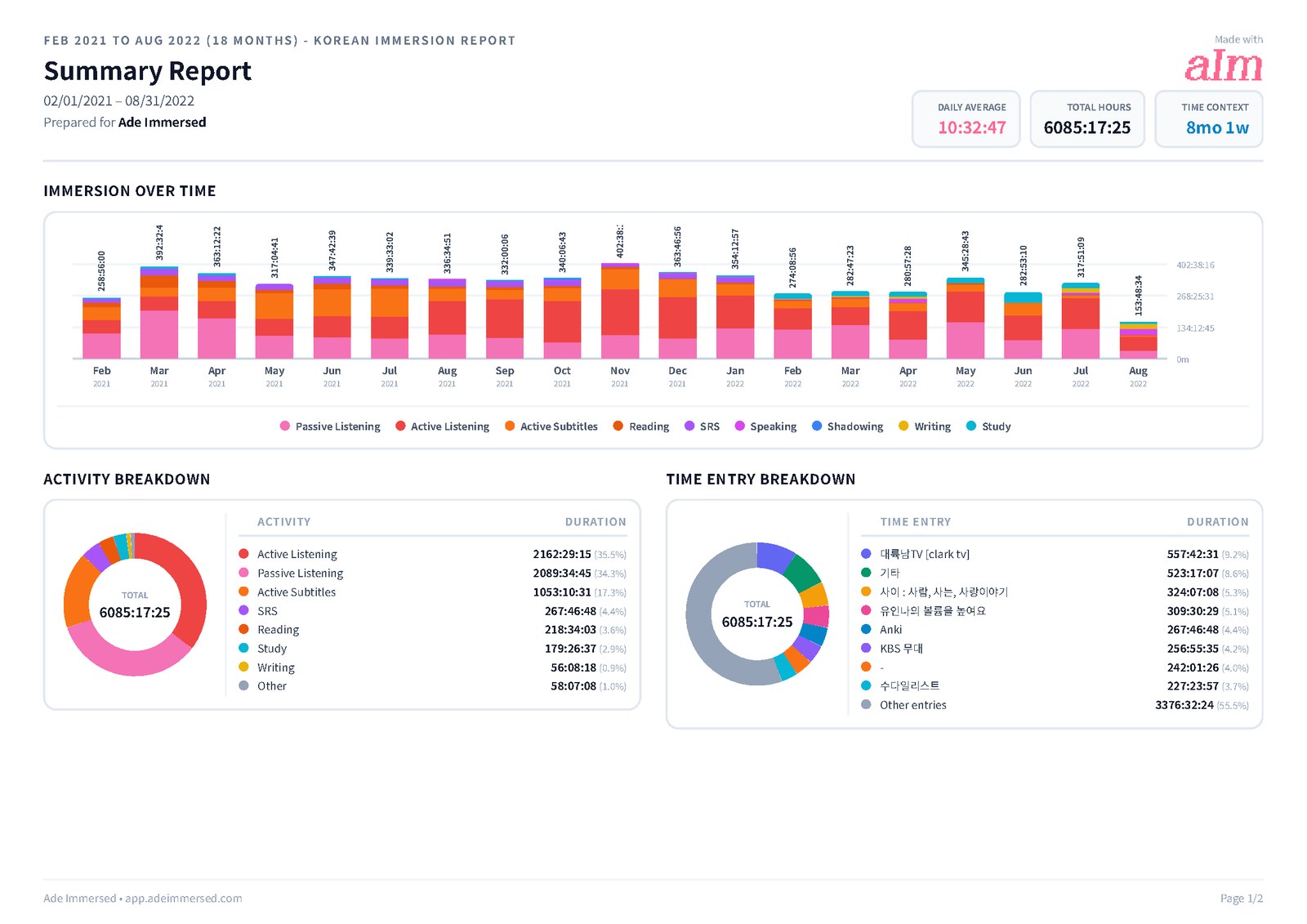
Immersed's reports are built for language immersion: each day stacked by the nine activities, a comprehension line over time, a consistency grid with your streak, and your top shows and channels with links back to them. They export to PDF (with Korean, Japanese and Chinese fonts and clickable links), Excel and CSV, and are part of Immersed Pro.
Why hours alone are not enough
A time report answers "how much?". For a freelancer that is the whole question, because hours are what gets billed. For a language learner it is half of it. Two people with 1,000 hours can be in very different places: one spent most of it with shows they could follow, the other with audio in the background they mostly couldn't.
That is why a learner two months in can be ahead of one six months in. Not the time, but how it was spent: which activities, content at the right level, the attention given. A useful immersion report shows what your time was made of, not only how much of it there was.
Toggl can get part of the way there if you set your projects up as activities (the method in how to track your immersion with Toggl Track). Immersed starts there: every session is one of nine activities, with the actual show or book and a comprehension rating attached.
Toggl's reports, as of October 2026
Toggl reorganized its reports into five tabs. The Weekly report was renamed Workload and now takes any date range. Here is what each tab does, from Toggl's own help center and blog.
- Summary: up to four headline numbers (total hours, billable hours, average daily hours, revenue, cost, profit), a bar chart by day, a pie chart, and a grouped list by project, client, tag, task or member with a second grouping under each row. Rounding and filters on top
- Detailed: every time entry that matches your filters, with columns you can add, hide and sort. You can edit entries right in the report, or bulk edit several at once
- Workload: the old Weekly report. Hours per grouping across your range, with a primary and a secondary grouping, shown as time or as revenue
- Profitability: revenue, labor cost and profit by member, project, client, task or tag. Premium
- My Reports: saved and custom reports, which you can share. Paid plans
What's free in Toggl and what's paid
Toggl's free plan is genuinely useful for one learner: timers on every device, and reports on your own time with PDF export. Some of the features that matter most for reading immersion data sit on the paid plans, though. Starter is $9 per user a month billed yearly ($12 monthly) and Premium is $16 ($24 monthly).
- Free: personal reports on your own time, such as Summary and Detailed, with filters and PDF export in portrait or landscape
- Paid (Starter and up): CSV and Excel export, My Reports, saved filtered views, sharing, team reports, billable rates
- Premium: stacking the Summary bar chart by project or tag, the Profitability tab, AND/OR filter conditions, cost and profit, scheduled report emails
Immersed's reports
In Immersed, reports live in Growth. The Growth page itself shows a weekly summary (written from your numbers by simple rules, no AI), your time, the days you showed up, and a chart of your days stacked by activity. Reports & analytics goes deeper, with four tabs: Summary, Detailed, My reports and CSV import.
Summary takes a week, a month, a year, all time or any dates you pick. Detailed lists every session in the range: search by title, note or platform, filter by activity, type or comprehension, and group by date, activity or type.
- Immersion over time: each day as a bar, as a total or stacked by the nine activities
- Comprehension: one tap lays your comprehension ratings over the chart, so you can see whether the same kind of content is getting easier
- Consistency: a grid of your recent days, darker the more you did, with days immersed, your streak and your best
- Activity distribution: what your time went to, as a share of the range
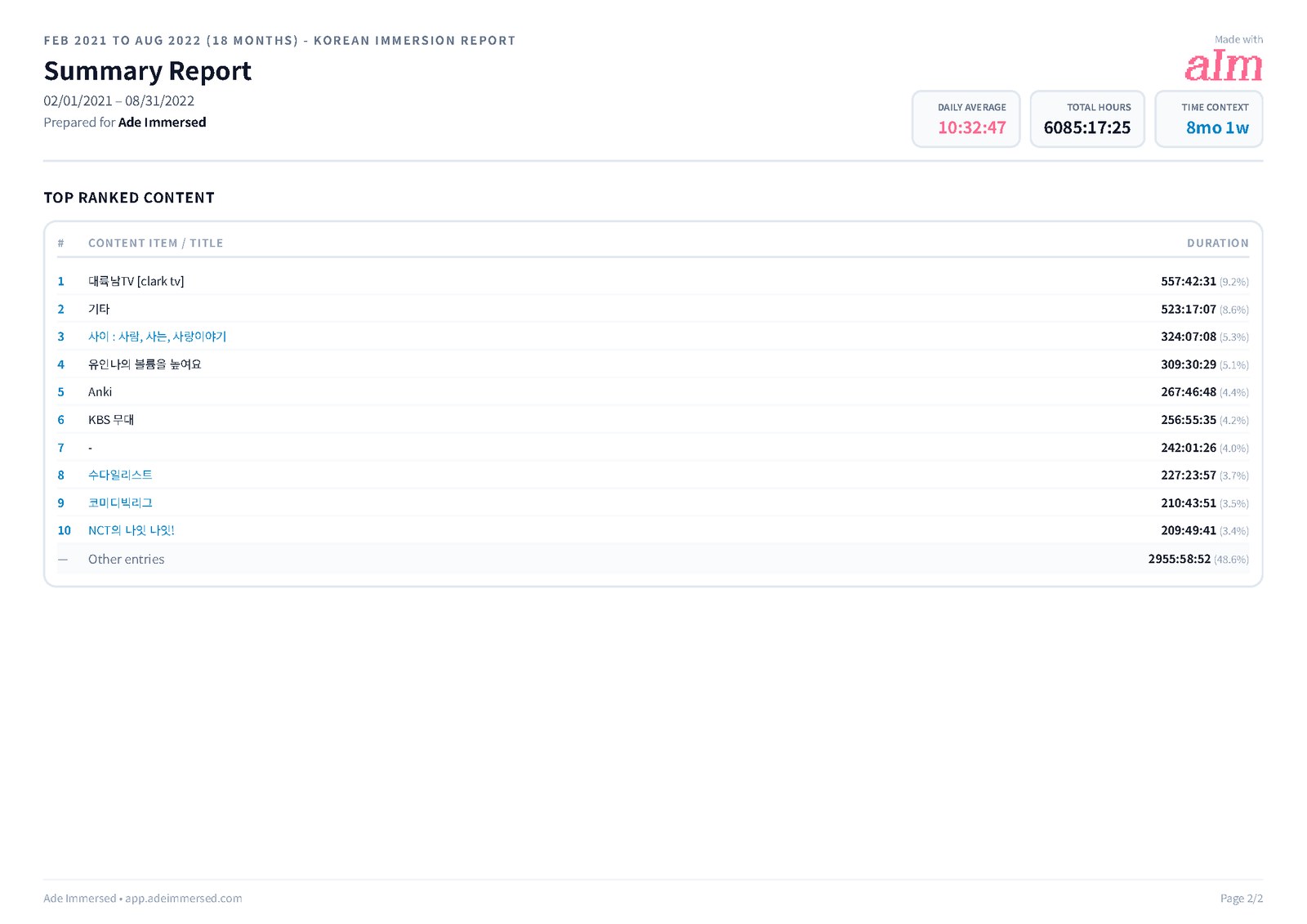
- Top items: the 10 shows, channels, podcasts and books you spent the most time with, linked back to them; the rest is grouped as "Other entries"
Side by side
The short version, feature by feature. Toggl is described on its free plan unless a row says otherwise; Immersed's reports are part of Immersed Pro.
| Toggl Track | Immersed | |
|---|---|---|
| Built for | Billable work, teams, clients | Language immersion |
| What a row is | A time entry: description, project, tags | A session: activity, show or book, minutes, comprehension |
| Activities | Projects or tags you set up yourself | Nine, built in |
| Chart by day | Yes; stacked by project or tag on Premium | Yes; stacked by activity |
| Comprehension over time | No | Yes, as a line on the chart |
| Consistency and streak | No | Consistency grid, streak and best |
| Top content | Grouped list by project, tag or client; entries in Detailed | Top 10 items with links back to them |
| Filters | Many; AND/OR conditions on Premium | Activity, type, comprehension, search |
| Billable rates, rounding, teams | Yes (rates and teams on paid plans) | No |
| PDF export | Yes, free; portrait or landscape | Yes; CJK fonts, clickable links, title, orientation, sections |
| CSV and Excel export | Paid plans | Yes |
| Saved reports | My Reports, paid plans | My reports, your saved PDFs |
| Sharing | Paid plans | Share link, valid 7 days, no account needed to open |
| Scheduled reports | Email delivery on Premium | Monthly report ready to generate in the app |
| Import from the other | Not applicable | Toggl CSV import |
| Price | Free; Starter $9, Premium $16 per user a month yearly | Pro: $60 a year with a free week, or $9.99 a month |
Exports you can hand to someone
Both export PDF. Toggl's PDF is a clean timesheet, made for clients and finance, and it is the one export on the free plan. CSV and Excel exports of the Summary, Detailed and Workload reports need a paid plan.
Immersed's PDF is made for a learner's month. You choose the report title (it starts as "Korean Immersion Report", with your language), portrait or landscape, the script and font for your language so Korean, Japanese or Chinese titles print properly, and which sections go in: overview stats, the immersion graph, the activity breakdown, top items, detailed entries and clickable links to the items. Excel and CSV download straight to your device.
For a full backup, the Detailed tab exports your whole log as one CSV, a row per session with language, activity, title, platform, link, start and end, duration, comprehension, tags, notes and time zone.
Saving and sharing reports
In Toggl, saved and shared reports are in My Reports on paid plans, and Premium can email a report on a schedule. Toggl also offers a weekly overview email you can turn on from your profile.
In Immersed, every PDF you save goes into My reports, where you can read it in the app, download it, share it or delete it. After your first seven days, and after every full month, a report is waiting there, ready to generate. Share makes a short link that anyone can open without an account. It lasts 7 days; you can make a fresh one or turn it off.
Where Toggl is better
Toggl's reports are excellent at what they were built for, and some learners should keep using them.
- A free plan that does a lot. Personal Summary and Detailed reports and PDF export cost nothing. Immersed's reports are part of Pro
- Billable work. Rates, revenue, cost, profit, rounding and fixed fees. If your tutoring or translation hours get invoiced, Toggl is the tool
- Filters. Filter and group by almost anything, with AND/OR conditions on Premium
- Teams. Reports across members and user groups. Immersed reports are for one learner
- Editing in the report. Fix or bulk edit entries right in the Detailed report
- One place for work and language. If you already track your job in Toggl, your language can sit next to it
Which to use, and moving across
Keep Toggl if you want a free stopwatch with solid reports, you track paid work in it already, or you are happy maintaining your own projects for activities. Use Immersed if you want the report to show what your hours were made of: the activity mix, whether comprehension is rising, the days you showed up and the shows that got you there.
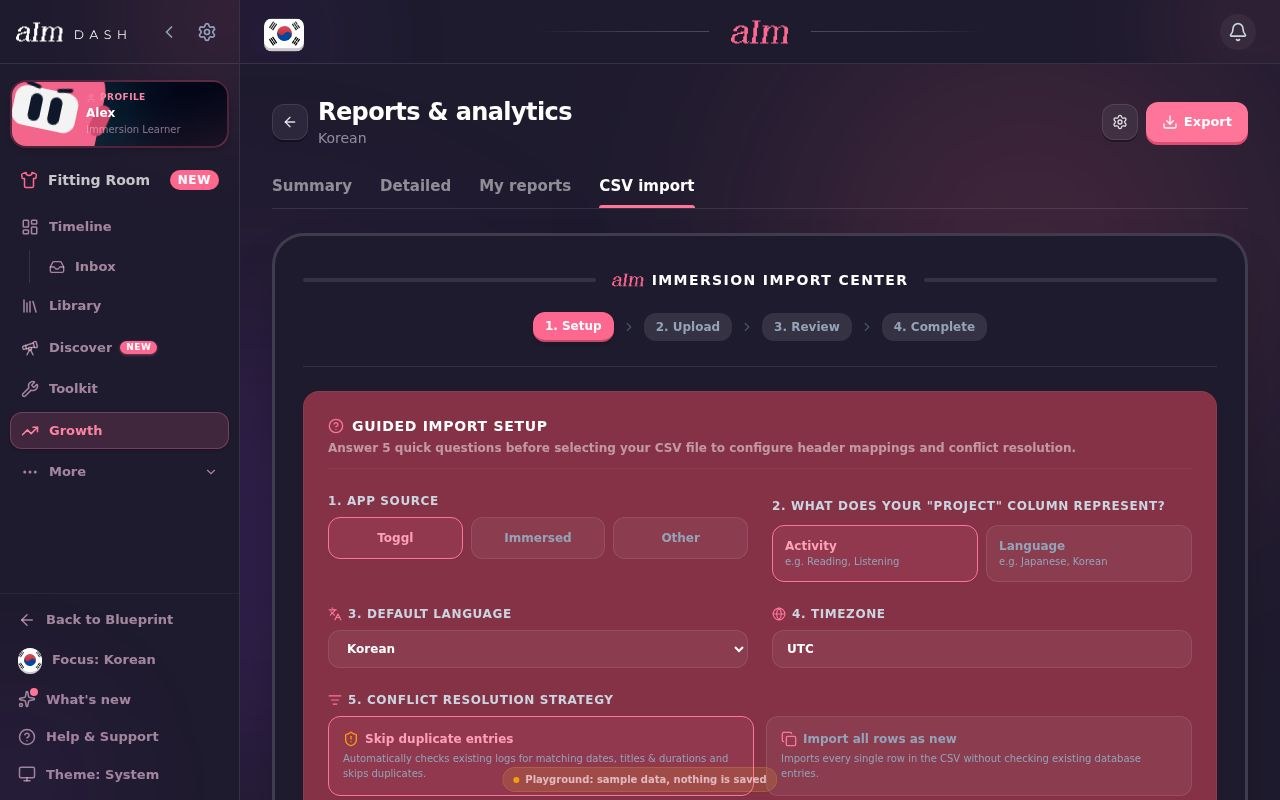
If you move, your history comes with you. Export your time entries from Toggl's Detailed report as a CSV (a paid feature on Toggl's side), then in Immersed open Growth, Reports & analytics, CSV import, and pick Toggl. Immersed lists your Toggl projects and lets you map each one to one of the nine activities and a language. Your descriptions become session titles.
FAQ
Questions people ask.
Are Toggl Track reports free?+
Partly. On the free plan you get personal reports on your own time, such as Summary and Detailed, with PDF export. CSV and Excel export, saved reports in My Reports and sharing need a paid plan, and stacking the Summary chart by project, the Profitability tab and scheduled report emails need Premium.
What happened to the Toggl Weekly report?+
Toggl renamed it Workload. It shows hours per grouping (project, client, tag, task or member) across a date range you choose, with a second grouping under each row, as time or as revenue.
Can Toggl show my immersion by activity?+
Yes, if you make one project per activity. The pie chart and the grouped list in the Summary report then show your activity mix. Stacking the daily bars by project is a Premium feature. Toggl has no comprehension rating, so it can't show whether you understood more over time.
What do Immersed reports show that Toggl does not?+
Each day stacked by the nine immersion activities, a comprehension line over time, a consistency grid with your streak, and your top shows, channels and books with links back to them. The PDF prints Korean, Japanese and Chinese titles properly and keeps the links clickable.
Can I export my Immersed reports?+
Yes. Summary exports to PDF, Excel or CSV for any range, and the Detailed tab exports your whole log as one CSV. PDFs can be shared with a 7-day link that opens without an account. Reports and exports are part of Immersed Pro.
Can I bring my Toggl reports into Immersed?+
You bring the entries, not the reports. Export your time entries from Toggl as a CSV, then use CSV import in Immersed's Reports & analytics and pick Toggl. Map each project to an activity and a language, and Immersed builds its own reports from your history. It reads the file only; there is no connection to your Toggl account.
Is Toggl or Immersed better for a language learner?+
Toggl if you want free, flexible time reports and don't mind building your own activities. Immersed if you want the report to show what your time was made of, how much you understood and how consistent you were, without setting anything up. Immersed Pro is $60 a year with a free week first, or $9.99 a month.