Trancy explains the line you just heard. Immersed shows the hours you put in.
Trancy is a browser extension and app that adds bilingual subtitles, AI word definitions and grammar breakdowns to YouTube, Netflix, Disney+, Coursera and ordinary web pages, and saves the words you look up. Immersed is a language immersion tracker and planner: a free plan built from your answers, then a daily timeline for the shows, podcasts and books you learn from, with reports of your hours. Trancy works inside the content. Immersed works across your day.
Free. About two minutes. No account, no card.
The short version
Checked October 24, 2026.
Something out of date? Tell me.
Trancy is for the moment you are watching or reading: two subtitle tracks, a tap on any word, an AI explanation of the grammar, and a wordbook of everything you saved. It works on more sites than most subtitle tools, and on phones as well as computers.
Immersed is for the plan and the record: when the watching happens, how long it lasted, what kind of immersion it was, how much you understood, and whether you kept it up. They do different jobs, so the useful question is how to use them together.
Trancy keeps the words you saved. Immersed shows what your hours were made of: which of nine activities, how much you understood, which shows and channels. Your 1,000 hours and someone else's 1,000 aren't the same.
01Two different jobs
Trancy saves words. Immersed records hours.
Trancy's unit is the word and the sentence. Look one up, get an AI definition or a grammar breakdown, save it to your wordbook, practice it later with flashcards. The free plan lets you save 100 words and 50 sentences; Premium removes the limit and adds AI speaking practice and pronunciation scoring.
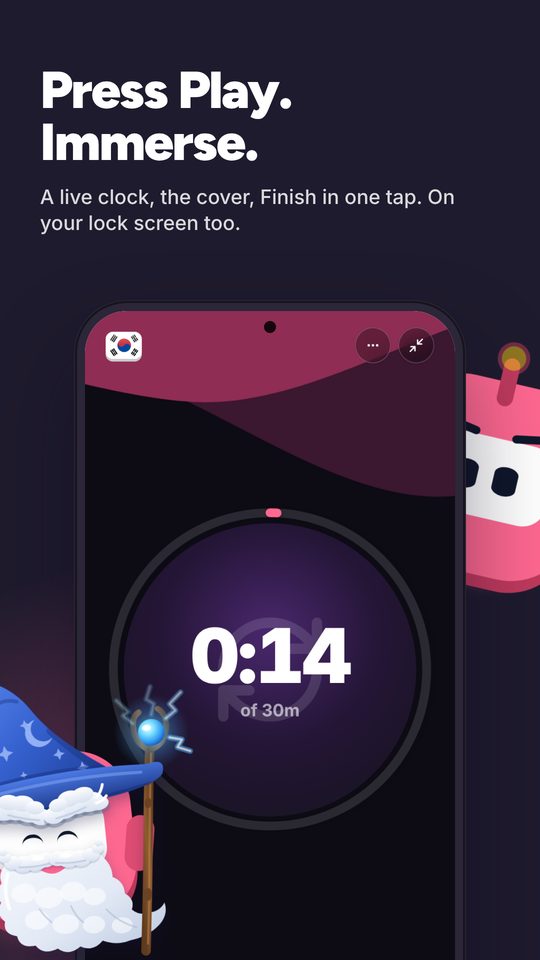
Immersed's unit is the session. Press play, pick one of nine activities (Active Subtitles for a Trancy episode, Reading for a translated article, Speaking for a practice chat), and stop when you're done. Immersed never reads your viewing history: you press play or log it afterward, and the Discover scroll and the free listening games log themselves. What you get back is your hours by activity, your comprehension over time and your streak.
Its extension, Immersed for Chrome (Chrome, Edge, Brave and Arc), sits on the same YouTube page as Trancy. Press Immerse on the watch page and the session starts, a small pill keeps the clock as you move between tabs, and the next video from the same creator or playlist joins the session on its own. It doesn't touch the subtitles, so the two don't get in each other's way.
- Trancy: subtitles, lookups, AI explanations, a wordbook, speaking practice
- Immersed: the plan, the timer, comprehension ratings, hours by activity, streaks
02A day with both
A lecture, a show and a podcast, all in one record.
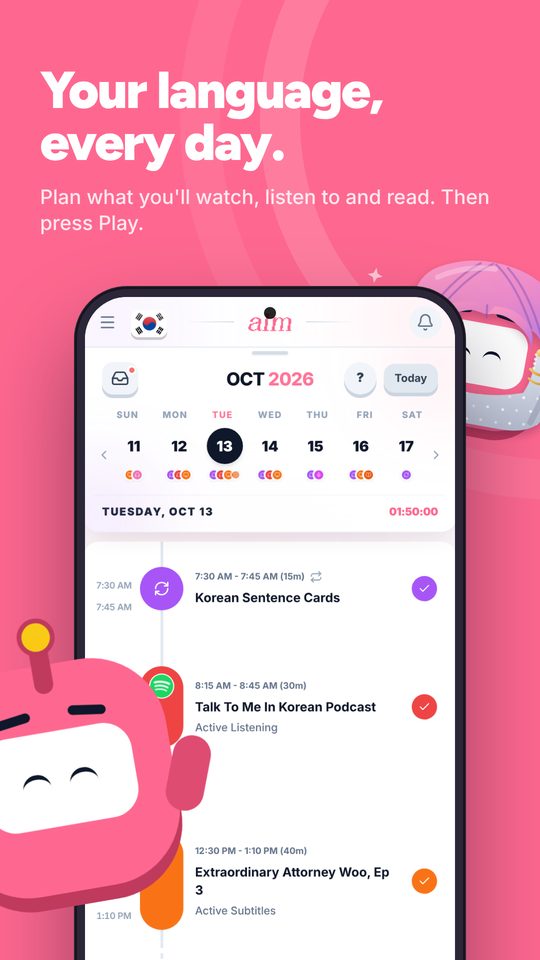
Say your day has a Coursera lecture at lunch, an episode on Netflix after dinner and a podcast on the commute home. Trancy helps with the first two: subtitles in both languages, a tap on the words you miss. Immersed holds all three on the timeline and times each one: Active Subtitles for the lecture and the episode, Passive Listening or Active Listening for the podcast.
Rate how much you understood each time you stop. After a month your report stacks the hours by activity, charts comprehension over time and links back to the lectures, shows and channels you spent the most time with. You can see which kind of content you follow best and whether it's improving, which a word list on its own can't show you.
03Before you press play
A plan for when the immersion happens.
Trancy makes any video easier to study once you've opened it. It doesn't tell you when to open it, or how much time your goal needs.
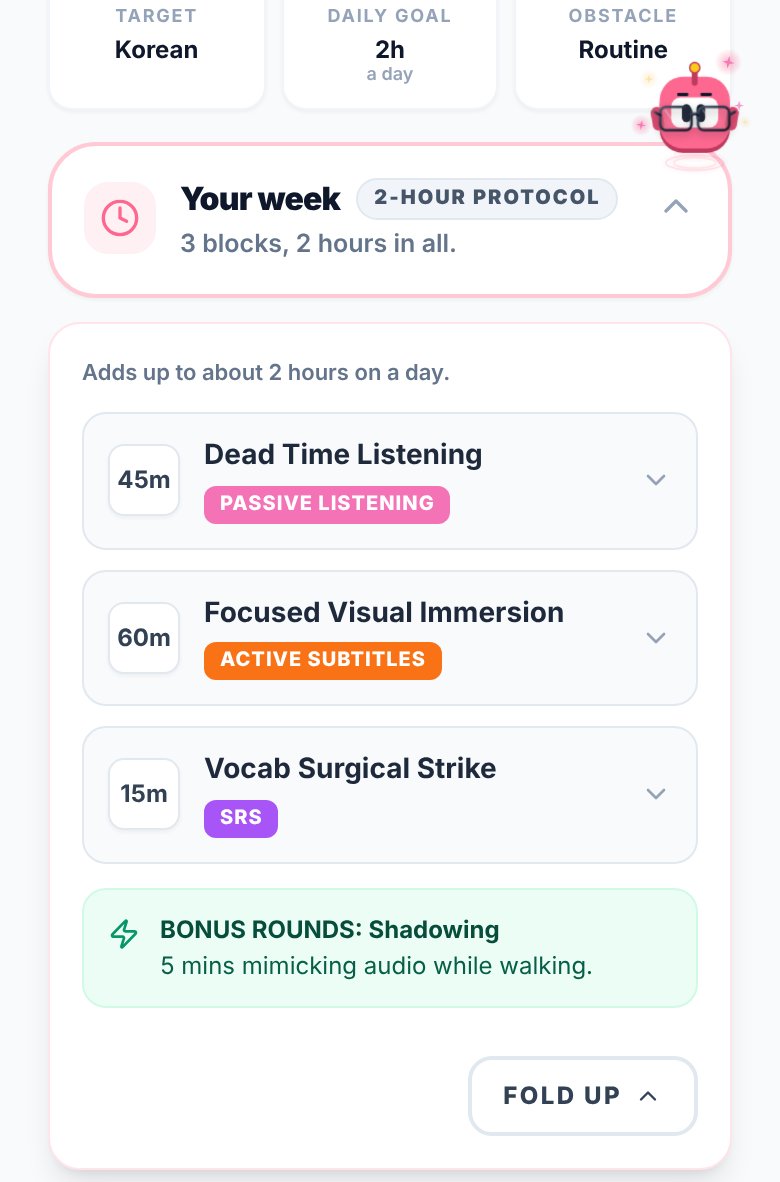
Immersed starts with a free blueprint: about two minutes of questions about your time, goals and level. It returns milestones for your first months, a daily protocol, and your Hidden Immersion Time, the commute and chores where passive listening fits. Then the timeline turns that into a day from Wake up to Wind down, with reminders.
Side by side · checked October 24, 2026
Immersed and Trancy, feature by feature.
Inside the content
Bilingual subtitles on video sites
Immersed · No
Trancy · YouTube, Netflix, Disney+, Coursera, Udemy and more
Translate web pages and PDFs
Immersed · No
Trancy · Yes
AI definitions and grammar breakdowns
Immersed · No
Trancy · Yes, with Premium
Save words and sentences
Immersed · No
Trancy · 100 words and 50 sentences free; unlimited with Premium
Speaking and pronunciation practice
Immersed · No, log it as Speaking or Shadowing
Trancy · AI speaking coach and pronunciation scoring, with Premium
Planning
A plan built from your time and goals
Immersed · Free blueprint
Trancy · No
Daily timeline with reminders
Immersed · Yes
Trancy · No
What to watch, listen to and read
Immersed · Immersion Library and Discover
Trancy · Works on what you open
Tracking and reports
Hours by activity
Immersed · Nine activities, timer or log after
Trancy · No
Comprehension over time
Immersed · Rated per session, charted
Trancy · No
Top shows and channels
Immersed · In your reports, with links
Trancy · No
Streaks and consistency grid
Immersed · Yes
Trancy · No
Export
Immersed · PDF, Excel, CSV
Trancy · Bilingual subtitle downloads
Apps and price
Browser extension
Immersed · Yes, Immersed for Chrome (unlisted; saving and sessions are Pro)
Trancy · Chrome, Edge and Firefox
Phone
Immersed · Web app that installs; Android app in testing for Google Play
Trancy · iOS and Android apps
Free plan
Immersed · Blueprint, games with leaderboards, Discord, sample app
Trancy · Subtitles, unlimited lookups, capped saving
Paid plan
Immersed · $60 a year or $9.99 a month
Trancy · Premium from $3.49 a month or $42 a year
Credit where it's due
Both are good. At different things.
What Trancy does well
- Works on a wide range of sites: YouTube, Netflix, Disney+, Coursera, Udemy, TED and ordinary web pages
- Runs in Chrome, Edge and Firefox, with iOS and Android apps too
- A generous free plan with unlimited lookups and translation
- AI definitions and grammar breakdowns for the line you just heard
- Speaking practice and pronunciation scoring built in, rare for a subtitle tool
- Translates PDFs side by side, handy for reading textbooks or articles
- Very low prices, from $3.49 a month
- Actively updated, with about 300,000 Chrome users
What Immersed does that Trancy doesn't
- Builds you a plan first, from your time, your goals and your level
- Puts that plan on a daily timeline with reminders
- Tracks immersion off the screen too: podcasts, books, conversations
- Asks how much you understood and charts it over time
- Shows your hours by activity, your streak and your daily average
- Suggests what to watch, listen to and read, and gives you a feed in your language that counts
- Starts a session in one click on YouTube's watch page with Immersed for Chrome, next to Trancy
Pick Trancy if
- You need help understanding videos and want AI explanations of grammar, not only translations
- You learn from Coursera, Udemy or TED as well as Netflix and YouTube
- You use Firefox, or want the same tool in an app on your iPhone
- You want to save words as you go and review them later
- You want speaking and pronunciation practice in the same app
Pick Immersed if
- You want a plan for your day, not only help inside one video
- You want to track all your immersion, including podcasts and reading on paper
- You want proof you are improving: hours, comprehension and streaks over months
- You already understand most of what you watch and need consistency more than translation
Use both, or move over
Trancy inside the content, Immersed around it
Keep Trancy for watching and reading. Plan the time in Immersed, start a session when you press play (Active Subtitles for video, Reading for an article or a PDF), and rate comprehension when you stop. Log your Trancy flashcard practice as SRS and your AI speaking practice as Speaking.
Starting from a video saved in Immersed? Set it to Open it on YouTube (Settings, When you tap Get Immersed on a video): the timer starts and the video opens on YouTube, where Trancy works. In the full-screen session, a Copy link button copies the video's link so you can paste it into whatever app you watch with.
One thing to watch: AI translations are good but not perfect with slang and idioms, so as your comprehension ratings climb, try a show with only target-language subtitles. Immersed's comprehension chart will show you whether it's working.
Pricing · checked October 24, 2026
What each one costs.
Immersed
- Free: the blueprint for one language (with the Toolkit, Library picks and the Fluency Checklist's Foundations), the listening games in 12 languages with their leaderboards, Aim Runner, the Discord and the sample app. A free account also gets the Fitting Room's day-one outfits, Hour Marks and badges from game time.
- Immersed Pro: $60 a year (starts with a free week, about $5 a month) or $9.99 a month. Timeline, sessions, Discover, Library, Growth and reports, more languages.
Trancy
- Free: bilingual subtitles, unlimited word and sentence translation, 100 saved words and 50 saved sentences, 50 PDF pages a month.
- Premium: $3.49 a month or $42 a year. On 2026-10-24 the yearly plan was on a 30% offer, $29.40 for the first year.
- Premium + Advanced AI: $8.79 a month or $105.60 a year ($73.92 on the same offer). Adds premium AI translation engines and higher limits.
- US prices from Trancy's website. Trancy says prices in the iOS app are set per region and tend to be higher. There is a free trial.
Trancy Premium is one of the cheapest paid tools in language learning. Immersed costs more because it does something else: it plans and tracks every hour you spend in your language, including the ones Trancy never sees.
FAQ
Questions people ask.
Is Trancy an immersion tracker?+
Not in the sense of counting your hours. Trancy helps you understand content and saves the words you look up. It doesn't plan your day, log your time by activity or show streaks. Immersed does that part.
Does Immersed have AI subtitles or a dictionary?+
No. Immersed has no subtitle tool or dictionary. It does have a browser extension, Immersed for Chrome, but that one saves videos and times sessions rather than changing what's on screen. Use Trancy inside the video and Immersed around it.
How much does Trancy cost?+
Free for the basics. On 2026-10-24, Premium was $3.49 a month or $42 a year (with a 30% first-year offer), and Premium + Advanced AI was $8.79 a month or $105.60 a year. Prices in the iOS app can be higher.
Trancy or Language Reactor?+
Language Reactor is the older, simpler choice for Netflix and YouTube in desktop Chrome, with a strong free version. Trancy covers more sites and browsers, has phone apps and adds AI explanations and speaking practice. Either one works well alongside Immersed.
Does Immersed track my YouTube or Netflix watching automatically?+
No. Immersed doesn't read your watch history. Press play when you start, or log a session afterward with the start and stop time. With Immersed for Chrome, one click on the YouTube page starts the session, and the Discover scroll logs itself.
What should I log Trancy time as in Immersed?+
Watching with subtitles is Active Subtitles. Reading a translated article or PDF is Reading. Flashcard practice is SRS, and AI conversation or pronunciation practice is Speaking or Shadowing.
More comparisons
Stop guessing. See what your hours add up to.
Answer a few questions and Immersed builds your plan: a daily routine that fits your life, milestones for your first months, and things to watch at your level. Free, about two minutes, no account needed.
The plan is free and stays free. No card.
Checked October 24, 2026 against published product information. Prices and features change; if something here is out of date, tell me on Discord and I'll fix it.