Loop tells you that you did it. Immersed shows what you did and what's next.
Loop Habit Tracker is a free, ad-free, open-source habit tracker for Android that many people use to keep a daily "study Japanese" checkmark alive. A checkmark says you did it, but what you did is the thing: your 1,000 hours and someone else's 1,000 are not the same, so Immersed records every session as one of nine activities. Immersed is a language immersion tracker and planner. It turns immersion into something you can see, plan and keep: a free plan built from your answers, a daily timeline for the shows, podcasts and books you learn from, and reports of your hours.
Free. About two minutes. No account, no card.
The short version
Checked October 24, 2026.
Something out of date? Tell me.
If you want one honest checkmark a day for your language, or a number like "30 minutes of listening", on an Android phone, with no account and no cost, Loop is excellent. It is hard to beat for free.
If you want a plan for what that daily habit should be made of, a timer that knows passive listening from active subtitles, and reports of your hours by activity, Immersed is built for that. Many learners only need Loop. Learners who keep checking the box and still feel stuck usually need the plan.
01The habit
A strong habit score, with nothing inside it.
Loop is very good at one thing: helping a habit stick. Each habit gets a strength score where every repetition makes it stronger and a missed day weakens it, so one bad day after a long run does not wipe you out the way a plain streak does. Schedules can be flexible, like three times a week, and reminders let you check off or snooze from the notification.
What a checkmark cannot tell you is what the habit was made of. "Japanese, done" looks the same whether it was ten minutes of flashcards or two hours of a drama with no subtitles. For a language, that difference is most of the story.
- Loop: yes/no habits, or measurable ones with a target, like minutes or pages
- Immersed: nine immersion activities, each timed, with how much you understood
02Before you start
Loop holds the habit you chose. Immersed helps you choose it.
Loop starts with an empty list. You decide the habit, the target and the schedule. That suits learners who already know their routine.
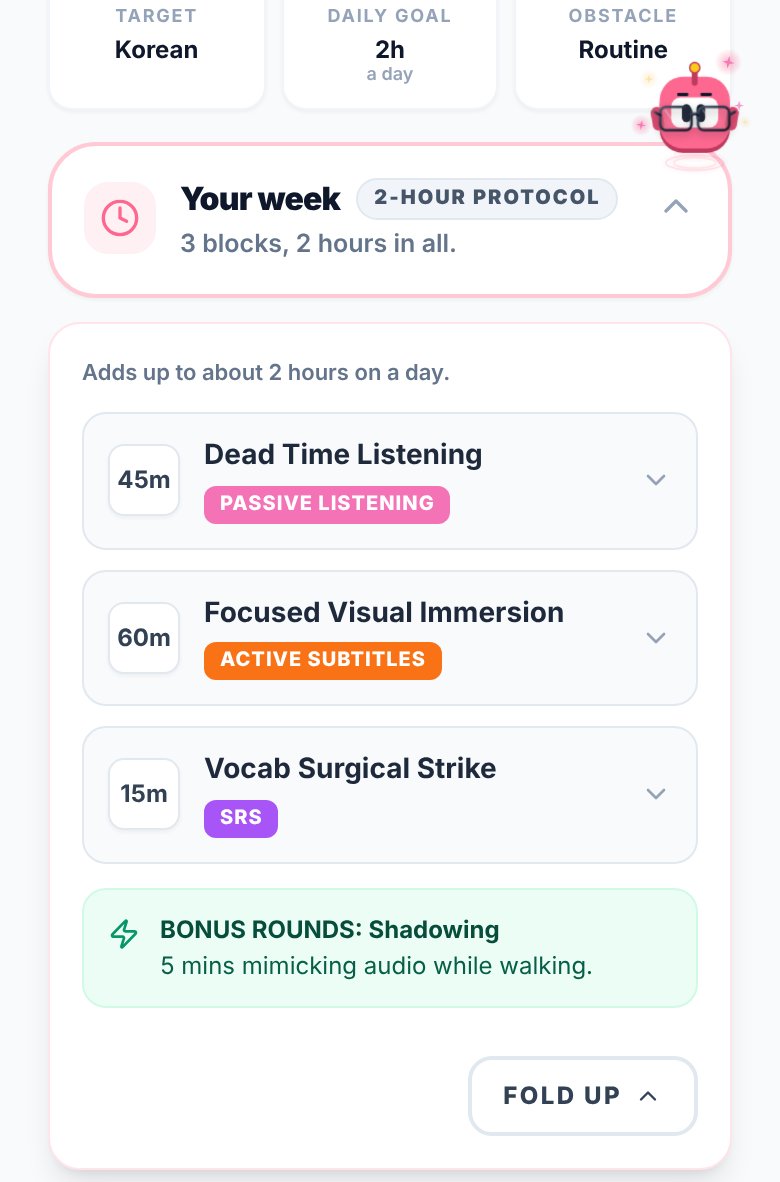
Immersed starts with a free blueprint, about two minutes of questions about your time, goals, level and what you already watch. It returns milestones for your first months, a daily protocol, the Hidden Immersion Time in your day (the commute, the dishes, the gym), and a library of things to watch, listen to and read in your language. No account needed, just a name and email.
03During the day
A timeline and a timer, not just a tick.
With Immersed Pro, the timeline lays out your day from Wake up to Wind down. Plan a podcast into the commute and an episode after dinner, set them to repeat, get reminders, and tick them off.
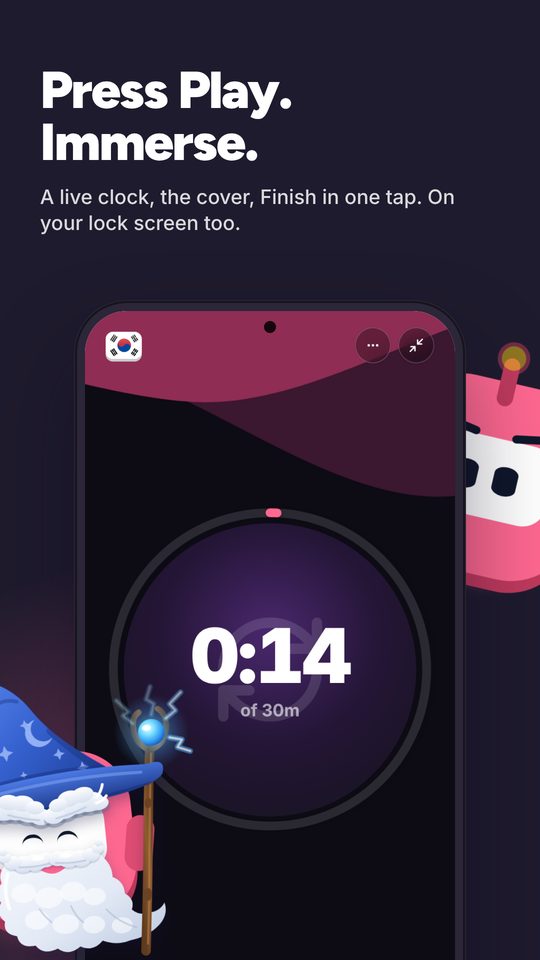
Press play and pick an activity: Active Listening, Passive Listening, Active Subtitles, Reading, Study, SRS, Speaking, Writing or Shadowing. Paste a YouTube, Spotify or Apple Podcasts link and it plays inside the session. Stop, rate how much you understood, and the session lands on your timeline. Forgot to press play? Log it afterward.
04Looking back
Both show your consistency. Only one shows your hours.
Loop's charts are clear and honest: your score, your history, how often you hit the habit. Its measurable habits can total minutes if you type them in each day.
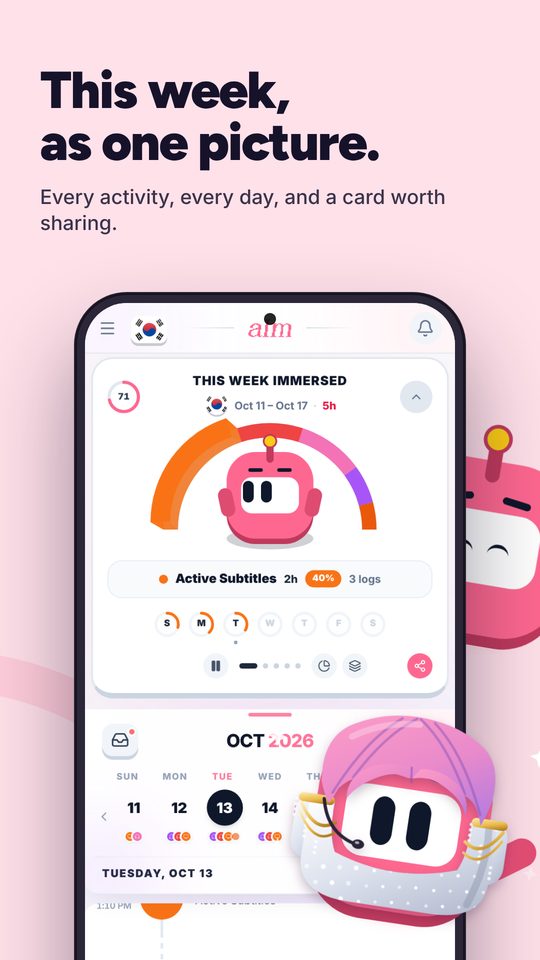
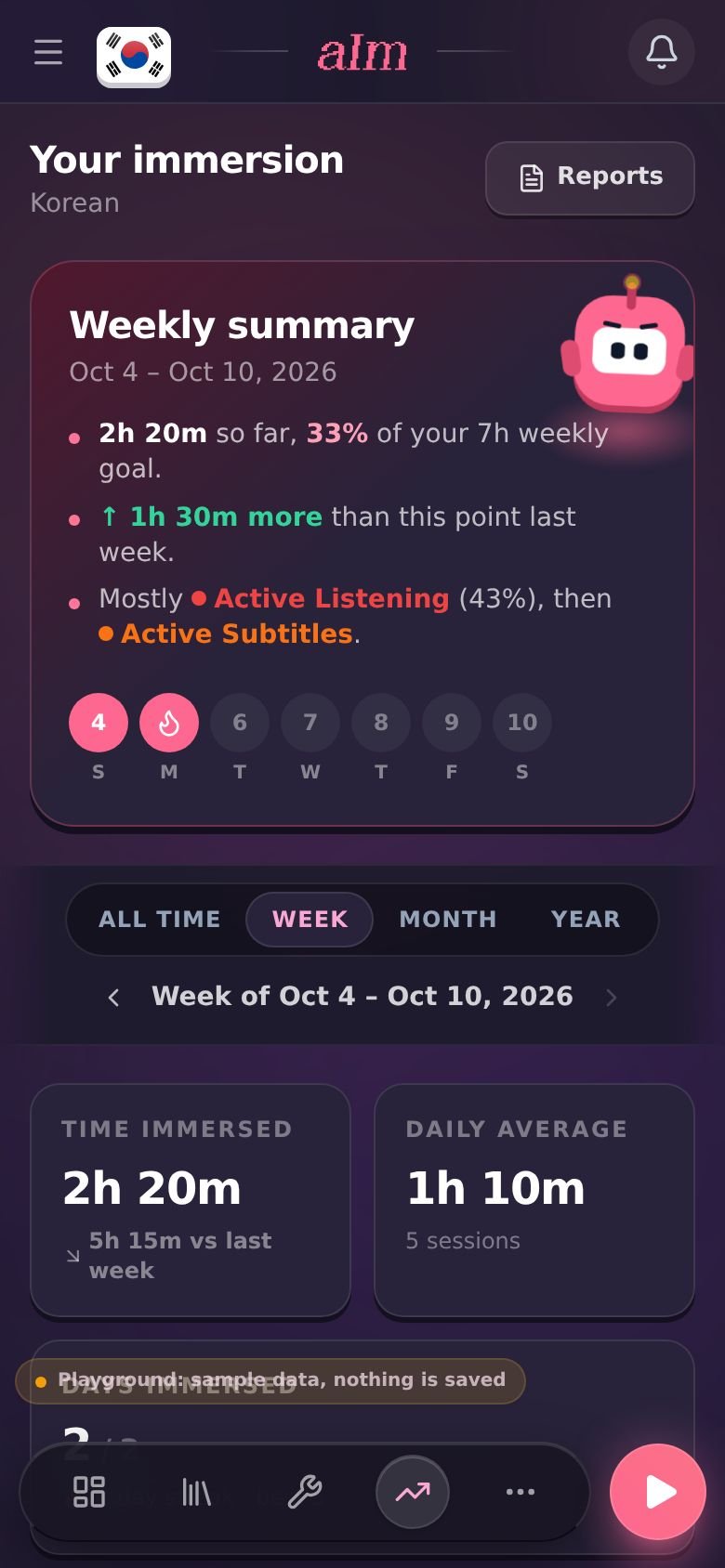
Immersed's Growth page stacks your hours by the nine activities, so you see how much was active listening, how much passive, how much reading with subtitles or speaking. A comprehension line shows whether you understand more over time, and the shows and channels you spent the most hours with are linked from the report. That mix explains progress a habit score can't: why a learner two months in can be ahead of one six months in.
There is a consistency grid with streaks too, and a Streak badge on your Profile that levels up from Kindling at 3 days to Eternal Flame at 1,000. Aim, the mascot, earns outfits for streaks and hours, and nothing is sold. Export a PDF, Excel or CSV, or share a report link.
05On your home screen
Loop has widgets today. Immersed has them in testing.
Loop's widgets let you check a habit off from the home screen, and they work today on any Android phone. Immersed's native Android app is in testing for Google Play, not public yet. For now, Android users install the web app from Chrome.
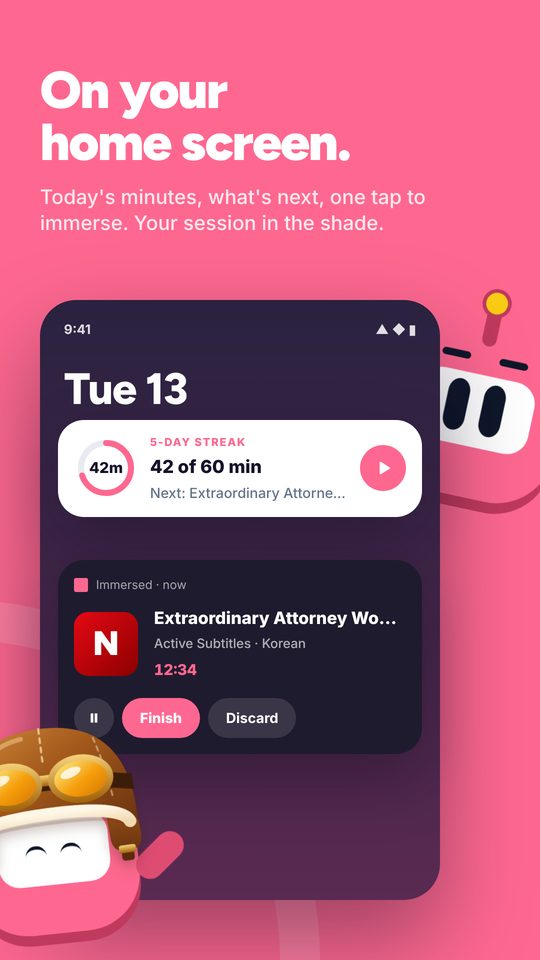
The Android app has nine home-screen widgets: a Heatmap of your days, Now with Play and Stop so you start a session without opening the app, Today, This Week Immersed, Weekly goal, Immersed time, Continue, By activity, and Aim in your outfit. A running session sits in the notification shade with Finish and the Aim button, and there is a Quick Settings tile to start one.
Side by side · checked October 24, 2026
Immersed and Loop Habit Tracker, feature by feature.
Planning
A plan for your language and your day
Immersed · Free blueprint from your answers
Loop Habit Tracker · No, you set your own habits
Daily planner
Immersed · Timeline from Wake up to Wind down
Loop Habit Tracker · No
Immersion milestones for your first months
Immersed · Yes, on the free blueprint
Loop Habit Tracker · No
What to watch, listen to and read
Immersed · Immersion Library, Toolkit and Discover
Loop Habit Tracker · No
Tracking
Yes/no daily habits
Immersed · Repeating tasks you tick off
Loop Habit Tracker · Yes, the core of the app
Numeric targets
Immersed · Hours from timed sessions
Loop Habit Tracker · Measurable habits with a target
Built-in timer
Immersed · Yes, with nine immersion activities
Loop Habit Tracker · No
Comprehension rating
Immersed · Per session, charted over time
Loop Habit Tracker · No
Play YouTube, Spotify, Apple Podcasts in a session
Immersed · Yes
Loop Habit Tracker · No
Reminders
Immersed · For planned tasks
Loop Habit Tracker · Per habit, with check off and snooze
Reports
Streaks and consistency
Immersed · Consistency grid with streaks; a Streak badge that levels up
Loop Habit Tracker · Habit strength score and streaks
Time by activity
Immersed · Yes, stacked by the nine activities, top shows linked
Loop Habit Tracker · No
Rewards for keeping it up
Immersed · Outfits for Aim earned by immersing, badges, monthly Sprints (Pro)
Loop Habit Tracker · No
Export
Immersed · PDF, Excel, CSV
Loop Habit Tracker · CSV and SQLite
Apps and price
Platforms
Immersed · Web app on phone and computer; Android app in testing for Google Play
Loop Habit Tracker · Android only (Google Play, F-Droid)
Home-screen widgets
Immersed · Nine in the Android app, in testing (Heatmap, Now with Play and Stop, Aim in your outfit...)
Loop Habit Tracker · Yes
Account
Immersed · None for the blueprint (name and email) or the sample app
Loop Habit Tracker · None, works offline
Open source
Immersed · No
Loop Habit Tracker · Yes, GPLv3
Price
Immersed · Free blueprint; Pro $60 a year or $9.99 a month
Loop Habit Tracker · Free, no ads, no in-app purchases
Credit where it's due
Both are good. At different things.
What Loop Habit Tracker does well
- Completely free, with no ads and no in-app purchases
- Open source under GPLv3, with no account and no cloud required, so your data stays on your phone
- A habit strength score that forgives a missed day after a long run, instead of resetting to zero
- Flexible schedules, like three times a week or every other day
- Measurable habits with targets, plus notes on specific days
- Home-screen widgets and reminders you can act on from the notification
- Mature and widely used: more than 5 million downloads on Google Play
What Immersed does that Loop Habit Tracker doesn't
- Builds you a plan first, from your time, your goals and your level
- Times each session and knows the nine immersion activities, so passive and active hours are kept apart
- Shows what your hours were made of: time by activity, a comprehension line, your top shows and channels linked
- Rewards that come only from immersing: outfits for Aim, badges that level up, monthly Sprints with medallions
- Lays out your day on a timeline, with tasks planned into the free gaps
- Tells you what to watch, listen to and read in your language, with a feed that counts as immersion
- Runs in the browser on phone and computer, including iPhone, where Loop has no app
Pick Loop Habit Tracker if
- You already know your routine and want one free checkmark a day for it
- You use Android and want an app that works offline with no account
- You care about open-source software and keeping your data on your device
- You track many life habits, and your language is one of them
Pick Immersed if
- You keep ticking "study" and still cannot follow a show or a podcast
- You want a plan for what your daily language time should be made of
- You want hours by activity and comprehension, not only done or not done
- You are on iPhone, or you want the same tracker on your computer
Use both, or move over
Keep the checkmark, add the hours
Some learners keep Loop for their whole life routine (sleep, gym, reading) and use Immersed for the language. A Loop habit like "one hour of immersion" pairs well with Immersed showing what that hour was.
If Loop is your only language tool, the free blueprint is a quick way to see whether your daily habit is the right size for your goal. It takes about two minutes and needs no account, just a name and email.
Pricing · checked October 24, 2026
What each one costs.
Immersed
- Free: the blueprint for one language (with the Toolkit, Library picks and the Fluency Checklist's Foundations), the listening games in 12 languages with their leaderboards, Aim Runner, the Discord and the sample app. A free account also gets the Fitting Room's day-one outfits, Hour Marks and badges from game time.
- Immersed Pro: $60 a year (starts with a free week, about $5 a month) or $9.99 a month. Timeline, sessions, streaks, Discover, Library, Growth and reports, monthly Sprints, more languages.
Loop Habit Tracker
- Free. No ads, no in-app purchases, no subscription. The source code is public under GPLv3.
Loop costs nothing and never will, and for a single daily habit that is a strong argument. Immersed charges for the timeline, sessions and reports, but the blueprint is free, so you can get your plan before you pay for anything.
FAQ
Questions people ask.
Is Loop Habit Tracker good for language learning?+
For keeping a daily habit alive, yes. Make a habit like "30 minutes of listening" as a measurable habit and type the minutes in each day. It will not plan your day, time your sessions, or know what kind of immersion you did.
Is Loop Habit Tracker really free?+
Yes. It is free, ad-free and open source under GPLv3, with no in-app purchases. It is available on Google Play and F-Droid.
Is there Loop Habit Tracker for iPhone?+
No. Its own FAQ says there is no iOS version, and warns that look-alike iOS apps are not the same project. Immersed runs in the browser on iPhone and installs to the home screen.
Does Immersed have habit streaks like Loop?+
Yes, in a different form. Growth shows a consistency grid with your streaks and the days you showed up, built from your timed sessions, and a Streak badge on your Profile levels up as the run grows. It does not have a habit strength score like Loop, and a missed day resets the streak.
Can I import my Loop history into Immersed?+
Not directly. Immersed has CSV import, including Toggl Track exports, but there is no Loop-specific import. Loop habits are checkmarks or daily numbers, not timed sessions.
Is Immersed free like Loop?+
Partly. The blueprint, the listening games with their leaderboards, the Discord and the sample app are free. The timeline, sessions, Discover and reports are Immersed Pro: $60 a year with a free week first, or $9.99 a month.
More comparisons
Stop guessing. See what your hours add up to.
Answer a few questions and Immersed builds your plan: a daily routine that fits your life, milestones for your first months, and things to watch at your level. Free, about two minutes, no account needed.
The plan is free and stays free. No card.
Checked October 24, 2026 against published product information. Prices and features change; if something here is out of date, tell me on Discord and I'll fix it.