Notion gives you the blocks. Immersed hands you the finished immersion planner.
Notion is a workspace of pages and databases that many learners turn into a language dashboard, often starting from a template. A Notion log counts minutes, but hours are one-dimensional: what you did in them is what moves you, so Immersed records each session as one of nine activities and shows what your time was made of. Immersed is a language immersion tracker and planner. It turns immersion into something you can see, plan and keep: a free plan built from your answers, a daily timeline for the shows, podcasts and books you learn from, and reports of your hours.
Free. About two minutes. No account, no card.
The short version
Checked October 24, 2026.
Something out of date? Tell me.
If you already live in Notion, enjoy building systems, and want your vocabulary, notes, reading list and immersion log in one place you shape yourself, Notion is free for individuals and endlessly flexible. A template gets you most of the way.
If you would rather not build or maintain the system, and you want a timer, a plan for your day and reports that already understand immersion, Immersed is built for that one job. You press play instead of typing a row, and the report shows how your hours split across listening, reading, subtitles, speaking and the rest, which is what explains your progress.
01Setting it up
A template is a starting point. Immersed is the finished thing.
Notion's own template gallery lists more than 100 language learning templates, many of them free, and sellers on Gumroad offer more: Language OS for $5 with an immersion tracker, a daily dashboard and a vocab bank, or the Language Learning Hub for $15 with movie, TV and YouTube trackers and a Pomodoro timer. Duplicate one and you have a dashboard in minutes.
Then it is yours to keep running. You choose the properties, fix the formulas when they break, and decide what counts as an hour of listening. Some people love that. Others spend more evenings on the dashboard than on the language.
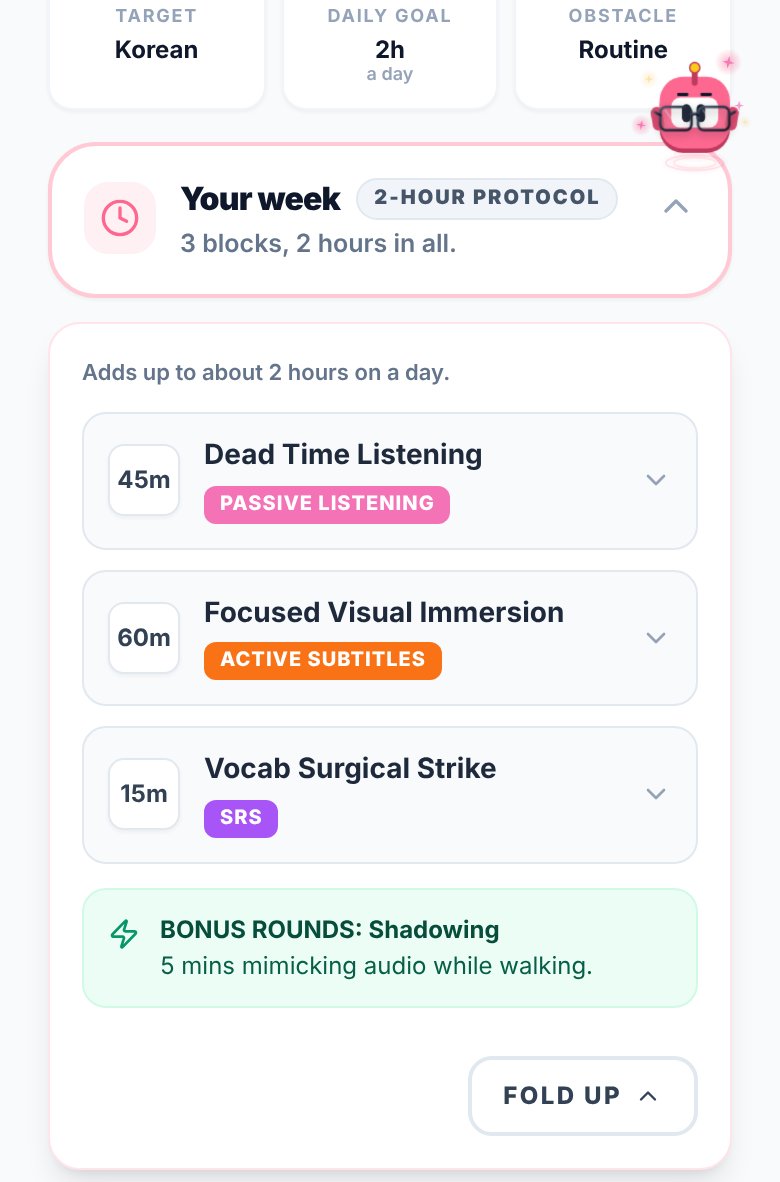
Immersed starts with a free blueprint instead: about two minutes of questions about your time, goals, level and what you already watch. It returns milestones for your first months, a daily protocol, the Hidden Immersion Time in your day and an Immersion Library of things to watch, listen to and read. No account needed (just a name and email), and nothing to build.
02While you immerse
A row you type later, or a timer you start now.
Notion has no stopwatch. Most immersion logs in Notion are a database where you add a row after the episode: title, date, minutes, type. Some templates use start and end buttons with a formula. Either way you are entering the data, and the entries you forget to add are the hours that go missing.
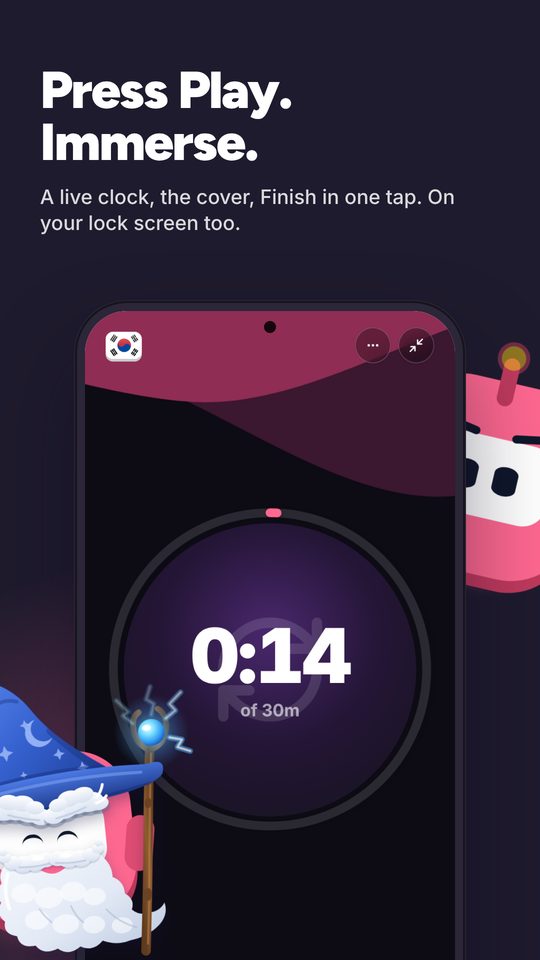
In Immersed you press play and pick one of nine activities: Active Listening, Passive Listening, Active Subtitles, Reading, Study, SRS, Speaking, Writing or Shadowing. Paste a YouTube, Spotify or Apple Podcasts link and it plays inside the session. Stop, rate how much you understood, add a note, and it lands on your timeline. Forgot to press play? Log it afterward.
- The play button can default to one activity, like Passive Listening on the commute
- Discover, a feed of creators in your language, logs scrolling as immersion
- Immersed doesn't read your viewing history: you press play (one click on YouTube with Immersed for Chrome) or log it. The Discover scroll and the free listening games log themselves
03Planning the day
A calendar view is not a plan.
Notion can show your log as a table, a board or a calendar, and Notion Calendar is free. What it cannot do on its own is tell you where immersion fits in a day that already has a job and a commute, or how many hours you still need.
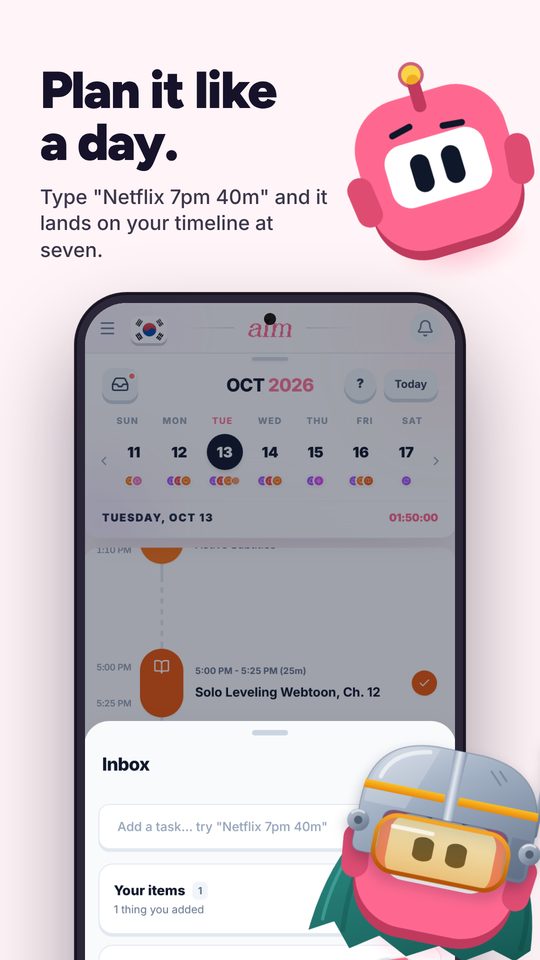
Immersed's timeline lays out your day from Wake up to Wind down. Plan an episode into the lunch gap and a podcast into the commute, set repeating tasks, get reminders and tick them off. Things without a time yet go in the Inbox, and quick add reads plain language: type "Netflix 7pm 40m" and it lands on today at 19:00 for 40 minutes. No database row, no date property.
For what comes next, there is the Fluency Checklist: 32 things an immerser has in place, in four stages, with the first stage free on the blueprint. With Pro, each month's Sprint gives you one Mission and Daily Quests that count from the sessions you log, with a medallion and that month's outfit for Aim, the mascot, when you finish.
04Looking back
A total says how long. The report says what it was made of.
Notion's Free plan includes one chart, with unlimited charts on paid plans. Rollups and formulas can total your minutes, but a total is one number. Two learners with 300 hours can be in very different places, and a sum won't tell you why.
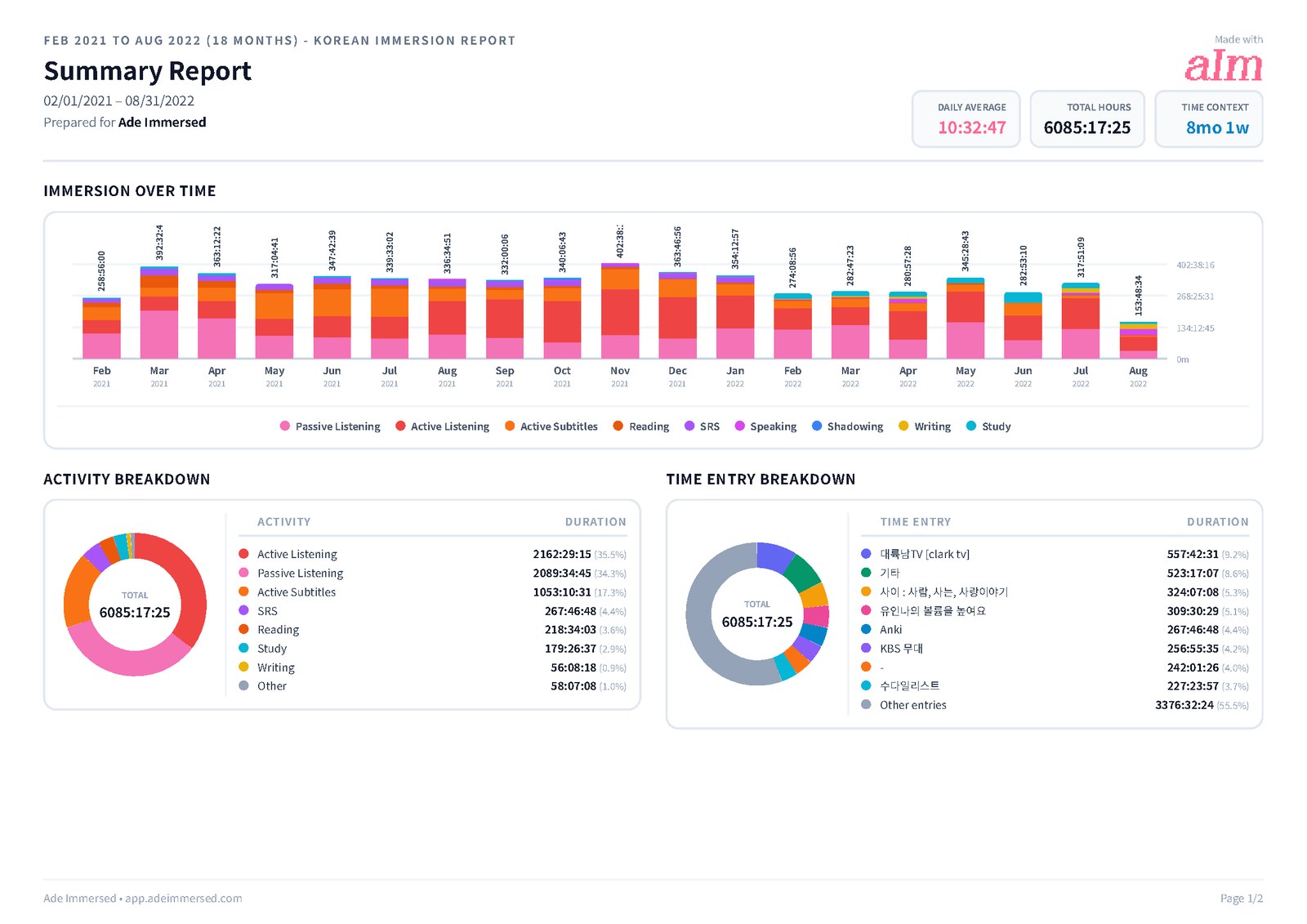
Immersed's Growth page shows your week, month, year and all time with the hours stacked by activity, so you can see how much was active listening, how much was passive, how much was reading with subtitles or speaking. A comprehension line shows whether you understand more over time, and your top shows and channels are listed with links back to them. That mix is usually what explains a learner two months in who is ahead of one six months in.
There is also the consistency grid with your streak, PDF, Excel and CSV export you can customize, and report share links. Monthly reports are saved in My reports. None of it needs a formula.
Side by side · checked October 24, 2026
Immersed and Notion, feature by feature.
Setup
Built for language immersion
Immersed · Yes, that is all it does
Notion · No, a general workspace; templates add it
A plan built for your language and your day
Immersed · Free blueprint from your answers
Notion · No
Customise everything
Immersed · No, the structure is set
Notion · Yes, any property, view or formula
Notes, vocabulary and journals
Immersed · Notes per session only
Notion · Yes, as much as you like
Tracking
Built-in timer
Immersed · Yes, press play
Notion · No; some templates add buttons or a Pomodoro
Immersion activities built in
Immersed · Nine, from Passive Listening to Shadowing
Notion · Whatever your template defines
Comprehension rating per session
Immersed · Yes, charted over time
Notion · Only if you add a property
Play YouTube, Spotify, Apple Podcasts inside the session
Immersed · Yes
Notion · Embeds on a page, not timed
Automatic tracking
Immersed · One press to start; Discover scroll and games log themselves; never reads history
Notion · No
Planning and content
Daily planner
Immersed · Timeline from Wake up to Wind down, with reminders
Notion · Calendar views, Notion Calendar, date reminders
Inbox and quick add
Immersed · Yes, "Netflix 7pm 40m" lands on today
Notion · A database row with a date property
Guided next steps
Immersed · Fluency Checklist stages and monthly Sprints
Notion · Only what your template defines
What to watch, listen to and read in your language
Immersed · Immersion Library and Toolkit
Notion · Only what you add
Reports
Streaks and consistency grid
Immersed · Yes
Notion · Build it yourself
Hours by activity
Immersed · Ready made, stacked by the nine activities, top shows linked
Notion · One chart free, unlimited on paid plans; you build each
Export
Immersed · PDF, Excel, CSV, share links
Notion · Markdown, CSV and HTML
Bring your history across
Immersed · CSV import with column mapping
Notion · Imports CSV and many apps
Apps and price
Phone and computer
Immersed · Web app that installs on both; Android app in testing for Google Play
Notion · Web, desktop, iOS and Android, with offline pages
Free plan
Immersed · Blueprint, games with leaderboards, Discord, sample app
Notion · Unlimited pages for individuals
Paid plan
Immersed · $60 a year or $9.99 a month
Notion · Plus $10 a member a month; templates $0 to about $15
Credit where it's due
Both are good. At different things.
What Notion does well
- Free for individuals with unlimited pages, which is plenty for a language dashboard
- Total flexibility: any property, view, formula or layout you can think of
- Everything in one place: vocabulary lists, grammar notes, journals, reading lists and your log
- A large template ecosystem, with more than 100 language learning templates in its own gallery
- Apps on web, desktop, iPhone and Android, with pages you can keep offline
- If you already plan work and life in Notion, your language sits next to everything else
What Immersed does that Notion doesn't
- Nothing to build: the activities, the timer and the reports are already set up for immersion
- Builds you a plan first, from your time, your goals and your level
- A timer you press instead of a row you remember to type
- Plays YouTube, Spotify and Apple Podcasts inside the session
- Tells you what to watch, listen to and read in your language, with a feed that counts
- Shows what your hours were made of: time by each of the nine activities, comprehension over time, your top shows and channels linked
- Next steps built in: the Fluency Checklist, and monthly Sprints with a Mission, Daily Quests and a medallion (Pro)
Pick Notion if
- You already use Notion every day and want your language in the same workspace
- You enjoy designing your own system and changing it as you go
- You want vocabulary, grammar notes, journals and the log all in one place
- You want to pay nothing and are happy to type your sessions in
Pick Immersed if
- You have built a Notion dashboard before and stopped updating it
- You want a timer and a plan for your day, not a database to maintain
- You want the tracker to understand immersion: passive vs active, subtitles, comprehension
- You want reports and streaks without building them
Use both, or move over
Keep Notion for notes, use Immersed for the hours
Plenty of learners keep their vocabulary, grammar notes and journal in Notion and let Immersed handle the time. The two never touch each other, and neither has to do the other one's job.
If you already have months of sessions in a Notion database, export it as CSV and open Growth, then Reports & analytics, then CSV import in Immersed. Choose Other as the source, map the columns to languages and activities, and your history joins your new sessions.
Pricing · checked October 24, 2026
What each one costs.
Immersed
- Free: the blueprint for one language (with the Toolkit, Library picks and the Fluency Checklist's Foundations), the listening games in 12 languages with their leaderboards, Aim Runner, the Discord and the sample app. A free account also gets the Fitting Room's day-one outfits, Hour Marks and badges from game time.
- Immersed Pro: $60 a year (starts with a free week, about $5 a month) or $9.99 a month. Timeline and Inbox, sessions, Discover, Library, Growth and reports, monthly Sprints, more languages.
Notion
- Free: unlimited blocks for individuals, 5 MB file uploads, 7 days of page history, one chart, Notion Calendar, a limited trial of Notion AI.
- Plus: $10 a member a month, up to 20% less billed yearly. Business: $20 a member a month. Enterprise: custom.
- Templates: many free in the Notion gallery. Paid ones on Gumroad cost about $5 (Language OS) to $15 (Language Learning Hub).
For one learner, Notion Free plus a free template costs nothing, and that is a real advantage. Immersed is about $5 a month on the yearly plan, and what you pay for is the part you would otherwise build: the timer, the plan, the library and the reports.
FAQ
Questions people ask.
Is Notion good for tracking language learning?+
Yes, if you like building your own system. A template gives you a dashboard for vocabulary, resources and an immersion log, and Notion is free for individuals. What it lacks is a built-in timer, a plan for your day and reports that understand immersion unless you build them.
Is there a free Notion template for language immersion?+
Yes. Notion's template gallery lists more than 100 language learning templates, and many are free. Paid ones on Gumroad, like Language OS and the Language Learning Hub, add immersion trackers and cost about $5 to $15.
Can I import my Notion immersion log into Immersed?+
Yes. Export the database as CSV from Notion. In Immersed, open Growth, Reports & analytics, CSV import, choose Other as the source, and map the columns. You can skip duplicates or import every row.
Does Immersed replace Notion?+
Only for the immersion part. Immersed plans, tracks and reports your immersion. It is not a notes app and doesn't hold vocabulary lists or grammar notes, so many people keep Notion for those.
Is Immersed free like Notion?+
Partly. The blueprint, the listening games with their leaderboards, the Discord and the sample app are free. The timeline, sessions, Discover and reports are Immersed Pro: $60 a year with a free week first, or $9.99 a month.
Does either one track my Netflix or YouTube time automatically?+
No. Neither reads your viewing history. In Notion you add a row; in Immersed you press play or log the session afterward. With Immersed for Chrome, one click on the YouTube page starts the session, and the Discover scroll logs itself.
More comparisons
Stop guessing. See what your hours add up to.
Answer a few questions and Immersed builds your plan: a daily routine that fits your life, milestones for your first months, and things to watch at your level. Free, about two minutes, no account needed.
The plan is free and stays free. No card.
Checked October 24, 2026 against published product information. Prices and features change; if something here is out of date, tell me on Discord and I'll fix it.