What's on my blueprint?

Your blueprint is built from your answers. The page shows you the short of it, one screen at a time: who you're becoming, the one thing to do tonight, the four parts of your blueprint, an honest word about your numbers, and where you go from here. You don't have to read it all tonight. Every page is in the PDF. The main parts are in your email, and your account keeps all of it once you have one. All of the page is free. Only the buttons that open the dashboard need Pro.
Aim comes with you. He stays small at the edge of the screen and says one line the first time each part comes into view, then goes quiet. Tap his words to put them away. On a big screen he lives at the top of the list of parts on the left, and what he says shows there. If your phone asks for less motion, or the app is in its low-power mode, he doesn't fly: he peeks over a card at the top with his opener in it, and his lines sit under each part's heading.
Where it's kept
The line at the top says where your blueprint lives, and it only says what's true for you right now:
- Without an account, once the email has gone: Yours to keep. The main parts are in your inbox at {your email}. The email has your mission, your day, your tools, your sprints and your reality check. Tonight's step, your first week and your circles are on the page and in the PDF.
- Without an account, back later in the same browser: This browser keeps your blueprint. Save the PDF to keep a copy anywhere. (In the Threads, Instagram or Facebook browser it just says Save the PDF to keep a copy anywhere., because you can't find that browser again later.)
- With an account: Saved to your account. Sign in anywhere and it's there.
- If the email didn't go: The email didn't go. with Send it again.
On a big screen there's also a quiet The PDF link on that line, and inside the Threads, Instagram or Facebook browser it's there on your phone too.
Aim's opener
He starts with your numbers: your busy day and your free day, in your language, then what your daily run fills on a typical day, and that on a busy one your daily goal still counts. If you already understand a lot, he just gives you the two numbers. If you've been at it before and the hurdle you picked was frustration, keeping it going or English pulling you back, his first line says your blueprint is built around what keeps getting in your way.
Your mission card
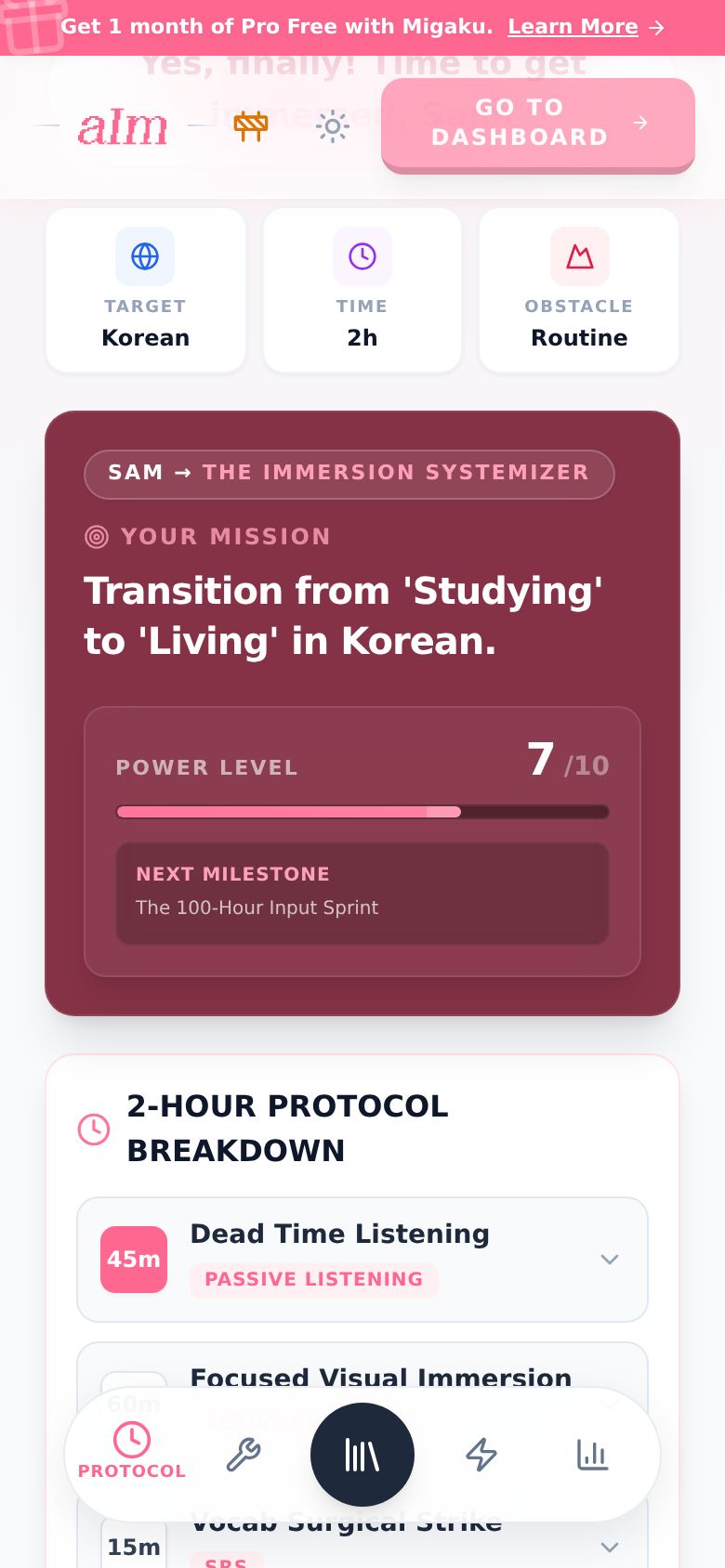
The hero of the page: who you're becoming (for example The Italian Media Maestro), your mission in one line and your Power Level out of 10. Power Level is your footing today, read from your answers; it's not a grade. Tap the meter and I explain the bands, with your Next Milestone underneath.
Share my mission, under your mission, opens your share card. It's yours, in your words: your mission's keepsake with your language's flag on it, Aim flying up out of the clouds in the look he wears for you (your outfit, the month's look, or his flying goggles), which day of your mission it is (Day 1 the day you get your blueprint), I'm learning Korean and why, and your minutes a day. It's signed with your first name: MAYA IMMERSED.
- Pick Story (tall, for Instagram and WhatsApp status) or Post (for chats and feeds), and a look: Night, Pink or Paper.
- Share opens your phone's share sheet with the picture. Where the app keeps text (a message, a post), your day, your sentence and your link go with it. It copies your link too, in case anyone asks where it's from. Save image saves the picture. Copy link copies just your link.
Your link is yours: anyone who opens it gets their own free blueprint, and friends who use it are counted as yours. Your card remembers the look and size you picked last.
Tonight
One thing to do tonight. On a new blueprint that's step 1 of your first week (it says Step 1 of 4 in your first week, or however many your week has). If the step is a YouTube search, the big button is Find it on YouTube (it opens that search), and the search is written under it. On an older blueprint it's the first block of your day.
Under it is a second button, and it says what it really does:
- With Pro: Open my timeline. Press Play there and your session starts.
- With a free account: Open my dashboard. Your free week starts there.
- Without an account: Make a free account. Sign in on any phone or laptop and your blueprint is there.
Then, if you're just getting started: That's tonight. Not the whole blueprint, just that one thing. The rest is below when you want it. If you've been at it a while: That's tonight. The rest is below when you want it. See your first week opens Your world at your first week.
Everything in your blueprint
Your blueprint in four parts, each as one row with a line about what's in it. Every page is in the PDF too. Tap a row and the part opens over the page; on a phone it fills the screen, on a big screen it's a panel in the middle. Previous and Next at the bottom move through the parts without going back. Close it with the X, by tapping outside it on a big screen, with Escape, or with your phone's back button. A part your blueprint doesn't have (an older one has no Your world) isn't listed.
- Your world: Your circles, where your language lives for you (the dot in the middle is the core, the most common words; the ring around it is your first circle, one narrow part of your world in your own words; the outer rings are wider; tap a ring for why it's there, its rooms and a playlist), then Your first week, a short project inside your first circle. Step 1 has a Tonight tag: it's the same step as the Tonight card. Tap a step to tick it off.
- Your day: Your daily run, your day split into blocks, each with its minutes, its activity and how to do it, with a link to start with. Then Hidden time, ways to swap your language into time you already spend, and Tired nights, for the evenings you've got nothing left.
- Your kit: Your tools, one job each (something to help you watch, flashcards, a dictionary, a translator and grammar). Already use something that does the job? Keep it. Swipe a card to see the other options for that job. Pink tabs are affiliate links. Then the Library: real things to watch, listen to and read in your language. See What tools does my blueprint give me? and How do I find things to watch, listen to and read?.
- Your first month: your two sprints (tap an item to tick it off; the circle shows how far you are), then Your milestones: how you'll know it's working, each with when (Week 2, Month 1, Month 3). Last, the Fluency checklist: the path from learner to immerser. Its first stage, Foundations, is free. Tap any item to see how to get there, and tick it when it's true for you. The later stages open with Pro; finish your Foundations and it shows Continue as an immerser.
At the bottom of the card: The PDF.
The honest part
Your reality check about your numbers: the short of it on the page, and the whole letter one tap away. Its title is your blueprint's own (for example "Where to start, and then the novel feels like a wall"). It says Written by AI from your answers, with Ade's rules., because it was.
What's on the page depends on where you are:
- Just getting started: what's realistic by Month 3, how far native speed is at your pace, how much closer the time already hiding in your day brings it, and that this isn't a verdict. Tap the words about the time hiding in your day and Your day opens where that time is explained. Under the button: It also shows what your hours are made of, and what to start and stop.
- Been at it before: the hurdle you picked and what changes now (one thing to stop, one to start), then the same few lines, then what your hours are made of: Hours are a frame. The mix is the story.
- Already strong: what changes now, what your hours are made of (Not how many hours, but what they are.), where you stand, and, when the time hiding in your day moves your goal, how far it is at this pace and how far with that time.
If you asked for Brutal Honesty or Challenge me, the hard number comes first, then the turn, then Month 3.
Then a small chart of your hours. The dotted line is the figure the US diplomats' school (FSI) gives for your language full time in class (for Korean, 2,200 hours). It's for scale, not your finish line. Read Ade's whole letter opens all of it: every paragraph, the full chart, what your hours are made of, everything that changes now, and Save as PDF.
You're set
The end of the page:
- What you have. Ticked, only when it's true: The main parts are in your inbox (once the email has gone) and Saved to your account. if you have one. Not ticked, because they're offers: Every page as a PDF, to keep anywhere. with Get the PDF, and without an account Not in an account yet. with Make a free account (sign in on any phone or laptop and your blueprint is there).
- One button: Show me tomorrow (without Pro: a look at tomorrow in the Immersed app, with your blueprint in it), or Open my timeline with Pro. With a free account there's also Open my dashboard, where your free week starts.
- Without Pro, why: the hurdle you picked, and what the app does about it.
- Me: one line for where you are (just getting started: Day one is now. Do tonight's one thing. Five minutes counts.; been at it before: You're not starting over. Do tonight's one thing.; already strong: You've already done the hard part. Tonight's step sharpens what you have.; with Pro: Your daily run is on your timeline. Start with tonight's step, up top.), then Ask me a question (it comes straight to me, and you can rate your blueprint there), find me in the Discord, and Read my note, my welcome note (it opens with Day one is now. if you're just getting started, and Your blueprint starts now. if you've been at it before).
- Share my mission, then Written by AI from your answers, with Ade's rules. and How it's made.
Aim lands here, says goodbye and waves.
Which parts are free?
Everything on this page is free. That includes the toolkit, the library picks, the sprints, the PDF and the Discord. Two things need Pro:
- Open my timeline and Open my dashboard. Without Pro, they open the free-week page instead, and the button says so.
- The Fluency checklist past Foundations.
- Saving a library pick with + to your Immersion List.
The whole list is in What can I do without Pro?.
Good to know
-
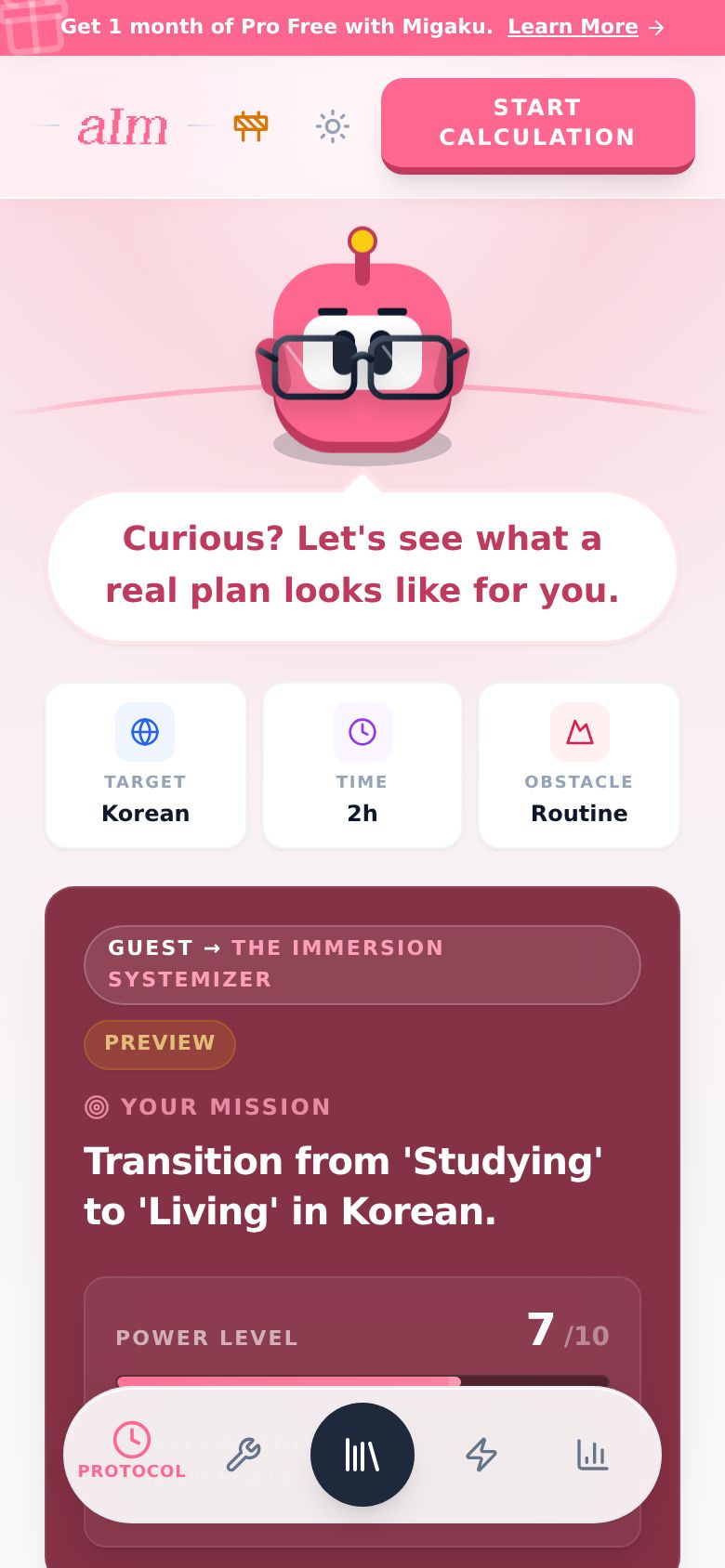
Haven't made one yet? Without a blueprint you'll see a sample with a Preview tag. Aim says so, with no personal numbers, and the honest part speaks about this learner and their day, because the answers are a made-up learner's. In the sample the library picks are blurred and there's no Fluency checklist. Tap Build my own blueprint to build your own. It's free, takes about 2 minutes and you don't need an account.
-
Two daily numbers. Your daily goal is your busy day: the number the tracker counts. Your daily run adds up to a typical day, which is a little more, because free days count too.
-
Ticks stay. First week ticks, sprint ticks and Fluency checklist ticks are saved on that device.
-
Desktop vs phone. It's the same page. On a big screen the list of parts stays on the left, with Aim at its top, and each part opens as a panel in the middle.