How do I upgrade to Pro?

Tap any upgrade button in the app. It opens Aim's own checkout page, where you pick yearly or monthly and pay. Yearly starts with a free week.
Steps
-
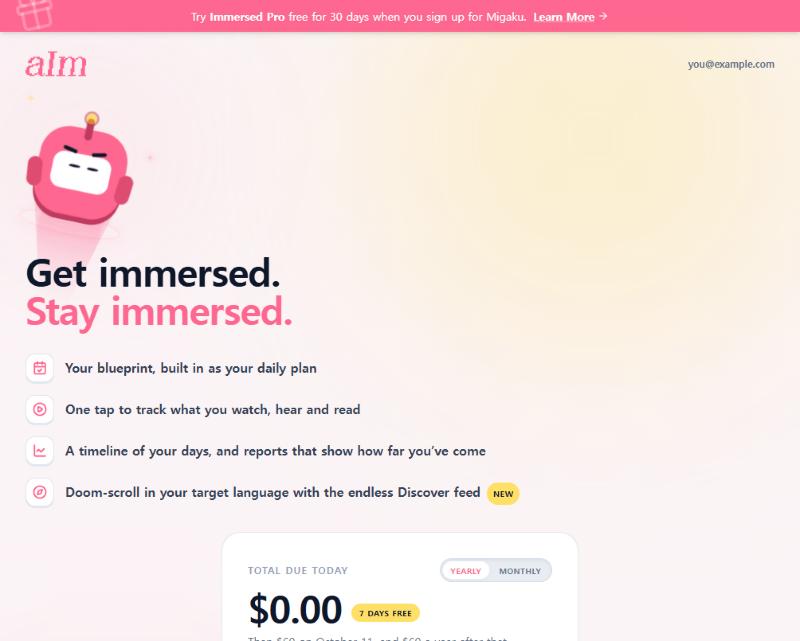
Tap any upgrade button. That can be "Get Aim Pro", the lock screen you see when you open the timeline without Pro, or a Pro pop-up on a feature that needs it. They all go to the same place.
-
If you don't have an account yet, Aim asks you to sign up first. When you're done, you land back on checkout with the same plan you picked. Nothing to redo.
-
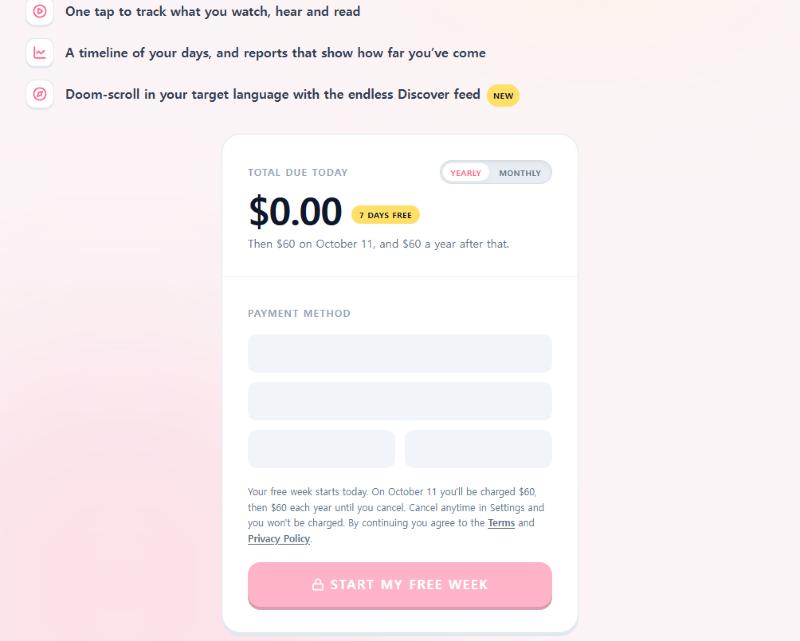
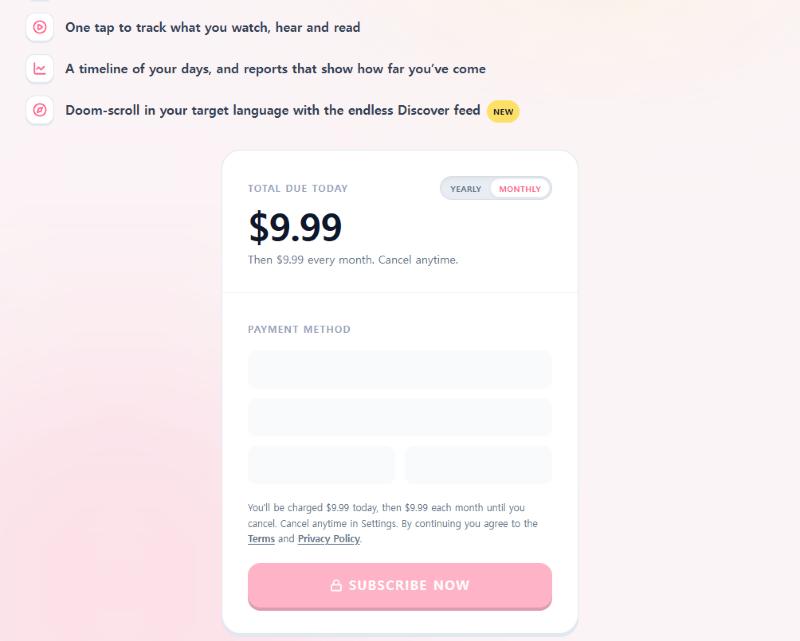
Pick Yearly or Monthly with the switch at the top of the price card.
- Yearly is $60 a year (about $5 a month). It starts with a 7-day free week. The card says "$0.00 due today" and shows the date of your first payment.
- Monthly is $9.99 a month. There's no free week, so you pay today.
-
Got a promo code? Tap Have a code? under the price, type it, and tap Apply. A green tag shows what it took off. Tap the small x on the tag to remove it.
-
Pay with a card, or with a wallet button (Apple Pay, Google Pay or Link) if your device offers one. The card fields come from Stripe, so I never see your card number.
-
Tap the pink button. It says Start my free week on yearly and Subscribe now on monthly.
-
You land on a "You're in!" page. Pro switches on within a few seconds. Keep that page open until it does.
What Pro gives you
- Your blueprint, built in as your daily plan
- One tap to track what you watch, hear and read
- A timeline of your days, and reports that show how far you've come
- The endless Discover feed, so you can doom-scroll in your target language
Free accounts keep a blueprint for one language, a preview of the Library and Tools, the listening games and their leaderboards, their Profile, the Fitting Room, Hour Marks and badges, and the Discord community. The full list is in What can I do without Pro?.
Good to know
- Cancel anytime. Go to Settings, then Billing. Cancel during your free week and you won't be charged.
- Yearly free week. It starts the moment you check out. The card tells you the exact day the first $60 comes out.
- Free Migaku month. If you subscribe to Migaku through my link, you get 30 days of Pro with no card. See What happens when my free month of Pro from Migaku ends?.
- If our checkout page can't load, Aim sends you to Stripe's own payment page instead. You'll see "Taking you to our secure payment page". Same price, same free week.
- Phone and desktop use the same page. On a wide screen the pitch sits on the left and the card on the right.
Why does it say "Payment received" instead of "You're in!"?
Your payment went through. Pro is just taking longer than usual to switch on. You don't need to pay again. Tap Check again after a minute. If it's still stuck, email support@adeimmersed.com with the order ref on that page, or poke me on Discord.
Why did I land on the sign-up page after tapping upgrade?
Checkout needs an account so your Pro has somewhere to live. Sign up and you come straight back to checkout with your plan picked.
Why am I still locked out after paying?
Give it a minute and reload. If the timeline still shows the Pro lock screen, email support@adeimmersed.com with the order ref from the page you landed on after paying, and I'll sort it out.
Why did repeating tasks and alerts say "Unlock Pro" when I already have Pro?
That was a bug, and it's fixed. When you opened a task, How often? and Needs alerts? checked an old setting on your device instead of your real subscription. So some Pro accounts saw Unlock Pro there, and tapping it (or Daily, Weekly or Monthly) broke the page.
Now the task editor reads the Pro on your account, so repeating tasks and extra alerts just work. If you don't have Pro, the Pro pop-up opens properly again. Its Restore button checks your real subscription. It says "Found it. Pro is active on this account." or "No Pro on this account. Signed up with another email? Sign in with that one."
Still seeing Unlock Pro? Reload the page and make sure you're signed in with the email you paid with. If it's still there, email support@adeimmersed.com or poke me on Discord.
Why did Go to Dashboard send me to the free-week page when I have Pro?
Also a bug, and also fixed. On your blueprint page, Go to Dashboard sent some Pro accounts to "Your First 7 Days Are On Us", the free-week page. Now Pro always goes straight to your dashboard. The Fluency Checklist on your blueprint is fully open for Pro too, with no locked stages and no "Continue as an immerser" pitch.