How do I use a promo code?

On the checkout page, tap Have a code? under the price, type your code and tap Apply. A green tag shows what it took off before you pay.
Steps
-
Tap any upgrade button in Aim ("Get Aim Pro", the Pro lock screen, a Pro pop-up). It opens the checkout page. No account yet? Aim asks you to sign up first, then brings you straight back.
-
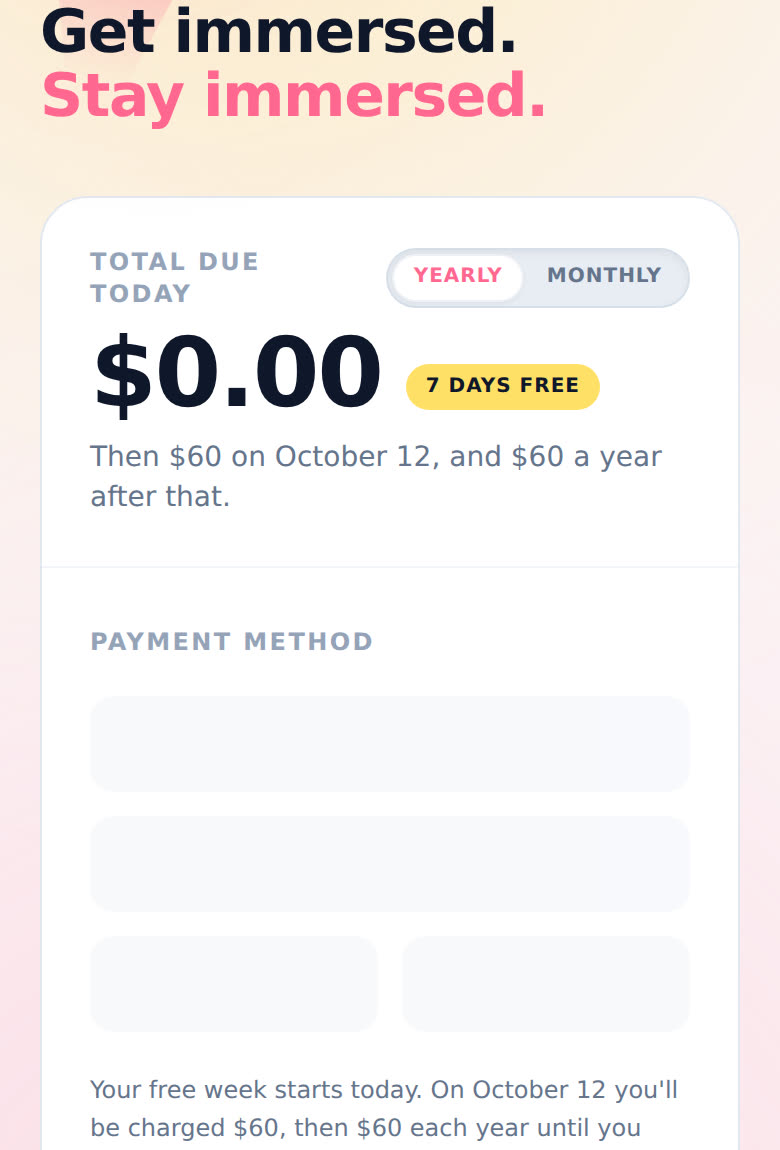
Pick Yearly or Monthly at the top of the price card. Do this before you add your code. Switching plans starts a fresh checkout and clears the code.
-
Wait for the payment form to load. Then tap Have a code? under the price.
-
Type your code in the Promo code box. It turns into capital letters as you type, so don't worry about that. Tap Apply. The button says "Checking…" for a second.
-
It worked if you see a green tag like "CODE applied: $10.00 off", and Aim does a little happy bounce. The total and the "Then …" line underneath update to match.
-
Pay as usual. The button says Start my free week on yearly and Subscribe now on monthly. See How do I upgrade to Pro?.
Changed your mind? Tap the small x on the green tag to take the code off.
Why didn't my code work?
A red line under the box tells you why, straight from Stripe ("That code didn't work." if it doesn't say more). The usual reasons:
- A typo. Check for a zero where an O should be.
- It ran out. Codes can expire, or only work a set number of times.
- It's for the other plan. Some codes only work on yearly or only on monthly. Flip the switch and try again.
- You already used it. Some codes only work once per person.
Still stuck? Email support@adeimmersed.com with the code, or poke me on Discord.
Good to know
- Only at checkout. There's no place to add a code after you've subscribed. Forgot yours? Email me and I'll sort it.
- Not on the upgrade pop-up. The pop-up used to have an "Enter Promo Code" link that showed half prices checkout never charged. It's gone: every code goes in on the checkout page, where Stripe checks it.
- One code at a time. To try another, take the first one off with the x.
- If our checkout page can't load, Aim sends you to Stripe's own payment page ("Taking you to our secure payment page"). Codes work there too: look for Stripe's promotion code link.
- The free week still counts. On yearly, a code changes what you pay after the free week. The card tells you the amount and the date.
- Same on phone and desktop.